Initializing, please wait a moment

Como Usar el Earth 3D Globe - Paso a Paso


El Earth 3D Globe carga en dos etapas: una linea de reloj en vivo (tu hora local y UTC) empieza a marcar de inmediato, y luego el globo aparece cuando el motor de 0.7 MB termina su descarga unica. Aqui esta cada control en orden.


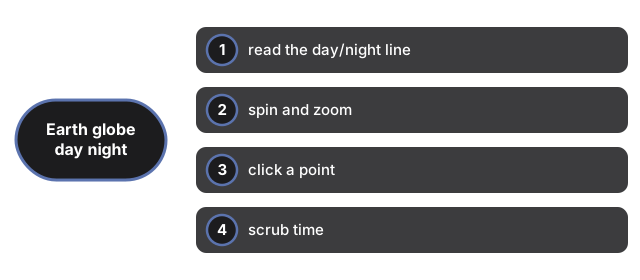
Paso 1 - lee la linea de dia/noche

La mitad iluminada del globo es donde el sol esta sobre el horizonte ahora mismo, calculado desde el reloj de tu dispositivo; la mitad oscura esta de noche, con un brillo suave y estilizado a lo largo de sus costas. La linea entre ellas - el terminador - es en vivo, y la lectura sobre la escena nombra el punto donde el sol esta directamente encima.


Paso 2 - gira y haz zoom

Arrastra en cualquier parte del globo para girarlo; desplaza o pellizca para hacer zoom desde una vista del planeta completo hasta el nivel de costa. El boton Fullscreen pone la escena en toda tu pantalla; Escape sale.


Paso 3 - haz clic en un punto

Haz clic (no arrastres) en cualquier punto del globo. El panel reporta su latitud y longitud, si esta en luz de dia, de noche, o cerca del terminador, y su hora solar local aproximada - hora solar derivada de la longitud, no la hora civil del fuso horario.


Paso 4 - desplaza el tiempo

El control deslizante de Tiempo previsualiza la linea de dia/noche hasta 12 horas antes o despues - deslizalo y observa el amanecer cruzar un continente. La etiqueta muestra el desplazamiento, la lectura del sol indica que una previsualizacion esta activa, y el boton Now regresa todo al reloj en vivo.


Paso 5 - confiale lo justo

La posicion del sol usa una aproximacion estandar con precision de aproximadamente un grado - suficiente para ver donde es de dia, no una efemeride astronomica. Las costas son el conjunto de datos simplificado de dominio publico Natural Earth 1:110m, y el brillo nocturno es un efecto estilizado, no datos reales de luces de ciudad. La pagina lee solo tu reloj, nunca tu ubicacion.

Te preguntas como se compara esto con una aplicacion de globo virtual completa? Mira el Earth Globe vs alternativas.

Para los momentos especificos en los que el Earth 3D Globe es la eleccion correcta - verificaciones rapidas de zona horaria, demostraciones de clase, descansos cortos - mira cuando usar el Earth 3D Globe.

← Volver a space 3D

Why trust these tools

  • Ten-plus years of web tooling. The freetoolonline editorial team has shipped browser-based utilities since 2015. The goal has never changed: get you to a working output fast, without an install.
  • No install, no sign-up. Open a tool and get a working output in seconds - nothing to download and no account to create. Tools that need heavy processing run it on our service, so even a low-powered machine gets the job done.
  • Analytics stops at the page view. We measure which pages get visited, not what you type or upload inside a tool. There is nothing to sign in to and no profile is attached to your input.
  • Open-source core components. The processing engines underneath (libheif, libde265, pdf-lib, terser, clean-css, ffmpeg.wasm, and others) are public and audit-able. We link to each one in its tool page's footer.
  • Free, with or without ads. All tools are fully functional without sign-up. The Disable Ads button in the header is always available if you need a distraction-free run.

Related tools:

  • All Guides - Browser Tool Library - Free, in-browser guides on compressing files, converting HEIC, testing screens, hashing, PDFs, and
  • Wheel Spinner (Wheel of Names) - Wheel Spinner Online - Type names or options, spin the wheel, and get a fair random winner right in
  • Solar System 3D Explorer - Solar System 3D Explorer - All eight planets orbit the sun live on screen - drag to orbit the view,
  • Black Hole 3D Visualizer - Black Hole 3D Visualizer - Tens of thousands of glowing particles orbit the black event-horizon
  • Galaxy 3D Simulator - Galaxy 3D Simulator - Up to 100,000 points form the spiral arms on desktop (30,000 on phones so
  • GPU Test - WebGL Benchmark & Info - GPU Test - WebGL Benchmark & Info - See what your browser's graphics stack can do - WebGL 1 and 2
  • City Time Machine 3D - City Time Machine 3D - Drag the 1945-2055 timeline and watch one city block's buildings, vehicles,
  • 2048 Game - Merge the Numbers Puzzle - 2048 Game - Merge the Numbers Puzzle - Slide the numbered tiles with the arrow keys, WASD, or a
  • Night Swarm Survivor - Night Swarm Survivor - free browser horde roguelite: WASD or touch move, auto weapons, XP
  • Pixel Necromancer - Play Pixel Necromancer free in the browser: aim spells at villagers, resurrect undead with Space,
  • Thirteen Card Duel - Play Thirteen Card Duel free in the browser: draw attack and defense cards, avoid the XIII death
  • Pixel Realm RPG - Play Pixel Realm RPG free in the browser: 8x8 tile top-down adventure with inventory, equipment,

Related guides:

Related news: