
News
Dated updates on the formats and browser features these tools work with - every claim cites its source.
Last reviewed: 2026-08-03
-
 JPEG XL Browser Support 2026 - Chrome, Firefox, Safari
Chrome 145, Firefox 152, and Safari - see which browsers open JPEG XL now, which still need a flag enabled, and what to use for images meanwhile.
-
 JPEG XL volta ao Chrome e Firefox - o que muda para suas imagens
Chrome 145 e Firefox 152 restauraram JPEG XL em 2026 - ainda atras de uma flag.
-
 JPEG XL vuelve a Chrome y Firefox - que cambia para tus imagenes
Chrome 145 y Firefox 152 restauraron JPEG XL en 2026 - aun detras de una flag.
-
 JPEG XL tro lai Chrome va Firefox - dieu gi thay doi voi anh cua ban
Chrome 145 va Firefox 152 khoi phuc JPEG XL nam 2026 - van o sau mot flag.
-
 JPEG XL Kembali ke Chrome dan Firefox - Apa yang Berubah untuk Gambar Anda
Chrome 145 dan Firefox 152 mengembalikan JPEG XL pada 2026 - masih di balik flag.
-
 JPEG XL ist zurueck in Chrome und Firefox - was sich aendert
Chrome 145 und Firefox 152 haben JPEG XL 2026 wiederhergestellt - weiterhin hinter einem Flag.
-
 AV2, AV1's Successor, Is Finalized - No Browser Opens It Yet
AV2, the successor to AV1, was finalized in 2026 - no browser decodes it yet.
-
 AV2, sucessor do AV1, finalizado - nenhum navegador abre ainda
AV2, o sucessor do AV1, foi finalizado em 2026 - nenhum navegador decodifica ainda.
-
 AV2, sucesor de AV1, esta finalizado - ningun navegador lo abre aun
AV2, el sucesor de AV1, fue finalizado en 2026 - ningun navegador lo decodifica aun.
-
 AV2, ke thua AV1, da hoan tat - chua trinh duyet nao mo duoc
AV2, ke thua AV1, da hoan tat dac ta nam 2026 - chua trinh duyet nao giai ma duoc.
-
 AV2, Penerus AV1, Sudah Final - Belum Ada Browser yang Membukanya
AV2, penerus AV1, sudah final sebagai spesifikasi pada 2026 - belum ada browser yang mendekodenya.
-
 AV2, der Nachfolger von AV1, ist fertiggestellt - noch kein Browser oeffnet es
AV2, der Nachfolger von AV1, wurde 2026 fertiggestellt - noch kein Browser dekodiert es.
-
 WinRAR Patches a Heap-Overflow Flaw in RAR5 Recovery Files
WinRAR 7.23 fixed a heap-overflow flaw in how it repairs multi-volume RAR5 archives.
-
 WinRAR corrige falha de heap-overflow nos arquivos de recuperacao RAR5
WinRAR 7.23 corrigiu uma falha de heap-overflow na forma como repara arquivos RAR5 multi-volume.
-
 WinRAR corrige falla de heap-overflow en archivos de recuperacion RAR5
WinRAR 7.23 corrigio una falla de heap-overflow en la forma de reparar archivos RAR5 multivolumen.
-
 WinRAR va sua loi heap-overflow trong file phuc hoi RAR5
WinRAR 7.23 sua loi heap-overflow khi phuc hoi file RAR5 nhieu phan.
-
 WinRAR Menambal Celah Heap-Overflow di File Recovery RAR5
WinRAR 7.23 menambal celah heap-overflow pada cara memperbaiki arsip RAR5 multi-volume.
-
 WinRAR behebt Heap-Overflow in RAR5-Wiederherstellungsdateien
WinRAR 7.23 behob einen Heap-Overflow-Fehler bei der Reparatur mehrteiliger RAR5-Archive.
-
 HEIC Arrived With iOS 11 - What Still Will Not Open It in 2026
Apple made HEIC the default iPhone photo format on September 19, 2017.
-
 HEIC chegou com o iOS 11 - o que ainda nao abre em 2026
A Apple tornou HEIC o padrao do iPhone em 19 de setembro de 2017.
-
 HEIC llego con iOS 11 - lo que aun no lo abre en 2026
HEIC es el formato por defecto del iPhone desde iOS 11 (19/09/2017).
-
 HEIC den voi iOS 11 - dieu van chua mo duoc nam 2026
HEIC la dinh dang mac dinh cua iPhone tu iOS 11 (19/09/2017).
-
 HEIC datang bersama iOS 11 - apa yang masih belum bisa membuka di 2026
HEIC jadi format default iPhone sejak iOS 11 (19/09/2017).
-
 HEIC kam mit iOS 11 - was es 2026 immer noch nicht oeffnet
HEIC ist seit iOS 11 (19.09.2017) das iPhone-Standardformat.
-
 FAT32 4 GiB File Limit - Why Large Videos Fail on USB
FAT32 caps any single file at 4 GiB minus 1 byte.
-
 Windows 11 Insiders can format FAT32 volumes up to 2 TB
Windows 11 Insider builds raise the command-line FAT32 format cap from 32 GB to 2 TB.
-
 7-Zip CVE-2026-58052 - RAR5 Mark-of-the-Web Bypass
CVE-2026-58052: a crafted RAR5 archive makes 7-Zip through 26.02 drop the Mark-of-the-Web tag, bypassing SmartScreen.
-
 7-Zip CVE-2026-14266 XZ Overflow - Update to 26.02
ZDI disclosed CVE-2026-14266 on 15 July 2026: crafted XZ data can overflow a heap buffer in 7-Zip.
-
 7-Zip CVE-2026-14266 overflow XZ - atualize para 26.02
A ZDI divulgou o CVE-2026-14266 em 15 de julho de 2026: dados XZ manipulados podem estourar um buffer de heap no 7-Zip.
-
 7-Zip CVE-2026-14266 overflow XZ - actualiza a 26.02
ZDI divulgó el CVE-2026-14266 el 15 de julio de 2026: datos XZ manipulados pueden desbordar un búfer de heap en 7-Zip.
-
 7-Zip CVE-2026-14266: Lỗi tràn bộ đệm XZ - Cập nhật lên 26.02
ZDI công bố CVE-2026-14266 vào ngày 15 tháng 7 năm 2026: dữ liệu XZ được tạo có chủ đích có thể gây tràn bộ đệm heap trong 7-Zip.
-
 7-Zip CVE-2026-14266: Celah Overflow XZ - Update ke 26.02
ZDI mengungkap CVE-2026-14266 pada 15 Juli 2026: data XZ yang dibuat khusus dapat menyebabkan heap buffer overflow di 7-Zip.
-
 7-Zip CVE-2026-14266 XZ-Überlauf - Update auf 26.02
ZDI hat CVE-2026-14266 am 15.
-
 Falha no 7-Zip pode burlar o aviso Mark-of-the-Web
Um arquivo RAR5 manipulado faz o 7-Zip ate 26.02 remover o Mark-of-the-Web, e o arquivo extraido escapa do SmartScreen.
-
 Fallo en 7-Zip puede evadir el aviso Mark-of-the-Web
Un archivo RAR5 manipulado hace que 7-Zip hasta 26.02 borre el Mark-of-the-Web, y el archivo extraido evade SmartScreen.
-
 Loi 7-Zip co the vuot qua canh bao Mark-of-the-Web
Mot file RAR5 bi che tao khien 7-Zip toi 26.02 xoa Mark-of-the-Web, nen file giai nen co the ne SmartScreen.
-
 Celah 7-Zip bisa melewati peringatan Mark-of-the-Web
Arsip RAR5 yang dibuat khusus membuat 7-Zip sampai 26.02 menghapus Mark-of-the-Web, jadi file hasil ekstrak bisa lolos SmartScreen.
-
 Fehler in 7-Zip kann die Mark-of-the-Web-Warnung umgehen
Ein praepariertes RAR5-Archiv laesst 7-Zip bis 26.02 das Mark-of-the-Web entfernen, sodass eine entpackte Datei SmartScreen umgeht.
-
 Adobe patches Acrobat and Reader flaws in APSB26-63
Adobe APSB26-63 (2026-06-09) fixes critical Acrobat and Reader bugs.
-
 libheif 1.22.0 patches HEIC heap overflow CVE-2026-32740
libheif 1.22.0 (2026-05-19) fixes CVE-2026-32740, a heap overflow when decoding crafted HEIC/AVIF grids.
-
 libheif 1.22.0 corrige overflow HEIC CVE-2026-32740
libheif 1.22.0 (2026-05-19) corrige CVE-2026-32740, overflow de heap ao decodificar grades HEIC/AVIF.
-
 libheif 1.22.0 behebt HEIC-Overflow CVE-2026-32740
libheif 1.22.0 (2026-05-19) behebt CVE-2026-32740, einen Heap-Overflow beim Dekodieren von HEIC/AVIF-Gittern.
-
 libheif 1.22.0 perbaiki overflow HEIC CVE-2026-32740
libheif 1.22.0 (2026-05-19) memperbaiki CVE-2026-32740, overflow heap saat mendekode grid HEIC/AVIF.
-
 libheif 1.22.0 va loi tran HEIC CVE-2026-32740
libheif 1.22.0 (2026-05-19) va CVE-2026-32740, tran bo nho heap khi giai ma luoi HEIC/AVIF.
-
 libheif 1.22.0 corrige overflow HEIC CVE-2026-32740
libheif 1.22.0 (2026-05-19) corrige CVE-2026-32740, un overflow de heap al decodificar rejillas HEIC/AVIF.
-
 Adobe corrige fallos en Acrobat y Reader en APSB26-63
Adobe APSB26-63 (2026-06-09) corrige bugs criticos en Acrobat y Reader.
-
 Adobe va loi Acrobat/Reader trong APSB26-63
Adobe APSB26-63 (2026-06-09) va loi nghiem trong tren Acrobat/Reader.
-
 Adobe behebt Fehler in Acrobat/Reader in APSB26-63
Adobe APSB26-63 (2026-06-09) behebt schwere Fehler in Acrobat/Reader.
-
 Adobe perbaiki bug Acrobat/Reader di APSB26-63
Adobe APSB26-63 (2026-06-09) perbaiki cacat serius di Acrobat/Reader.
-
 Adobe corrige falhas no Acrobat e Reader no APSB26-63
Adobe APSB26-63 (2026-06-09) corrige bugs criticos no Acrobat e Reader.
-
 Limite de 4 GiB do FAT32 - por que videos grandes falham no USB
O FAT32 limita qualquer arquivo a 4 GiB menos 1 byte.
-
 Windows 11 Insider formata FAT32 ate 2 TB na linha de comando
Windows 11 Insider sobe o limite FAT32 via CLI de 32 GB para 2 TB.
-
 Limite de 4 GiB de FAT32: videos grandes fallan en USB
FAT32 limita cualquier archivo a 4 GiB menos 1 byte.
-
 Windows 11 Insider formatea FAT32 hasta 2 TB en linea de comandos
Windows 11 Insider sube el tope FAT32 por CLI de 32 GB a 2 TB.
-
 Gioi han 4 GiB cua FAT32 - video lon that bai tren USB
FAT32 gioi han moi file o 4 GiB tru 1 byte.
-
 Windows 11 Insider format FAT32 den 2 TB bang dong lenh
Windows 11 Insider nang gioi han format FAT32 CLI tu 32 GB len 2 TB.
-
 Batas 4 GiB FAT32 - video besar gagal di USB
FAT32 membatasi setiap file di 4 GiB kurang 1 byte.
-
 Windows 11 Insider format FAT32 hingga 2 TB lewat command line
Windows 11 Insider naikkan batas format FAT32 CLI dari 32 GB ke 2 TB.
-
 FAT32 4-GiB-Limit - warum grosse Videos auf USB scheitern
FAT32 begrenzt jede Datei auf 4 GiB minus 1 Byte.
-
 Windows 11 Insider formatieren FAT32 bis 2 TB per Kommandozeile
Windows 11 Insider heben das CLI-FAT32-Formatlimit von 32 GB auf 2 TB.
-
 MP3 Patents Expired 2017 - What Changed for Your Audio Files
Fraunhofer ended MP3 licensing on 23 April 2017 after the last core patents expired.
-
 Patentes MP3 expiraram em 2017 - o que mudou no seu audio
Fraunhofer encerrou o licenciamento do MP3 em 23 abril 2017 apos as patentes centrais expirarem.
-
 Patentes MP3 expiraron en 2017 - que cambio en tu audio
Fraunhofer cerro la licencia de MP3 el 23 abril 2017 tras expirar las patentes centrales.
-
 Bang sang che MP3 het han 2017 - dieu gi thay doi voi file am thanh
Fraunhofer dong chuong trinh cap phep MP3 ngay 23 thang 4 nam 2017 sau khi cac bang sang che cot loi het han.
-
 Paten MP3 kedaluwarsa 2017 - apa yang berubah untuk file audio Anda
Fraunhofer menutup lisensi MP3 pada 23 April 2017 setelah paten inti kedaluwarsa.
-
 MP3-Patente 2017 abgelaufen - was sich fuer Ihre Audiodateien aenderte
Fraunhofer beendete die MP3-Lizenzierung am 23.
-
 EXIF Orientation Tags - Why Photos Look Rotated After Upload
A photo's EXIF Orientation tag tells a viewer how to rotate it, and not every tool reads that tag.
-
 Tags de Orientação EXIF - Por que as Fotos Ficam Giradas Após o Upload
A tag de Orientação EXIF de uma foto diz ao visualizador como girá-la, e nem toda ferramenta lê essa tag.
-
 Etiquetas de Orientación EXIF - Por Qué las Fotos Aparecen Giradas Tras Subirlas
La etiqueta EXIF Orientation de una foto le indica al visor cómo girarla, y no todas las herramientas la leen.
When a browser changes which image formats it can open, a PDF standard gains a new revision, or an operating system switches its default file type, the practical question is always the same: does anything in your own workflow need to change? Each article on this page answers that question for one specific development. Every article carries its publication date, links to the original announcements it is based on, and ends with concrete advice tied to the files you actually handle - so you can decide in a minute whether the change affects you.
Articles here stay focused on changes that touch everyday file work: image and video formats, archives and compression, PDF, browser capabilities, and privacy rules around file handling. General technology headlines are out of scope. When a story develops, the existing article is updated in place with a dated note rather than duplicated, so one URL stays the reliable reference for that topic.
How every article is checked
Each headline claim is confirmed against at least two independent sources before publication - typically one report plus a primary source such as a browser vendor's release notes, a standards body announcement, or the caniuse support tables. When reports disagree, the primary source wins, and the article says which version was verified. Direct quotes are short and attributed; everything else is written from scratch, because the useful part is not the announcement itself but what it changes for the files on your device. Each article also carries its own "Last reviewed" date, separate from the publication date above it, that moves forward whenever the page is re-checked against new sources.
Why format and browser changes deserve a dated record
Most file-handling advice on the web ages silently. A guide written in 2022 will tell you that no browser opens HEIC photos, that WebP breaks in Safari, or that a new image format is "coming soon" - and none of those statements survive contact with 2026. Browser vendors ship new format support behind experimental flags first, enable it by default months or years later, and occasionally remove support they already shipped. Standards bodies publish revisions that PDF readers and archive tools adopt on their own schedules. Operating systems change default capture formats between versions, which is why a phone photo that opened everywhere last year suddenly needs converting this year.
The gap between "announced" and "usable" is where mistakes happen. A format that a browser can decode behind a flag is a preview for developers, not a safe choice for sharing files with other people. A format that one browser enables by default is still risky if the other browsers have not followed. The practical threshold is default-on support across the major browsers - and reaching that point is news worth acting on, while everything before it is news worth watching. Articles here always say which side of that line a change sits on.
What to do while a change is still settling
The safe default rarely changes: keep the formats that open everywhere as your delivery formats, and treat newer ones as an optimization you adopt when support is broad. For photos going to other people, that means JPG first - the HEIC to JPG converter covers the most common conversion, and the HEIC vs JPG vs WebP guide explains when each format earns its place. For files that are too large to send, the image compressor and the zip file creator work with formats that need no adoption watch at all. When an article here recommends changing a habit, it links the exact tool or guide for the switch, so the advice ends in a step you can take immediately rather than a development to keep an eye on.
Coverage areas
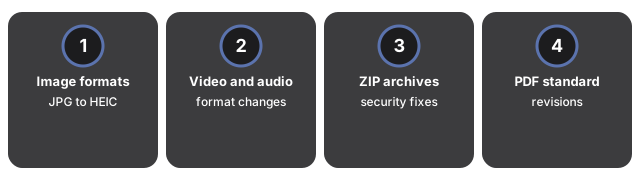
Stories are picked from the same categories the tools on this site serve. If a story does not affect at least one of those areas, it does not get an article - a small set of relevant, carefully maintained pages serves a reader far better than a fast stream of loosely related headlines ever could.
- Image formats (JPG, PNG, WebP, AVIF, HEIC, JPEG XL) and their browser support
- Video and audio formats
- ZIP and archive handling, including security fixes that affect how archives should be opened
- The PDF standard and its revisions
- Browser and operating-system changes to file handling
- Privacy or data-protection rules that change where files may be processed
Why trust these tools
- Ten-plus years of web tooling. The freetoolonline editorial team has shipped browser-based utilities since 2015. The goal has never changed: get you to a working output fast, without an install.
- No install, no sign-up. Open a tool and get a working output in seconds - nothing to download and no account to create. Tools that need heavy processing run it on our service, so even a low-powered machine gets the job done.
- Analytics stops at the page view. We measure which pages get visited, not what you type or upload inside a tool. There is nothing to sign in to and no profile is attached to your input.
- Open-source core components. The processing engines underneath (libheif, libde265, pdf-lib, terser, clean-css, ffmpeg.wasm, and others) are public and audit-able. We link to each one in its tool page's footer.
- Free, with or without ads. All tools are fully functional without sign-up. The Disable Ads button in the header is always available if you need a distraction-free run.