
PDF Tools
Use these PDF tools to create, split, merge, secure, and convert PDFs quickly from any device, with no install, no signup, and no third-party redirect. Each tool runs over a short-lived HTTPS processing service that returns the result back to your device; the hub itself does no processing - it is the routing page that picks which tool the task belongs on.

-
 Online PDF Composer - Reports & Notes in Minutes
Type or paste text, apply headings/lists/tables/page breaks, and export a fresh PDF.
-
 PDF Page Range Splitter - Multiple Ranges in One Job
Split a PDF by page range - single (e.g.
-
 Split PDF to Single Pages - One File per Page Online
Split PDF to individual pages online - one PDF file per source page, numbered in order.
-
 Merge PDF Files Online - Join Multiple PDFs to One
Merge PDF online - combine multiple PDF files into one, preserving the upload order.
-
 Encrypt, Protect PDF By Password
Protect your confidential PDFs from unauthorized access with this PDF encryption tool.
-
 Remove PDF Password Online - Free
Easily remove password protection from your PDF files with an efficient and free online tool.
-
 PDF Preflight Checker - Validate for PDF/A Archival
Free online PDF preflight - no software to install.
-
 Flatten PDF Online - Bake Layers, Forms & Annotations
Flatten PDF online - bake form fields, annotations, and layered content into the page itself.
-
 PDF to Text Converter (Extract Text)
Extract text from PDF online for copying and editing.
-
 PDF to Images Online - Export PNG or JPG Per Page
Turn every page of a PDF into a separate PNG or JPG.
-
 Convert PDF to HTML Online - Preserve Page Structure
PDF to HTML converter online - turn a PDF into standards-compliant HTML that preserves headings, lists, tables, and images.
-
 JPG/PNG/WebP to PDF Converter - Reorder, Export
Merge multiple photos (JPG, PNG, BMP) into one PDF.
-
 PDF Form Filler Online - Fill In Existing Form Fields
Fill in an existing PDF's form fields online, right in your browser.
-
 Rotate PDF - Free Online
Rotate PDF - Turn every page 90, 180, or 270 degrees, right in the browser.
-
 Delete PDF Pages - Free Online
Delete a page range from a PDF (e.g.
-
 Add Watermark to PDF - Free Online
Add Watermark to PDF - Add a watermark to every page of a PDF, right in the browser.
-
 Add Page Numbers to PDF - Free Online
Add Page Numbers to PDF - upload a PDF, pick a starting number, and download every page stamped "Page N" at the bottom, right in your browser.
-
 Reorder & Organize PDF Pages - Free Online
Reorder & Organize PDF Pages - Put the pages of a PDF into a new order, right in the browser.
-
 Pdf Compressor Online - Free Online
Pdf Compressor Online - shrink a PDF's file size in the browser with one click, no upload.
-
 Sign PDF (Add Signature) - Free Online
Sign PDF (Add Signature) - Place a signature image onto a PDF page, right in the browser.
-
 Pdf Editor Online - Free Online
Pdf Editor Online - Add typed text to a PDF page at a chosen position, size, and color, right in the browser.
-
 Chat with PDF - Ask Your PDF Questions Privately
Open a PDF and ask questions in plain language.
-
 OCR PDF - Make a Scanned PDF Searchable in Your Browser
Turn a scanned PDF into a searchable PDF on your device - pages keep their exact look, Ctrl+F and copy start working, and the file is never uploaded.
-
 File Viewer - Free Online
File Viewer - Inspect a file as an expandable tree in the browser.
-
 Redact PDF - Black Out Text Permanently (No Upload)
Black out names, numbers, and sensitive text in a PDF so the content is truly deleted, not covered.
Build, review, and share PDFs with confidence
Tasks often chain: split a range, remove a password, then flatten the result before sharing. For a final archive copy, run Flatten PDF first to bake in form fields and annotations, then Protect PDF By Password - flatten is not redaction, so remove sensitive text in Compose PDF first when content must not be recoverable. Any step that changes the format rather than the page set - PDF to Text, PDF to Images - can shift the layout, so review its output before you pass the file on.
Quick comparison
| Tool | Best for | Typical output | Tip |
|---|---|---|---|
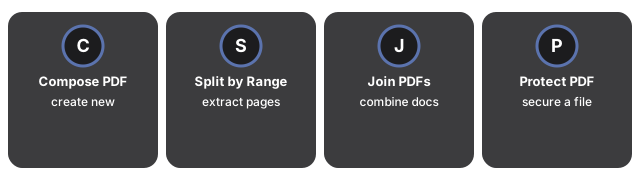
| Compose PDF | Create from scratch | New PDF | Use for reports/notes |
| Split PDF by Range | Extract selected pages | Smaller PDF | Great for signatures |
| Join PDFs | Combine documents | One merged PDF | Check order first |
| Protect PDF | Secure a file | Password-protected PDF | Share password separately |
| PDF to Text | Copy/edit content | Plain text | Review for layout loss |
A note on accessibility and searchable text
A PDF that looks fine to a human can still be unreadable to screen readers and search. The difference usually comes down to whether the file has a real text layer or is only a picture of text.
- Born-digital PDFs (exported from Word, Pages, or a design tool) carry a text layer by default. Our PDF to Text tool can extract that text directly and preserves paragraph order.
- Scanned PDFs are photographs of pages. They need OCR before anything can extract the words. If PDF to Text returns a blank result, that is usually the reason.
- Tagged PDFs carry extra structure (headings, lists, reading order) for screen readers. Tagging is preserved when you merge, split, or compress, but can be lost when you convert to images.
When you need a form or contract to stay legally accessible, keep the original export rather than a re-scanned copy, and prefer Compose PDF for edits so the text layer survives.
Page-size catalog shared by Preflight and Images to PDF
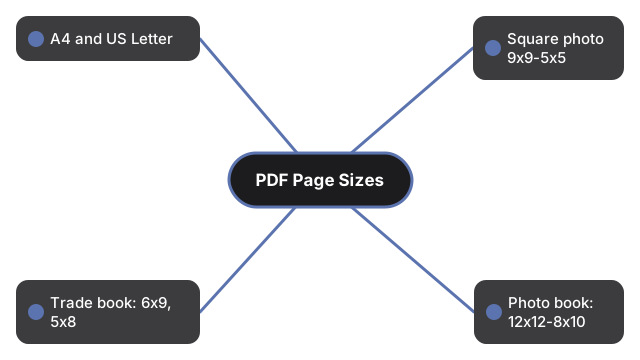
Two tools on this hub - Preflight PDF and Images to PDF - share the same trim-size dropdown so a document can be authored at one size and then validated against that same size without converting between catalogs. The supported sizes group into four print families:
- Paper. A4 (the international office standard for letters, reports, and forms) and 8.5x11 Magazines (the US letter equivalent, also used for short-run magazines).
- Square photo. 9x9, 7x7, and 5x5 - common for square photo prints, social-media album exports, and small gift cards where the layout is symmetrical.
- Trade book. 6x9 and 5x8 - the two trim sizes most book printers list as defaults for paperback novels, manuals, and self-published trade titles.
- Photo book. 12x12, 13x11, 10x8, 8x10, and 8.25x10.25 - rectangular and large-square trims used by photo-book printers; 12x12 is the most common wedding-album trim, 8x10 is the standard photo-print rectangle.
Open Images to PDF when the document does not yet exist - the converter writes each image to the chosen trim. Open Preflight when the document already exists and you need a pass/fail report against the chosen trim. A trim picked on one of the two tools is the same entry on the other, so a document authored at 6x9 validates against 6x9 with no catalog conversion in between.
How processing works across the hub
Every transform on this hub - Split, Protect, Flatten, Compose, Join, PDF to Text, PDF to HTML, and Images to PDF - routes through a short-lived HTTPS processing service. The service receives the upload, runs the operation, streams the result back, and releases the working copy. The file is not retained and no account is required. Lightweight checks (file size, page count) stay local in the browser. If a specific document cannot leave your device, use a desktop tool for that file; for everything else, the service handles the transform in seconds with no install.
Last reviewed: 2026-09-30
Free Tool Online Editorial TeamMerge PDFs online - free, no signup
Merge PDFs. The Join tool combines as many PDFs as you upload into one document. Drop the source files in the order you want them stacked, press Join, and the merged PDF downloads back to your device once the merge completes - with no watermark on the result and no email address asked for.
Split a PDF online - free, no install
Two splitters live here for two different reader tasks. Split PDF By Range pulls a contiguous section - pages 3 to 7, or just the appendix - out of a longer document and hands back a single smaller PDF you can email or upload. Split PDF To Each Pages goes the other way: every page leaves as its own file, which is what you want for per-page signatures or single-page form uploads. Neither splitter stamps a watermark on what it hands back.
PDF to Text, PDF to Images, and Flatten PDF - what each does
PDF to Text extracts the text layer from a born-digital PDF and hands it back as a plain .txt file - useful when you need the words without the layout. PDF to Images converts each page to a PNG or JPG - use it when the destination is a slide deck or image gallery, not a printable document. Flatten PDF bakes form fields and annotations into the page so an archive copy renders identically on every viewer.
Why trust these tools
- Ten-plus years of web tooling. The freetoolonline editorial team has shipped browser-based utilities since 2015. The goal has never changed: get you to a working output fast, without an install.
- No install, no sign-up. Open a tool and get a working output in seconds - nothing to download and no account to create. Tools that need heavy processing run it on our service, so even a low-powered machine gets the job done.
- Analytics stops at the page view. We measure which pages get visited, not what you type or upload inside a tool. There is nothing to sign in to and no profile is attached to your input.
- Open-source core components. The processing engines underneath (libheif, libde265, pdf-lib, terser, clean-css, ffmpeg.wasm, and others) are public and audit-able. We link to each one in its tool page's footer.
- Free, with or without ads. All tools are fully functional without sign-up. The Disable Ads button in the header is always available if you need a distraction-free run.
Frequently Asked Questions
Which tool should I pick when I need one PDF from a set of images?
Use Images to PDF. It preserves the order you upload the files and produces a single multi-page PDF. If you need to mix images, existing PDFs, and blank pages, pick Compose PDF instead.
My PDF-to-text extraction is blank - why?
Your PDF is a scanned image of text, not a digital text layer. PDF to Text extracts the text layer directly; scanned PDFs need OCR first. If you only have the scan, use a dedicated OCR tool before converting.
Are my PDFs uploaded to your server?
The hub catalog page itself never receives your files - it is a discovery surface that lists the PDF tools and routes you to the one your task belongs on. Once you click a member tool, that tool runs through a short-lived HTTPS processing service: the file is uploaded over a secure connection, the requested operation (split, protect, preflight, flatten, PDF-to-text, PDF-to-HTML, compose, join, images-to-PDF, remove-password) runs server-side, and the result is streamed back to your device for download.
The working copy is released as soon as the response is delivered; the file is not retained on a permanent server, no account or sign-in is required, and the file is not indexed or re-used. Lightweight read-only inspections (file size, page count, format check before you press the action button) run locally in the browser. Every transformation that produces a new file or a downloadable report runs on the processing service - not in the browser. If a particular document is too sensitive to leave the device for any reason, pick a desktop PDF tool for that one file; for everything else, the service is the trade-off for getting the work done in seconds without an install.
Two practical signals tell you the tool you opened is using the service: the upload button accepts files larger than a few megabytes, and the tool produces a downloadable output file (a new PDF, a text export, an image export, or a pass/fail report). When both signals are present, the file is going through the processing service.
Which PDF tool reads a file vs writes a file?
Read-only (no new PDF written): Preflight PDF reports pass/fail against PDF/A profiles, PDF to Text extracts a `.txt`, PDF to Images emits one image per page, PDF to HTML emits an HTML export. Write (new PDF produced): Compose PDF, Split PDF by Range, Join PDFs, Protect PDF, Remove PDF Password, Flatten PDF, Images to PDF. The split between the two columns is what determines whether the tool needs an existing PDF as input or accepts other formats (or no input).
Can I password-protect a PDF for sensitive documents?
Yes - use PDF Password or Protect PDF to add or manage a password. Password protection is useful for email delivery; for highly sensitive documents, pair it with a secure sharing channel and not just email.
What if I need to convert a PDF to images instead of text?
Use PDF to Images. Each page becomes a separate JPG or PNG you can embed, edit, or share. For a single HTML export of the whole PDF, pick PDF to HTML.
Which tool should you use?
- Compose PDF to write, format, and export a document from scratch.
- Split PDF By Range when you only need selected pages.
- Join PDF From Multiple Files to merge separate PDFs into one.
- Protect PDF By Password to secure sensitive content.
- Remove PDF Password when you already know the password and need an unlocked copy.
- Flatten PDF to simplify form fields and annotations before sharing.
- PDF To Text or PDF To Images to reuse content in another format.
Quick decisions: which PDF tool should you open first?
When a PDF workflow spans two or three tools, order matters. Here is the sequence that covers the most common starting states:
Received a locked PDF you can still open. The password is not blocking you - pick the tool for what you want to do next (extract text, split, merge, or convert). Password handling is only required when the file refuses to open at all.
Received a locked PDF you cannot open. Start with Remove PDF Password (you must know the password). Once the lock is stripped, return here and pick the next tool for the transformation you actually need.
Starting from images on your phone or scanner. Run Images to PDF first to assemble one file, then Compose PDF if you need page reorders, rotations, or an added cover.
Starting from a large PDF you want to shrink. Try Flatten PDF first - if your file has form fields, comments, or layered annotations, flattening often cuts size significantly by baking those layers into the page content.
Starting from a PDF and heading to Word or Markdown. Extract with PDF to Text. For scanned PDFs without a text layer, OCR first with a dedicated OCR step, then come back for the clean text pass.
Archiving a sensitive final. Flatten PDF removes interactive layers that could leak metadata, then Protect PDF by Password applies a user or owner password before the file leaves your machine.
For image-heavy PDFs you want to edit page-by-page, open PDF to Images first; for text-heavy PDFs with headings you want to preserve, PDF to HTML retains more structure than plain text.
Reading an existing PDF for compliance vs. writing a new PDF from images. Two tools on this hub share the page-size dropdown - Preflight PDF and Images to PDF - but they sit on opposite ends of the PDF lifecycle. Preflight reads an existing PDF and reports whether it matches a target archival profile (PDF/A-1A, PDF/A-1B) or a chosen page-size; it does not create a PDF. Images to PDF accepts JPG and PNG uploads, lets you order them, and writes a brand-new PDF at the page size you pick; it does not validate existing PDFs. Open Preflight when the PDF already exists and you need a pass/fail report; open Images to PDF when the PDF does not exist yet.
Looking for something different? The site map lists every PDF tool, guide, and resource in one place.