
Note: Zip size MB. Please type your password exactly. If everything is OK, click the Remove button to remove your zip file
The removal process has completed.
Remove ZIP Password Online with Our Free Tool
When you already know the ZIP password, upload the archive and enter that password; the tool re-saves an unlocked copy any extractor opens without prompting. When the password is forgotten, this will not help - modern AES-128 / AES-256 ZIP encryption stays locked, and no reputable tool recovers it.
Main features of our Zip Password Remover include:
- Instant Access: Quickly remove a known password without software downloads.
- Cross-Device Compatibility: Use it on any device with internet access.
- Security Focused: Your upload travels over HTTPS and the password is used only to process that one archive.
- Completely Free: No hidden fees or subscriptions required.
How the password removal works
Type the exact password into the password field, then drop your .zip onto the upload area. The service reads that one passphrase over HTTPS, re-saves the archive without its encryption layer, and hands back a download link for the unlocked copy - your original archive on disk is never touched. If the password field is left blank or the password is wrong, the backend rejects the job outright rather than returning a half-processed file, because the service reads the password directly from that field before it can proceed. The unlocked copy is held only briefly on the server and rotates off after a short retention window, so download it before you close the tab.
What this tool can't do (forgotten passwords)
This is not a brute-force cracker - it cannot guess or recover a password you do not know. AES-128 and AES-256 derive their encryption key directly from the password, so the archive stays mathematically locked without it, regardless of file size or how old the archive is. If you forgot a password you set yourself, the safest path is to create a fresh archive with the ZIP file compressor and share the new password through a separate channel. If someone else sent you the archive, ask them for the password directly - there is no online unlocker that defeats strong ZIP encryption.
Read the guide: Zip Unlocker Online for a longer walkthrough of which of these two cases applies to your archive before you upload.
Sibling tool: if the archive has no password and you just need its contents out, use Unzip File instead. ← Back to ZIP Tools
FreetoolOnline Editorial TeamKey Benefits of the Online Zip Password Remover
- No Software Needed: Remove passwords online with nothing to install, hassle-free.
- Fast & Secure: Enjoy instant results without compromising your data privacy.
- Mobile-Friendly: Use the tool across devices, including smartphones and tablets.
Why Use an Online Zip Password Remover Tool?
This tool offers a streamlined solution for unlocking Zip files without complex software or downloads, perfect for quick access to protected files.
Features of Our Free Online Zip Password Remover
- Secure Password Removal: Enter the correct password and the tool unlocks the contents; your upload travels over HTTPS and the temporary copy is deleted after a short retention window.
- No Downloads or Installations: Work directly from your browser on any device-desktop, laptop, tablet, or smartphone.
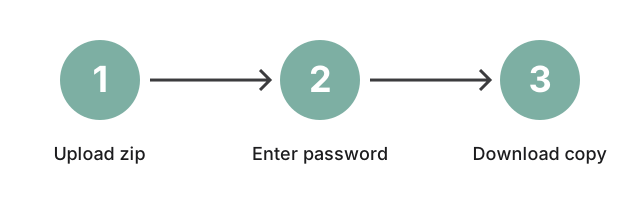
- Fast Results with Simple Steps: Just upload, enter the password, and download your unlocked file.
How to Remove a Password from a Zip File Online
- Enter Password: Provide the correct password for the file. This tool does not attempt to guess or crack passwords.
- Upload Your File: Select the password-protected Zip file you want to unlock.
- Unlock & Download: The tool will remove the password, allowing you to download the unlocked file.
Frequently Asked Questions
Is this Zip file password remover free?
Yes, this tool is completely free. No hidden costs, subscriptions, or limitations.
Do I need the original password?
Yes, the original password is required to unlock the file. The tool doesn't crack or guess passwords; it securely removes the protection once the password is entered.
Can I use this tool on my mobile device?
Yes, the tool runs in the mobile browser - tap the upload field, paste the password, and download the unlocked copy from your phone or tablet.
What if I don't know the password?
This tool removes a Zip password only when you can supply the correct one - it does not crack unknown passwords. If the archive came from someone else, ask the sender for the password directly; there is no online unlocker that can break strong ZIP encryption. If you set the password yourself and forgot it, recover the original files from another source (a backup, the sender's email, your cloud drive) and create a fresh archive with the ZIP file compressor.
Ensuring Your Data's Security
Your archive is sent over HTTPS to the processing service, unlocked there once you supply the correct password, and the temporary copy is deleted after a short retention window; the original file on your device is never modified. The password is used only to unlock that one archive and is not stored for recovery.
Supported File Formats
This tool is specifically designed to remove passwords from standard Zip files. If you have other archive types, check our other tools for compatible options.
Conclusion: Unlock Your Zip Files Easily and Securely
Our free online Zip password remover is the perfect solution for unlocking password-protected Zip files with minimal effort. Fast, secure, and available across devices, this tool simplifies access to your files without the need for additional software.
and manage your Zip files in the browser!