Editorial Team
The small team that writes, reviews, and dates every guide on this site - the principles below name how corrections, review dates, and tool-page claims are handled.
Last reviewed: 2026-08-02
Editorial principles
Read the principles
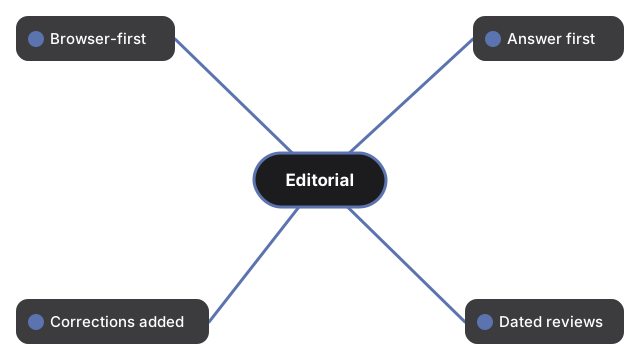
- Browser-first where possible; server-side when needed. Lightweight tools (developer utilities, device tests, simple converters) run inside your browser. Heavier tools that need native binaries (HEIC decoding via libheif, ffmpeg / ImageMagick command runners, PDF flatten / merge / split / preflight, video conversion, image optimization with SlimJpg) upload over HTTPS to our processing service, run server-side, and the files are removed shortly after. Each tool page documents its own data flow in plain words.
- Answer first, depth second. Every tool page answers the question you came with at the top: what the tool does, the three steps to use it, and one concrete fact about how it handles your file. Longer explanations sit below the tool for readers who want the trade-offs.
- Corrections are added, not hidden. When an article needs a correction, we add the new information below the existing paragraph and date it. Readers who bookmarked the page find what they remembered, plus the correction.
- Dated reviews you can verify. Every guide and every hub page shows a review date. When a page is re-checked, the date moves. A date that never moves is not a trustworthy one, so we move ours.
Our editors
Editor - Content & User Experience Lead
Owns the words: writes the one-sentence definition, the three-step instructions, and the FAQ answers on every tool page, and re-reads each page for accuracy at least once a quarter.
Editor - Tool Engineering Lead
Owns the code path: reads the live tool end-to-end before the page ships, traces every reader-facing claim back to the frontend pipeline or the backend service class, and clears the technical accuracy of each instruction step.
Editor - Quality & Cross-Device Review
The three roles read each other's work before anything ships: no page reaches you until an editor who did not write it has checked it against the live tool and the staging build. Every tool page and guide carries a Last reviewed date, and that date only moves once all three editors have signed off on the change.
Editorial policy
Read the two commitments
- Per-tool truth-source for data handling. The first FAQ answer on every tool page states whether that tool runs entirely in your browser or uploads over HTTPS to our processing service (where the file is removed shortly after), so the browser-first principle above is verifiable tool by tool rather than a blanket promise.
- No rewriting of published paragraphs. Corrections are appended and dated, never silently overwritten, so a bookmarked answer stays findable alongside any later addenda.
How often the site is checked
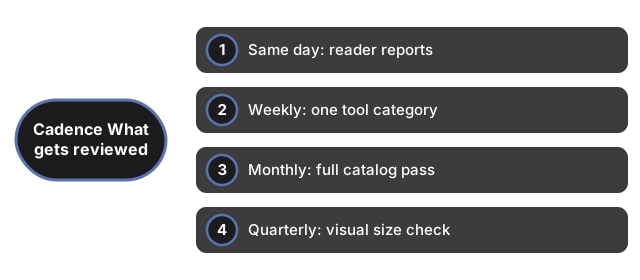
The site is on a layered review schedule so that no part goes stale:
Read the review schedule
- Same day: Reader-reported issues (via the contact form) are acknowledged and triaged the same day they arrive.
- Weekly: One category of tools (PDF, image, image converter, developer, device-test, video, utility, or ZIP) is given a full review - every tool in the category is tested end-to-end in the latest Chrome, Firefox, Safari, and Edge; every related guide is re-read for accuracy; every dead link is fixed.
- Monthly: A pass over the full tool catalog. Broken tools are retired. New tools are proposed to fill workflows readers ask about in the contact form and in the queries that brought visitors to the site.
- Quarterly: A full-site visual check on every common screen size - phone, tablet, laptop, and external monitor. Layout issues are logged and fixed before the next publishing window.
How we check content before publishing
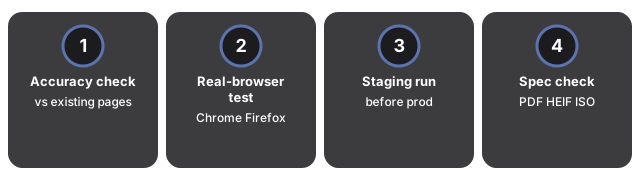
Every new tool, every new guide, and every substantive edit passes three checks before it lands on the public site:
Read the 3 pre-publish checks
- Accuracy and repetition check. The new text is read against every existing tool page and guide to catch contradictions with something we said elsewhere and to remove repetition the reader has already seen on another page. Every factual claim (how a file format behaves, which browsers support it, what the tool's size limit is) is verified against the file format's public specification before publishing.
- Real-browser test. Every tool is opened in a real browser - current Chrome, Firefox, Safari, and Edge - at phone, laptop, and desktop screen sizes. We confirm the UI does not overlap or clip, the tool completes its job on a real test file, the Disable Ads button still works, and keyboard users can reach every control.
- Staging run. The change goes live first on a staging copy of the site, which is not indexed by search engines. An editor reads the staging page the way a first-time reader would. Only after the staging read passes does the change land on the site you are reading now.
What we base our answers on
Read the sources we verify against
- The file format's public specification. The PDF spec (ISO 32000), the HEIF / HEIC spec (ISO 23008-12), the MP4 container spec (ISO 14496-14), the ZIP file format spec (PKWARE APPNOTE), and so on. If a format behavior is in the spec, we quote it rather than guess.
- Official browser vendor documentation. What Chrome, Firefox, Safari, and Edge actually support today - which image formats they can decode, which video codecs they can play, which APIs they expose - comes from the vendors' own release notes, not from hearsay.
- The open-source engines the tools run on. The site's image, PDF, audio, and video tools are built on public open-source libraries - libheif, libde265, libjpeg-turbo, poppler, pdf.js, ffmpeg.wasm, clean-css, terser, and others. Every tool page credits the library it uses so you can read the source code or the changelog yourself.
How the site is built
Tool pages render as plain static HTML and ship the same code to every reader. When two readers disagree about a claim - "does HEIC preserve EXIF?", "can the browser play this MP4 codec?" - the editor settles it using the source-of-truth ladder named above. The named editor who last reviewed the tool page owns the resolution.
Questions we have been asked
Who writes the content on each tool page?
Tool pages and guides are written by the Content & User Experience Lead and reviewed for accuracy by the Tool Engineering Lead before publishing. Every guide and every hub page carries a short credit line under the title that names the editorial team and the last review date, so you can see at a glance how recently the page has been checked.
Is the content AI-generated?
Content is written by human editors who use AI tooling in the drafting stage (outlining, checking for repetition against existing pages, catching phrasing quirks). Every published paragraph is read end-to-end by a human editor who verifies it against the source specification or the tool UI before it goes live. We do not publish AI output without that review. AI is treated as a drafting assistant, not as an author.
Where can I read the editorial plan for the current month?
The editorial work runs on a public per-cycle cadence: every cycle is a dated folder in the development repository carrying the SEO analysis, implementation plan, and verify-and-ship log together. A reader who wants to see what changed scans the folders by date and reads the per-cycle plan plus the matching progress log. Cycles run one to two weeks.
How do I report a broken tool or a wrong answer?
Use the contact form. Include the URL of the page, what you expected to happen, what actually happened, and - if an instruction no longer matches what you see - the page's "Last reviewed" date, so the right editor for that tool family can re-check it. If the report is a security concern (a tool leaking file contents, a dangerous download, a phishing link in content), put "security" in the subject line - we acknowledge security reports within 24 hours. All other reports are triaged within 72 hours.
Behind every dated review credit is a schedule built so no corner of the site drifts out of date. A reader who flags a problem through the contact form hears back the same day. Each week one tool family is run end-to-end in current Chrome, Firefox, Safari, and Edge. Once a month the whole catalogue gets a sweep, and once a quarter every page is checked on screens from phone to external monitor. Nothing waits for a reader to complain.
The source ladder named above is deliberately in a fixed order. A format's own specification outranks everything else - ISO 32000 for PDF, ISO 23008-12 for HEIC, ISO 14496-14 for MP4, the PKWARE APPNOTE for ZIP - because it is the one document the format's own creators agreed to. Browser-vendor release notes come next, since they describe what Chrome, Firefox, Safari, and Edge actually do today rather than what a spec permits in theory. The open-source engine's own source code is the tie-breaker only when the first two stay silent on a detail.
These editorial principles are easy to verify on the page itself. Work stays browser-first whenever a tool can run client-side, and only moves server-side when a native binary is truly needed. Every page gives you the answer first and the depth second, instead of making you scroll past background first. Corrections are appended, never silently rewritten, so the first version a reader bookmarked stays intact. The dated review credit at the top only moves forward once all three editors have signed off on what changed.