Initializing, please wait a moment

Formatter JSON Online Langkah Demi Langkah


Referensi cepat untuk pembaca yang mendarat di sini dari pencarian "formatter JSON online langkah demi langkah". Panduan ini berpasangan dengan alat di Parser dan Formatter JSON.

Mengapa ini penting

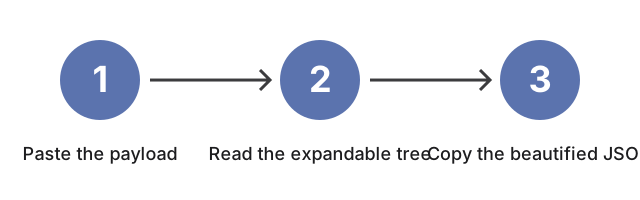
Panduan ini menelusuri Parser dan Formatter JSON satu panel pada satu waktu: tempel payload ke editor kiri, lihat panel kanan merender pohon yang dapat diperluas, gunakan tombol Salin JSON Cantik untuk mengambil output berindentasi, dan ganti lebar indentasi ketika konsumennya adalah alat diff yang ketat. Pembaca baru melihat apa yang dilakukan setiap kontrol sebelum mengkliknya, dalam urutan yang digunakan sesi nyata.


Bagaimana alat ini cocok

Buka Parser dan Formatter JSON dan tempel payload ke editor kiri dalam urutan yang sama dengan panduan ini: panel kanan menyalakan pohon yang dapat diperluas, tombol Salin JSON Cantik menjatuhkan output berindentasi ke clipboard Anda, dan pemilih lebar indentasi beralih antara 2 spasi (default ramah diff) dan 4 spasi (gaya legacy).

← Kembali ke alat developer

Why trust these tools

  • Ten-plus years of web tooling. The freetoolonline editorial team has shipped browser-based utilities since 2015. The goal has never changed: get you to a working output fast, without an install.
  • No install, no sign-up. Open a tool and get a working output in seconds - nothing to download and no account to create. Tools that need heavy processing run it on our service, so even a low-powered machine gets the job done.
  • Analytics stops at the page view. We measure which pages get visited, not what you type or upload inside a tool. There is nothing to sign in to and no profile is attached to your input.
  • Open-source core components. The processing engines underneath (libheif, libde265, pdf-lib, terser, clean-css, ffmpeg.wasm, and others) are public and audit-able. We link to each one in its tool page's footer.
  • Free, with or without ads. All tools are fully functional without sign-up. The Disable Ads button in the header is always available if you need a distraction-free run.