Initializing, please wait a moment

Convertidor de Video HD Online Paso a Paso


Use el Convertidor de Video HD para reempaquetar video entre containers (MP4, WebM, MOV) o recodificarlo opcionalmente - todo en el navegador via FFmpeg.wasm sin subir el archivo.
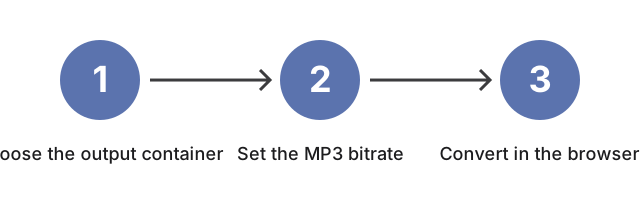
Tres pasos para convertir con el convertidor de video HD: elige el container de salida, ajusta el bitrate MP3 y luego convierte en el navegador.
Tres pasos: elige el container de salida, ajusta el bitrate MP3 y luego convierte en el navegador.

Por que importa

Antes de soltar el archivo en el convertidor, dos decisiones paso a paso cambian lo que sale. Primera, el contenedor - el dispositivo o plataforma social define una lista rigida de lo que reproduce (MP4 reproduce en casi todas partes; WebM es nativo del navegador; MOV es nativo de iOS; MKV mantiene multiples pistas de audio; AVI es el fallback legado). Reempaquetar entre contenedores mantiene el bitrate, frame rate y resolucion originales intactos. Segunda, para extraccion solo de audio, el bitrate MP3 coincide con el contexto de escucha - 128 kbps para palabra hablada, 192 kbps para uso general, 256 kbps para musica, 320 kbps para archivado.

Bitrate MP3Mejor paraTamano aprox. / min
128 kbpsVoz, podcasts~0,9 MB/min
192 kbpsMusica de uso general~1,4 MB/min
256 kbpsMusica de alta calidad~1,9 MB/min
320 kbpsArchivo~2,4 MB/min

Como encaja la herramienta

Despues de que ambas decisiones estan resueltas, el lector abre Convertidor de Video HD Online y la zona de soltar acepta el archivo fuente; el selector de contenedor refleja la eleccion de la primera decision arriba, y el selector de bitrate MP3 refleja la eleccion de la segunda. La conversion entonces corre localmente en el navegador del lector via FFmpeg.wasm.

← Volver a herramientas de conversion de imagen


Controles avanzados (recodificacion opcional)

Ademas del cambio de contenedor anterior, la herramienta ofrece controles opcionales que recodifican el video en lugar de solo reempaquetarlo. Elige un codec de video (H.264, H.265 o VP9), define un nivel de calidad de 1 (mejor) a 5 (menor), elige una resolucion o un preset vertical 9:16 (o un tamano personalizado), define una tasa de fotogramas, agrega un fundido de entrada y salida, o divide la salida en segmentos de duracion fija. Cada uno funciona igual - completamente en tu navegador con FFmpeg.wasm, sin subida. La recodificacion tarda mas que un reempaquetado y reescribe el video, asi que usala cuando necesites un archivo mas pequeno, un codec o resolucion especifica, un clip vertical para feeds de movil, o varios segmentos cortos en vez de un archivo largo.

Why trust these tools

  • Ten-plus years of web tooling. The freetoolonline editorial team has shipped browser-based utilities since 2015. The goal has never changed: get you to a working output fast, without an install.
  • No install, no sign-up. Open a tool and get a working output in seconds - nothing to download and no account to create. Tools that need heavy processing run it on our service, so even a low-powered machine gets the job done.
  • Analytics stops at the page view. We measure which pages get visited, not what you type or upload inside a tool. There is nothing to sign in to and no profile is attached to your input.
  • Open-source core components. The processing engines underneath (libheif, libde265, pdf-lib, terser, clean-css, ffmpeg.wasm, and others) are public and audit-able. We link to each one in its tool page's footer.
  • Free, with or without ads. All tools are fully functional without sign-up. The Disable Ads button in the header is always available if you need a distraction-free run.

Related tools:

  • Convert GIF To Images Frame - Extract every frame from an animated GIF and save each as PNG or JPG.
  • All Video Converter - Upload a video, trim with start/duration sliders, convert to MP4, WebM, MOV, MP3, or WAV.
  • FFmpeg Online - FFmpeg online - run FFmpeg or FFprobe commands on your media through our processing service.
  • GIF Maker and Gif Editor - GIF maker online - create an animated GIF from a video clip or a sequence of still images.
  • Camera Test - Free camera test online: live preview, resolution readout, switch front and back camera, capture
  • Video And SlideShow Maker - Video maker online - build an MP4 slideshow from a sequence of images with optional audio.
  • Video Tools - Change MOV to MP4, turn photos into a video, or run FFmpeg filter chains in your browser - three
  • All Guides - Browser Tool Library - Free, in-browser guides on compressing files, converting HEIC, testing screens, hashing, PDFs, and
  • Hd Online Video Converter - Convert HD video files between MP4, WebM, MOV, AVI, and MKV right in your browser.
  • Online Video Trimmer - Online Video Trimmer - Trim an MP4, MOV, or WebM video to the exact time range you need, right in
  • Video to GIF Converter - Video to GIF Converter - Convert a VIDEO input into a GIF output - one step, in the browser.
  • Audio Trimmer

Tags: #guide, #video, #converter, #ffmpeg

Related guides:

Related news: