iPhone-Fotoformat Erklärt
Last reviewed: 2026-09-08
Free Tool Online editorial teamZuletzt geprüft: 2026-09-08. Verwenden Sie HEIC zu JPG, wenn Sie ein iPhone-Foto außerhalb von Apple-Geräten teilen müssen.
Die vier Formate und wann iOS sie verwendet
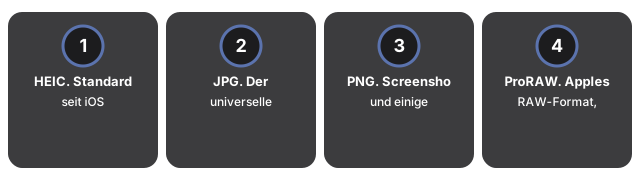
- HEIC. Standard seit iOS 11 auf iPhone 7 und neuer. Etwa 50% kleiner als JPG bei gleicher visueller Qualität. Nativ auf iPhone, iPad, Mac. Nicht nativ unter Windows oder Android.
- JPG. Der universelle Fallback. iOS verwendet JPG, wenn das Foto an ein Nicht-Apple-Ziel über das Teilen-Sheet geht.
- PNG. Screenshots und einige Bearbeitungen. Verlustfrei und groß.
- ProRAW. Apples RAW-Format, verfügbar auf Pro-Modellen. Zur Bearbeitung in Lightroom; nicht zum Teilen.
Für Batch-Konvertierung verwenden Sie HEIC zu JPG in Ihrem Browser. Schritt-für-Schritt: how to convert an iPhone photo to JPG für Einzelfotos oder how to convert 100 HEIC photos to JPG für Batch-Verarbeitung.
Das Browser-Panel desselben Konverters lässt Sie das Ausgabeformat für den ganzen Batch wählen - JPG, PNG oder WebP - Sie sind also nicht auf JPG festgelegt, nur weil es am kompatibelsten ist; wählen Sie PNG, wenn der Batch Screenshots enthält und Sie diese verlustfrei behalten möchten. Wählen Sie mehrere HEIC-Fotos aus, werden sie eins nach dem anderen konvertiert, mit einer Download-Karte pro Foto; sind zwei oder mehr fertig, packt ein einziger Button den ganzen Batch in ein ZIP, statt jedes Foto einzeln herunterzuladen. Mehrseitige PDF-Ausgabe bleibt serverseitig - das Browser-Panel deckt JPG, PNG und WebP ab.
iPhone-Formate unter Windows, Android und Chat-Apps öffnen
iPhone-Formate unter Windows, Android und Chat-Apps öffnen heißt HEIF-Support zu installieren wo das OS ihn nicht hat, oder HEIC zuerst nach JPG zu wandeln - auf iPhone Photo Format Explained das Format greift erst bei der Weitergabe.
Chat-Apps kodieren still neu, was die Rechnung ändert. WhatsApp konvertiert ein HEIC beim Senden in JPG und komprimiert auf etwa 80-85% Qualität, sodass der Empfänger nie Ihr Original sieht; Messenger und der komprimierte Modus von Telegram tun dasselbe. Die Mail-App ist die Ausnahme, die man kennen sollte: ihre Größenauswahl (Klein, Mittel, Groß, Tatsächliche Größe) behält das unveränderte HEIC nur bei "Tatsächliche Größe" - die anderen drei verkleinern und konvertieren in JPG. Wenn Sie die Originaldaten unverändert brauchen, teilen Sie über Dateien oder konvertieren Sie zuerst lokal mit HEIC zu JPG.
| Ziel | Was mit einem HEIC passiert | Typische Größenänderung | Stattdessen senden |
|---|---|---|---|
| Windows / Android | Leere Vorschau ohne installierte Erweiterung | Umwandlung zu JPG: ~1,5x größer, öffnet sich aber überall | JPG |
| WhatsApp / Messenger | Automatisch in etwa 85% JPG umgewandelt | Die Plattform kodiert auf ~80-85% JPG-Qualität neu | Erst lokal konvertieren für volle Qualität |
| Gmail / die meisten E-Mail-Dienste | Anhang kommt an, aber der Empfänger sieht möglicherweise das falsche Symbol | Die JPG-Kopie ist typischerweise 30-50% größer in Byte | JPG |
| Lightroom / Fotoeditor | Öffnet sich, aber mit weniger Spielraum als RAW | ProRAW-Dateien sind 25-50 MB gegenüber 1,5-2,5 MB HEIC | ProRAW oder das Original-HEIC |
Häufig gestellte Fragen
Kann ich verhindern, dass EXIF-Metadaten mitkonvertiert werden?
Bei der Server-Konvertierung nicht - das Kontrollkästchen für die EXIF-Erhaltung (Kameramodell, Verschlusszeit, ISO, Aufnahmedatum) ist fest angehakt und ausgegraut, Sie können es nicht abwählen. Die Metadaten bleiben also immer im JPG-, PNG-, WebP- oder PDF-Ergebnis erhalten.
Kann ich die JPG-Qualität selbst festlegen statt der automatischen Optimierung?
Ja. Standardmäßig wählt eine KI-gestützte automatische Optimierung die Qualität. Deaktivieren Sie diese Option im Einstellungsbereich, um den Regler manuell im Bereich 70-85% einzustellen.
Wie lange bleibt die hochgeladene oder konvertierte Datei auf dem Server verfügbar?
Nur etwa 1 Minute. Laden Sie das Ergebnis sofort nach der Konvertierung herunter - danach entfernt der Server die Datei automatisch.
Gibt es ein Zeitlimit für die Konvertierung im Browser-Panel?
Ja, jedes Foto hat im Browser-Panel ein Zeitlimit von 60 Sekunden für die lokale Dekodierung. Bei einem Batch verarbeitet das Panel die Fotos einzeln nacheinander, damit der Speicher des Geräts nicht überlastet wird.
Kann ich in einem Durchgang mehrere Ausgabeformate gleichzeitig erhalten, zum Beispiel JPG und PNG?
Nein, das Format-Dropdown lässt jeweils nur eine Auswahl zu (JPG, WEBP, PNG oder PDF). Für ein zweites Format konvertieren Sie den Batch erneut mit der anderen Auswahl.
Welche Seitengrößen kann ich für die kombinierte PDF-Ausgabe wählen?
Die Server-Option bietet die Originalgröße sowie mehrere feste Formate wie 8.5x11 (Magazine), A4 und mehrere Fotobuch-Formate von 5x5 bis 13x11 - Letzteres ist die Standardauswahl.
Why trust these tools
- Ten-plus years of web tooling. The freetoolonline editorial team has shipped browser-based utilities since 2015. The goal has never changed: get you to a working output fast, without an install.
- No install, no sign-up. Open a tool and get a working output in seconds - nothing to download and no account to create. Tools that need heavy processing run it on our service, so even a low-powered machine gets the job done.
- Analytics stops at the page view. We measure which pages get visited, not what you type or upload inside a tool. There is nothing to sign in to and no profile is attached to your input.
- Open-source core components. The processing engines underneath (libheif, libde265, pdf-lib, terser, clean-css, ffmpeg.wasm, and others) are public and audit-able. We link to each one in its tool page's footer.
- Free, with or without ads. All tools are fully functional without sign-up. The Disable Ads button in the header is always available if you need a distraction-free run.