
Note: Zip size MB. If everything is OK, click the UnZip button to extract the archive contents.
The unzipping process has completed.
Unzip Files Online Quickly and Easily
Unzip File takes a ZIP archive, lists its contents as a browsable tree, and lets you download any file individually or grab the whole tree with Download All. If the archive is password-protected, the tool prompts for the password before the file list renders. No installation or account is required.
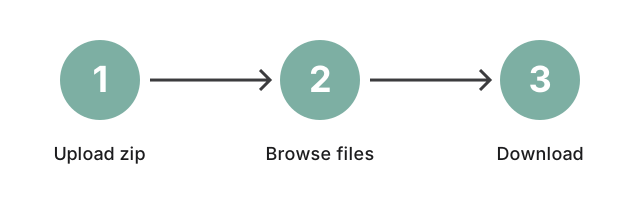
Three steps to extract a ZIP online
- Drop your ZIP into the upload area. The tool reads the archive header and lists the contents in a tree.
- Browse the contents. Open folders, preview file types, and pick what you actually need - you don't have to extract the whole archive.
- Click any file to download. Each file downloads on its own; the working copy on the service is removed after the download window.
Most ZIPs open instantly. Larger archives take a moment while the file index loads - the page shows "Reading archive..." during that step so you know the tool is still working.
Why .zip is the default archive format
The .zip format has one big advantage: every modern operating system, every email client, and every cloud storage tool can open it natively. Windows, macOS, iOS, Android, and most Linux distributions support it without any extra software. That makes ZIP the safest default when you receive an archive from someone whose setup you do not know - they almost certainly know how to open it. Other formats (RAR, 7z, TAR.GZ) compress slightly more efficiently, but they often need a separate app on the recipient's side. When in doubt, ask the sender to repackage as ZIP, or use this online file extractor to read it directly without installing anything.
Read the plain-vs-password ZIP guide for the disambiguation step between plain ZIPs (this page) and password-protected ZIPs (which route to https://freetoolonline.com/zip-tools/remove-zip-password.html instead).
Unzip a file online - free, password-protected, or on a Mac
Free, no install, no account - on any machine
Unzip File is free with no signup wall and no paid step, so it works the same on a managed laptop that blocks third-party installers as on a personal machine. Uploaded archives travel over HTTPS and are deleted after the download window, so nothing lingers on the backend. If the goal is the other direction - bundling loose files into a new .zip - the companion creator is Zip File; pick this page when you already hold a .zip and need its contents out. Browsing an untrusted RAR5 archive here also sidesteps the desktop 7-Zip Mark-of-the-Web bypass (CVE-2026-58052) - previewing the contents on this page never touches your own installed 7-Zip binary, the one the bug targets, so you can see what a RAR5 file holds before deciding whether to extract it with a desktop tool at all.
Open a password-protected ZIP when you know the password
If the archive was created with a password the sender shared, the tool prompts for it before the file tree renders; type the password and the extraction continues, with the password deriving the AES key locally for the unpacking step (it is not stored or sent for recovery). The contents then render as a folder tree the same way an unprotected archive would. For a forgotten password there is no recovery path against modern AES-128 or AES-256 encryption - the only practical option is to ask the sender to share it again or to re-send the archive without one.
Open a ZIP online on a Mac
macOS already opens a plain .zip with a double-click in Finder. Use Unzip File instead when a managed Mac blocks installing helper apps like Keka or The Unarchiver - no Mac-specific helper app is required, and the flow is the same one described above for Windows or Linux.
When extraction may fail. Standard DEFLATE ZIPs and modern AES-128 / AES-256 password archives are the supported path. Unusual compression methods (some LZMA or BZIP2 variants outside the common ZIP profile) can fail to unpack - ask the sender to recreate the archive with default ZIP settings, or try a desktop tool that advertises that method.
Last reviewed: 2026-08-04
FreetoolOnline Editorial TeamSibling tool: to strip a password you already know off a protected archive, use Remove ZIP Password instead. ← Back to ZIP Tools
How to Use the Online Unzip Tool
Our online unzip tool is designed to make file extraction easy and accessible for everyone. Follow these steps to extract files from any archive format:
- Upload Your Archive File: Start by selecting the ZIP, RAR, 7z, or other archive files you want to unzip.
- Select the Files to Extract: Browse through the contents of the archive and choose specific files or folders you need.
- Begin the Extraction: Click to extract, and the selected files will be processed in moments.
- Download the Unzipped Files: Once complete, download the extracted files directly to your device.
Benefits of Using an Online Unzip Tool
Using an online unzip tool offers several advantages over traditional desktop software. Here are some key benefits:
- Convenience: Access and unzip files from any device with a browser, no installations required.
- Time-Saving: Start unzipping files instantly without waiting for software downloads or updates.
- Cross-Platform Compatibility: Works on all devices, including Windows, macOS, iOS, Android, and Linux.
- Secure Processing: Files upload over HTTPS, are extracted on the service, and the working copy is deleted after the download window.
Frequently Asked Questions
Why unzip files online instead of using desktop software?
Unzipping files online eliminates the need for installing extra software, which saves storage and time. This is ideal for users on the go or working from devices that lack dedicated unzipping software.
What types of archive formats does this tool support?
This online unzip tool supports all popular formats, including ZIP, RAR, 7z, TAR, and many others, providing flexibility for users working with various archive types.
Is it safe to unzip files online?
The ZIP uploads over HTTPS, is extracted on the freetoolonline service, and the working copy is deleted after the download window; the session is anonymous with no sign-in. For files that must never leave your device (NDA source code, medical records, contracts), use a desktop unzip tool instead - see "How does this tool protect my data?" below.
Can I unzip files on mobile devices?
Absolutely. This tool is fully compatible with mobile devices, including smartphones and tablets. You can upload, extract, and download files from any internet-connected device with a browser.
Do I need to extract the entire archive, or can I select specific files?
You can select specific files or folders to extract, making it easy to access only the files you need, which is particularly helpful when working with large archives.
How does this tool protect my data?
The ZIP file uploads over HTTPS to the freetoolonline service, the archive is extracted server-side, and the extracted contents are returned via a short-lived download URL. The session is anonymous (no sign-in, no email collected) and the output bucket rotates on a short retention interval - the file is not retained overnight. For archives containing material that must never leave your device (NDA-protected source code, medical records, contracts), use a desktop unzip tool (7-Zip on Windows, the macOS Finder right-click, your file manager on Linux) instead of any online extractor, this one included.
Conclusion: Enjoy Fast and Easy Online File Extraction
Unzipping files online provides a fast, convenient, and secure way to manage compressed files without installing extra software. Whether you're accessing files from a desktop, laptop, or mobile device, this tool makes it easy to unzip files online in moments.
and simplify your file management experience.