ZIP password types - strong vs weak, explained (when an online remover can help)
Before uploading to Remove ZIP Password, check the encryption type in 7-Zip or WinRAR. ZIP 2.0 (ZipCrypto) with a short password recovers in seconds-to-minutes. AES-256 with a strong 12-or-more character password cannot be cracked by any online tool - ask the sender. AES-256 with a short password may succeed; try it.
freetoolonline.com Editorial Team| Encryption | KDF cost per attempt | Short password (≤8 chars) | Strong password (12+ chars) |
|---|---|---|---|
| ZIP 2.0 (ZipCrypto) | 1× (CRC-32) | Recovers in seconds-minutes | Hours to weeks |
| AES-256 (PBKDF2) | ~1,000× slower | Hours to days | Not recoverable |
Case 1 - Legacy ZIP 2.0 (traditional encryption): recoverable in seconds-to-minutes for short / numeric / dictionary passwords
"ZIP 2.0 traditional encryption" (also called "ZipCrypto" by 7-Zip and "ZIP encryption" by WinZip) is the original ZIP password format from PKWARE's PKZIP 2.0 in 1989. It is the default password format for built-in ZIP support on older Windows ("Send to compressed (zipped) folder" on Windows 7 / 8 / 10) and for many web-app file-export ZIPs. "Remove ZIP password" tools recover this format quickly because (a) the ZIP 2.0 key derivation is cheap - one CRC-32 plus a few bit operations per password attempt, not a deliberately slow KDF like PBKDF2 - and (b) most passwords on this format are short, numeric, or dictionary words.
- When the online remover wins fast: the password is 1-8 characters, all-numeric (a date, a phone number, a postcode), a common-language dictionary word, or a documented default like "123456" / "password". Remove ZIP Password typically lands the answer in seconds-to-minutes.
- When the online remover slows down: the password is 9-12 characters mixed-case alphanumeric. The brute-force search space grows by ~70x per character, so a 6-char password that finishes in 2 seconds takes weeks at 10 characters and the remover may time out.
- How to tell you have ZIP 2.0: in 7-Zip, right-click the locked entry → Properties → "Method" column shows
ZipCrypto. In WinRAR, file properties show "ZIP 2.0 (legacy)". On macOS, rununzip -v archive.zipin Terminal and read the encryption mode in the central-directory header. - After recovery: the remove the password fromed archive no longer has the legacy encryption, so re-zipping it in a modern tool with AES-256 (see Case 2) is the right next step if you need to keep the file confidential.
Case 2 - WinZip AES-256 with a strong password: not recoverable by any online remover
WinZip AES-256 (the "AE-2" extension introduced in WinZip 9.0 in 2003, adopted by 7-Zip, WinRAR, modern macOS, and most modern Linux ZIP tools) uses the Advanced Encryption Standard at a 256-bit key size, with the key derived from the password through PBKDF2-HMAC-SHA1 and 1,000 iterations - a deliberately slow key-derivation function. A strong password (12+ characters, mixed letter case, digits, and symbols, not a dictionary word) creates a search space of roughly 10^24 candidates that no single machine, GPU rig, or online tool can iterate through in any reasonable time. The cryptography is computationally secure against brute force at the password sizes most users actually pick.
- When this case applies: the file's creator chose AES-256 in 7-Zip ("Encryption method → AES-256"), WinZip ("Use AES encryption"), WinRAR (AES default for ZIP since 5.x), or macOS built-in archiving (AES-256 default since macOS 10.13). The password is 12+ characters and not a dictionary word.
- What an online remover cannot do: brute-force AES-256 + a strong password would take longer than the age of the universe on any hardware that exists today. The tool will run, time out, and return "not recoverable". The cryptography did its job - this is the expected outcome, not a tool failure.
- How to tell you have AES-256: in 7-Zip the "Method" column shows
AES-256; in WinRAR the encryption details say "AES-256" or "AE-2";unzip -v archive.zipon Linux / macOS shows compression-method code 99 in the local file header for AE-2 entries. - What the right next step is: ask the file's creator for the password, check the email / chat / document where it was originally communicated, use the password-recovery feature of the original archive tool, or treat the archive as unrecoverable and request a fresh export. If the issue is a corrupt ZIP rather than a forgotten password, see Recover a corrupt ZIP file - options.
Case 3 - WinZip AES-256 with a weak / short / dictionary password: possibly recoverable, slower than ZIP 2.0
The middle case is the tricky one. The ZIP uses AES-256 (modern, strong cryptography), but the password is short (6-8 characters), all-numeric, or a dictionary word. PBKDF2-with-1,000-iterations makes each attempt ~1,000x slower than a ZIP 2.0 attempt - a search that finishes in 2 seconds on ZIP 2.0 takes ~30 minutes on AES-256. Dictionary attacks against a common word still finish in minutes-to-hours; brute-force against 1-8 digits (10^8 candidates) finishes in hours-to-a-few-days on consumer hardware. Remove ZIP Password attempts this and may or may not return the answer within its time budget.
- Worth trying: the password is suspected to be 1-8 digits (a date, a postcode, a four-digit PIN extended to 8) or a single common dictionary word.
- Will time out: the password is 9+ characters mixed-case with symbols, or a multi-word passphrase. At that point the file is effectively in Case 2.
- What to expect: Remove ZIP Password returns either the recovered password (Case 1 / weak Case 3 outcome) or "not recoverable within time budget" (strong Case 3 / Case 2 outcome). The tool does not pretend to crack what it cannot.
Where your file goes during the upload
Remove ZIP Password does the removal step on a backend service, not fully inside the browser - and the file only travels anywhere in Case 1 or a weak Case 3 above, where uploading is actually worth trying. The ZIP goes over HTTPS to the processing service, the password you supply is used once to re-save the archive without its encryption layer, and the unlocked copy is handed back to you for download. The working copy on the service is not kept indefinitely: it rotates off within the same short retention window every server-side tool on this site uses, so there is no long-lived copy of the archive or its password sitting on the server once the download link goes stale.
This is also why Case 2, and a strong Case 3 password, never need an upload at all: if the encryption genuinely is not recoverable, sending the file anywhere buys nothing, so asking the sender for the password - or checking wherever it was first shared - is the right move instead of testing an online remover against it. Only Case 1 and a weak Case 3 password - short, numeric, or a dictionary word - make the short upload-and-download window in this tool worth using in the first place.
Decision flow: from a locked ZIP to the right next step
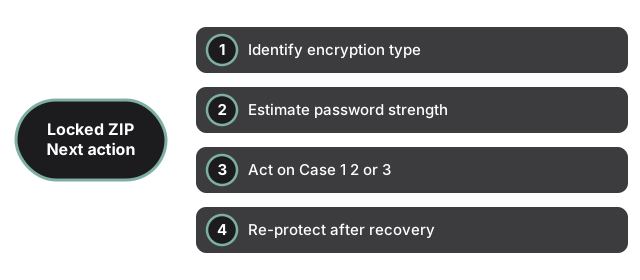
Step 1 - identify the encryption type. Open the ZIP in 7-Zip / WinRAR or run unzip -v archive.zip. ZipCrypto / "ZIP 2.0" / "Traditional" → Case 1. AES-256 / "AE-2" → Cases 2 or 3, decided by password strength.
Step 2 - estimate the password strength. If you have any guess (a date, a project codename, a recipient's name) you fall into Case 1 / weak Case 3 and an online remover is worth trying. If the file came from a security-conscious sender who chose a random 16-character passphrase you fall into Case 2 and an online remover will not help.
Step 3 - act on the case. Case 1 or weak Case 3 → upload to Remove ZIP Password; expect an answer in seconds-to-hours. Case 2 (or strong Case 3) → do NOT upload; recover the password from where it was originally stored (email, password manager, documentation), ask the sender, or treat the archive as unrecoverable.
Step 4 - re-protect after recovery. If the password recovery succeeded and you still need confidentiality, re-zip the contents with Compress, ZIP File and Folder or 7-Zip using AES-256 and a strong passphrase recorded in a password manager. The recovered file is in legacy ZIP 2.0 by design - leaving it in that format keeps it weakly protected. The companion guide PDF password types - owner vs user covers the analogous structure on the PDF side; the underlying lesson is the same in both formats - encryption strength and password strength multiply, and a weakness in either makes the file recoverable.
Related guides: ZIP password recovery online - covers recovery options for forgotten passwords step by step. ZIP password unlocker - explains what the online remover does when you have the password and how it differs from brute-force cracking.
Why trust these tools
- Ten-plus years of web tooling. The freetoolonline editorial team has shipped browser-based utilities since 2015. The goal has never changed: get you to a working output fast, without an install.
- No install, no sign-up. Open a tool and get a working output in seconds - nothing to download and no account to create. Tools that need heavy processing run it on our service, so even a low-powered machine gets the job done.
- Analytics stops at the page view. We measure which pages get visited, not what you type or upload inside a tool. There is nothing to sign in to and no profile is attached to your input.
- Open-source core components. The processing engines underneath (libheif, libde265, pdf-lib, terser, clean-css, ffmpeg.wasm, and others) are public and audit-able. We link to each one in its tool page's footer.
- Free, with or without ads. All tools are fully functional without sign-up. The Disable Ads button in the header is always available if you need a distraction-free run.