
This online tool bundles your files and folders into one downloadable ZIP archive. The in-browser path builds the ZIP on your device with no upload; the upload path adds an optional password (Standard, AES-128, or AES-256) and a custom archive name set in Settings.
Or zip in your browser (no upload)
Pick files (or a folder) and build the ZIP entirely on your device. Nothing is uploaded; this mode does not add a password (use the upload mode above for AES encryption).
The zipping process has completed.
Free Online Zip File Compressor - Efficiently Compress and Secure Your Folders
This free ZIP compressor packs a folder or a batch of files into one archive - sized to clear a 25 MB email attachment cap, fit a cloud upload, or hand off a project as a single file. No software install, no account needed.
Last reviewed: 2026-09-12
Free Tool Online Editorial TeamThe upload pipeline sends files over HTTPS, builds the ZIP on the host, and returns the download URL - files rotate off the bucket on a short interval. When the bundle holds anything sensitive, lock it at build time: the Password setting offers Standard for casual access control, AES-128 for stronger encryption, or AES-256 for the strongest layer the ZIP format supports. Send that password to the recipient through a channel separate from the archive itself, so one intercepted message never carries both the file and its key.
In the in-browser mode you can set a compression level from 0 (store only, fastest) to 9 (smallest archive), and the tool reports the finished size against the original so you can confirm how much space the bundle saved before you download it. Because that in-browser path never opens a separate installed archiver, you also skip whatever patch backlog that program carries - a desktop 7-Zip heap-overflow bug (CVE-2026-14266) needed a manual update to fix since the app has no auto-update.
Common jobs for a ZIP compressor
- Compress to email: a deck plus its assets travels as one attachment instead of a dozen separate files the recipient has to re-assemble.
- Share files or upload to cloud: one ZIP uploads faster than a long file list because the network makes fewer round-trips.
- Back up a working folder: archive a folder before a system change so you have a clean rollback copy that travels as a single file.
Reduce ZIP file size - what to expect

To hit a size target (25 MB email, 100 MB upload form, 1 GB cloud limit), the biggest wins come from uncompressed source files. Already-compressed media (JPG, PNG, MP4, MP3) barely shrinks - a ZIP can only bundle it, not re-encode it. Realistic savings by file type:
| Source file mix | Typical reduction | Can hit 25 MB? |
|---|---|---|
| Text, code, JSON, CSV | 60 - 80% | Yes, even from large folders |
| Office docs (DOCX, XLSX, PPTX) | 10 - 25% | Often, when the source is under ~120 MB |
| PDFs (mixed) | 5 - 15% | Only if the source is already small |
| Photos (JPG/PNG/HEIC) | 0 - 5% | Rarely - compress photos first with an image tool |
| Video (MP4/MOV) | 0 - 3% | No - re-encode the video before zipping |
An image compressor or a video tool trims pixel data rather than bundling it, which is why it beats a plain ZIP on media - run the photos or clips through one first, then bundle the optimized results for the smallest practical archive.
Pick your starting point - existing ZIP, loose files, or a whole folder
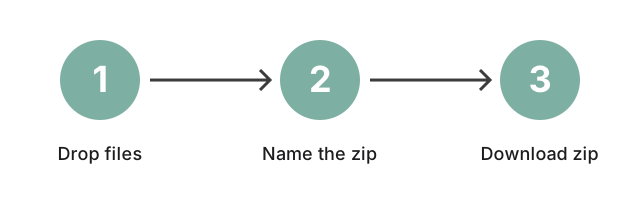
All three produce one ZIP - drop the input above. Naming happens in Settings before you press Zip, so the archive that lands in the recipient's inbox already carries the label you chose rather than a generated string. The starting point changes one detail:
| Your starting point | What the tool does |
|---|---|
An existing .zip file you want smaller (compress zip file / zip file compressor / reduce zip file size) | Upload the archive; the tool re-bundles its contents into a new ZIP. |
| Several loose files you want as one archive (compress files to zip / online file compressor) | Upload the files, name the archive, and download a single ZIP that bundles them. |
| A whole folder, sub-folders included (compress folder / folder compressor) | Upload the folder; the tool preserves the folder structure inside the ZIP so the recipient extracts back to the same layout. |
Need the reverse? The unzip file tool extracts an existing archive; remove ZIP password opens one you already have the password for. Not sure which of the two your archive needs? Telling a locked ZIP from a plain one walks through the check before you upload it. Weighing ZIP against RAR, 7z, or TAR.GZ? The file compressor vs ZIP comparison guide covers the trade-offs in two minutes. If the archive reports itself as corrupt rather than just locked, these zip repair options walk through re-downloading, partial extraction, and desktop repair tools before you assume the contents are gone.
One archive out of a whole folder
Drop an existing .zip, a batch of files, or a folder into the panel above and download one compressed archive. How much smaller it gets depends on what is inside - the size table above gives realistic ranges by file type.
How to Compress Folders for Email and Storage
Compressing folders online with this tool is fast and easy. Here's a quick step-by-step guide:
- Customize Output: Input the name, set password protection, and choose encryption by clicking the button at the page header.
- Upload Your Folder: Drag and drop files or folders into the designated area, or click the upload area to browse and select files. The tool supports bulk uploads for compressing multiple items simultaneously.
- Start Compression: Once uploaded, the tool automatically begins compressing the files into a compact folder, minimizing size without affecting content quality.
- Download Your Compressed File: After compression, download the compact file directly to your device for sharing, storage, or secure archiving.
Why Use an Online File Compression Tool?
Using an online file compressor has several advantages over traditional desktop software, particularly in terms of ease of use, accessibility, and security:
- Direct Browser Compression: Reduce file sizes without downloading additional software, making it accessible across devices like smartphones, tablets, and computers.
- Easier File Sharing: Compress large folders for faster sharing, reducing transfer times and ensuring files stay within email size limits.
- Save Valuable Storage: Minimize file sizes to free up device or cloud storage space.
- Secure Compression with Encryption: Protect sensitive data with password encryption, ensuring secure storage and transfer.
Frequently Asked Questions
How does compressing a folder reduce file size?
Compression works by applying algorithms that eliminate redundant data, thereby reducing file sizes. This makes files easier to manage without affecting their quality.
Can I compress large folders online?
Yes! This tool supports compressing large folders, making it easier to manage and share even the biggest files.
Is it safe to compress folders online?
Absolutely. This tool ensures secure compression with encrypted processing. Once compression is complete, files are automatically deleted from the server for privacy.
Where do my files go when I upload them?
When you use the main upload panel (needed for password / AES encryption), your files travel over HTTPS to a short-lived processing service that builds the ZIP archive and hands back a download link; the working copy rotates off the server after a short retention window, with no permanent storage. If you would rather nothing leave your device, use the "Zip in your browser" panel instead - it builds the archive locally with no upload at all, though that mode does not support password protection.
Do I need software to compress folders?
No software is needed. Simply upload your files to the browser-based tool, compress them, and download the resulting file.
What's a strong password for a ZIP archive?
Use at least 12 characters and mix letters, numbers, and one symbol - a phrase like Sunset-River-2026! is far stronger than a short password. Avoid the file owner's name, the project name, or anything visible in the archive's filename. Send the password through a separate channel (text message, signal, in person) instead of the same email that carries the ZIP. If you forget a password you set yourself, this tool cannot recover it - make a new archive and re-share the password.
Conclusion: Simplify and Secure Your Folders with Free Online Compression
Managing large files has never been easier. With this free online compression tool, you can shrink folder sizes to save space, simplify sharing, and add encryption for extra security. Compress files in the browser - no downloads or installations needed; passwords can be added per archive if you need an extra layer.
today! Use our free online file compressor for easy, secure, and efficient file management.