Initializing, please wait a moment

Test LCD

Una prueba LCD muestra colores solidos a pantalla completa - rojo, verde, azul, blanco y negro - para que el sangrado de luz, los pixeles atascados e iluminacion irregular se vean contra un fondo uniforme en segundos. Abre la herramienta, toca cada color para llenar la pantalla y busca cualquier punto o linea que no coincida con el fondo.

Tambien llamado prueba de pantalla o test de display, este chequeo LCD es el mismo diagnostico rapido: mostrar un color solido a la vez para que los pixeles muertos o atascados y el sangrado de luz destaquen contra un fondo uniforme.

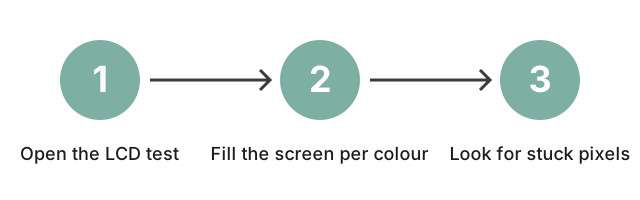
Tres pasos para ejecutar un test LCD: abre la herramienta, llena la pantalla con cada color solido y luego busca pixeles atascados o sangrado de luz.
Tres pasos: abre el test LCD, llena la pantalla con cada color solido y luego busca pixeles atascados o sangrado de luz.
PropiedadValor
FormatoHerramienta online, sin instalacion
VelocidadEn el navegador; ciclo de colores a pantalla completa en segundos
PrivacidadSe ejecuta localmente en el navegador - sin subida
Herramienta de implementacionhttps://freetoolonline.com/device-test-tools/lcd-test.html
Colores probados5 pantallas solidas - rojo, verde, azul, blanco y negro
Tipos de pixel defectuoso3 tipos: muerto (siempre apagado), atascado (siempre encendido) y caliente (color fijo)

Why trust these tools

  • Ten-plus years of web tooling. The freetoolonline editorial team has shipped browser-based utilities since 2015. The goal has never changed: get you to a working output fast, without an install.
  • No install, no sign-up. Open a tool and get a working output in seconds - nothing to download and no account to create. Tools that need heavy processing run it on our service, so even a low-powered machine gets the job done.
  • Analytics stops at the page view. We measure which pages get visited, not what you type or upload inside a tool. There is nothing to sign in to and no profile is attached to your input.
  • Open-source core components. The processing engines underneath (libheif, libde265, pdf-lib, terser, clean-css, ffmpeg.wasm, and others) are public and audit-able. We link to each one in its tool page's footer.
  • Free, with or without ads. All tools are fully functional without sign-up. The Disable Ads button in the header is always available if you need a distraction-free run.

Related tools:

  • Camera Test - Free camera test online: live preview, resolution readout, switch front and back camera, capture
  • Keyboard Test - Keyboard test online - press each key to highlight it, spot non-working keys, and verify Num Lock,
  • LCD Test - Test your LCD screen for dead pixels, stuck pixels, and backlight bleed.
  • Microphone Test - Free microphone test online: live spectrum meter, mic permission check, and optional speaker
  • Device Test Tools - Test camera, microphone, keyboard, and LCD online before meetings.
  • All Guides - Browser Tool Library - Free, in-browser guides on compressing files, converting HEIC, testing screens, hashing, PDFs, and
  • Screen Recorder - Record your screen, camera, or microphone in the browser, blur faces while recording, and download
  • GPU Test - WebGL Benchmark & Info - GPU Test - WebGL Benchmark & Info - See what your browser's graphics stack can do - WebGL 1 and 2
  • Linux Online - Run Linux in Your Browser (Terminal & Desktop) - Linux Online - Run Linux in Your Browser (Terminal & Desktop) - A real Linux command line - and a

Tags: #guide, #device-test, #lcd, #lcd-test, #screen-test, #dead-pixel

Related guides: