Formato de Foto do iPhone Explicado
Last reviewed: 2026-07-02
Free Tool Online editorial teamÚltima revisão: 2026-07-02. Use HEIC para JPG quando precisa compartilhar uma foto do iPhone fora dos dispositivos Apple.
Os quatro formatos e quando iOS os usa
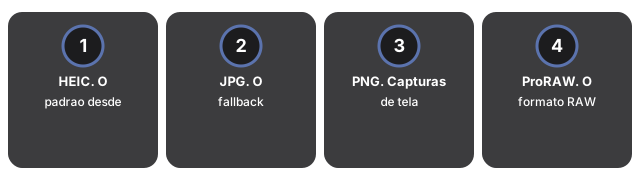
- HEIC. O padrão desde iOS 11 no iPhone 7 e mais novos. Aproximadamente 50% menor que JPG na mesma qualidade visual. Nativo no iPhone, iPad, Mac. Não nativo no Windows ou Android.
- JPG. O fallback universal. iOS usa JPG quando a foto vai para um destino não-Apple via folha de compartilhamento.
- PNG. Capturas de tela e algumas edições. Sem perdas e grande.
- ProRAW. O formato RAW da Apple, disponível em modelos Pro. Para edição no Lightroom; não para compartilhamento.
Para conversão em lote, use HEIC para JPG no seu navegador. Passo a passo: how to convert an iPhone photo to JPG para fotos individuais ou how to convert 100 HEIC photos to JPG para processamento em lote.
O painel no navegador desse mesmo conversor deixa escolher o formato de saída do lote - JPG, PNG ou WebP - então você não fica limitado ao JPG só porque é o mais compatível; escolha PNG se o lote misturar capturas de tela e você quiser mantê-las sem perdas. Ao selecionar várias fotos HEIC, a conversão ocorre uma por vez com um cartão de download para cada foto; com duas ou mais concluídas, um único botão empacota o lote inteiro em um ZIP em vez de baixar cada foto separadamente. A saída em PDF de várias páginas continua sendo apenas do lado do servidor - o painel no navegador cobre JPG, PNG e WebP.
Abrir formatos do iPhone no Windows, Android e apps de chat
Abrir formatos do iPhone no Windows, Android e apps de chat significa instalar suporte HEIF onde o SO não tem, ou converter HEIC para JPG primeiro - em iPhone Photo Format Explained o formato só aperta na transferência.
Apps de chat recodificam em silêncio, o que muda a conta. O WhatsApp converte um HEIC para JPG ao enviar e recomprime para cerca de 80-85% de qualidade, então o destinatário nunca vê seu original; Messenger e o modo comprimido do Telegram fazem o mesmo. O app Mail é a exceção que vale conhecer: seu seletor de tamanho (Pequeno, Médio, Grande, Tamanho real) só mantém o HEIC intacto em "Tamanho real" - os outros três reduzem e convertem para JPG. Quando você precisa dos bytes originais intactos, compartilhe pelo Arquivos ou converta localmente primeiro com HEIC para JPG.
| Destino | O que acontece com um HEIC | Mudança típica de tamanho | Envie isto em vez disso |
|---|---|---|---|
| Windows / Android | Prévia em branco sem uma extensão instalada | Converter para JPG: ~1,5x maior mas abre em qualquer lugar | JPG |
| WhatsApp / Messenger | Convertido automaticamente para cerca de 85% JPG | A plataforma recodifica para ~80-85% de qualidade JPG | Converta localmente primeiro para qualidade total |
| Gmail / maioria dos emails | O anexo chega, mas o destinatário pode ver o ícone errado | A cópia em JPG normalmente fica 30-50% maior em bytes | JPG |
| Lightroom / editor de fotos | Abre, mas com menos margem que RAW | Arquivos ProRAW ficam com 25-50 MB vs 1,5-2,5 MB do HEIC | ProRAW ou o HEIC original |
Why trust these tools
- Ten-plus years of web tooling. The freetoolonline editorial team has shipped browser-based utilities since 2015. The goal has never changed: get you to a working output fast, without an install.
- No install, no sign-up. Open a tool and get a working output in seconds - nothing to download and no account to create. Tools that need heavy processing run it on our service, so even a low-powered machine gets the job done.
- Analytics stops at the page view. We measure which pages get visited, not what you type or upload inside a tool. There is nothing to sign in to and no profile is attached to your input.
- Open-source core components. The processing engines underneath (libheif, libde265, pdf-lib, terser, clean-css, ffmpeg.wasm, and others) are public and audit-able. We link to each one in its tool page's footer.
- Free, with or without ads. All tools are fully functional without sign-up. The Disable Ads button in the header is always available if you need a distraction-free run.