Base64 - When to Use and When Not To
Last reviewed 2026-04-27. Open Base64 to Image or Image to Base64 for in-browser conversion.
Free Tool Online Editorial Team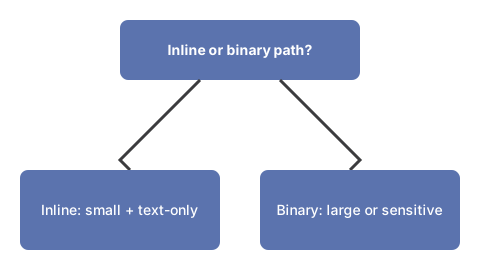
What base64 actually does
Base64 is a binary-to-text encoding that converts raw bytes into printable ASCII characters. Take three bytes of binary input - 24 bits. Group them as four 6-bit chunks. Map each 6-bit chunk to one of 64 ASCII characters (A-Z, a-z, 0-9, +, /). Output is now safe to put in an email body, a URL, a JSON string, or a JavaScript source file - none of which handle raw binary cleanly.
The price is the encoding's expansion: every 3 bytes in becomes 4 bytes out. Plus padding (the "=" signs at the end) for inputs whose length is not a multiple of 3. The math is exact: encoded size = ⌈input/3⌉ × 4 bytes.
Right call: small inline binary in text protocols

- Small inline images. A 1 KB icon in a data URL inside CSS avoids a separate HTTP request. The 33% bloat costs 300 bytes; the saved request costs at least 1 RTT plus headers. Below ~4 KB, inline wins. Above that, a separate file with HTTP/2 multiplexing is faster.
- Email attachments. SMTP and email bodies are 7-bit ASCII by tradition. MIME wraps binary attachments in base64 specifically to fit the protocol. You almost never see this directly - mail clients encode and decode automatically.
- Binary in JSON. JSON only stores strings, numbers, booleans, arrays, and objects. To put binary in a JSON field, you base64 it. APIs that return image bytes inside JSON, OAuth tokens with binary signatures, and protobuf-over-JSON all use this pattern.
- URL parameters with binary. URL-safe base64 (using
-and_instead of+and/) lets you put short binary identifiers in query strings without percent-encoding.
Wrong call: large payloads or fake encryption

- Embedding large images in CSS or HTML. A 500 KB photo as a data URL becomes 670 KB of base64 plus the parser overhead, plus it cannot be cached separately, plus it blocks the parser. Just link the image file.
- "Encoding" sensitive data. Base64 is reversible by anyone. It is encoding, not encryption. Putting a password or API key through base64 obfuscates nothing - the decode is one click.
- Storing files in a database. Most databases have native binary types (BLOB, BYTEA). Storing binary as base64 in a TEXT column wastes 33% of the disk and forces a decode on every read.
- Long-running data transfer. If the binary is multi-megabyte, every byte of overhead matters. Stream the binary directly with the right Content-Type header.
Tools and decision rules
Three tools cover the most common base64 tasks in the browser: Base64 Encoder for encoding any text or data string, Image to Base64 for outgoing binary, and Base64 to Image for incoming. None requires an upload outside the browser.
The decision rule: under 4 KB and inline-friendly destination → base64 is fine. Over that or anywhere with a real binary path available → use the binary path. The full developer set is at the developer tools hub.
About the 4 KB threshold
The 4 KB rule of thumb is an HTTP/1.1-era heuristic for inline images in CSS data URLs - on HTTP/1.1 each separate request paid roughly 1 RTT plus header overhead, so under 4 KB an inline image was cheaper than a second request even with the base64 33 percent expansion. On HTTP/2 and HTTP/3 the request cost falls (header compression, multiplexing on one connection), and the break-even point shifts up: a separate file is faster sooner. The decision rule still holds in shape - small inline binary in a text destination is the right call; large binary that has a real binary path is the wrong call - only the exact threshold moves with the underlying protocol.
Related reading: base64 encoder - when to use it covers timing decisions by scenario, and base64 encoder vs alternatives compares it to other encoding schemes such as URL encoding and hex. If the goal is avoiding a server round-trip entirely rather than just avoiding a second request, free online tools that work without uploading files covers the broader no-upload landscape base64 is one small part of.
Why trust these tools
- Ten-plus years of web tooling. The freetoolonline editorial team has shipped browser-based utilities since 2015. The goal has never changed: get you to a working output fast, without an install.
- No install, no sign-up. Open a tool and get a working output in seconds - nothing to download and no account to create. Tools that need heavy processing run it on our service, so even a low-powered machine gets the job done.
- Analytics stops at the page view. We measure which pages get visited, not what you type or upload inside a tool. There is nothing to sign in to and no profile is attached to your input.
- Open-source core components. The processing engines underneath (libheif, libde265, pdf-lib, terser, clean-css, ffmpeg.wasm, and others) are public and audit-able. We link to each one in its tool page's footer.
- Free, with or without ads. All tools are fully functional without sign-up. The Disable Ads button in the header is always available if you need a distraction-free run.