
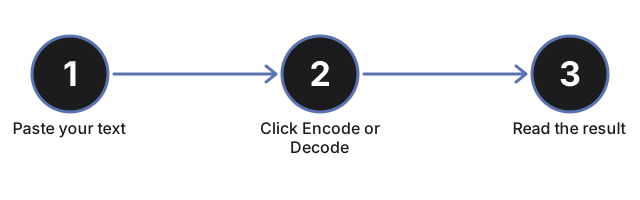
Paste plain text to turn it into Base64, or paste Base64 to decode it back; click Encode or Decode and the converted string lands in the output box, with a decode error flagged inline when the input is not valid Base64.
Base64 Encoder
Encode text to Base64 or decode a Base64 string back to text, right in your browser. Encoding uses the browser's own btoa and atob, so nothing you paste is uploaded and no account is needed.
When to use it
- Inspect a Base64-encoded token to read what it holds.
- Prepare a data URI to embed inline in HTML or CSS.
- Decode a Base64 payload returned by an API response.
How the encoding works
How the encoding works in Base64 Encoder: the encoder is UTF-8 safe, so accented characters and non-Latin text round-trip correctly. If you paste a string that is not valid Base64, the decoder shows an error inline instead of failing silently - text only, no file upload, and nothing leaves this browser tab.
Two examples show it in practice. Encoding the two letters "Hi" produces SGk=, and decoding SGk= back gives "Hi" again. Encoding the accented word "café" produces Y2Fmw6k=, and decoding that string returns the accent mark intact - proof the UTF-8-safe wrapping preserves accented and non-Latin characters, not just plain English letters.
For worked examples on each use case - embedding in HTML, inspecting tokens, and decoding API payloads - see the Base64 encoder guide.
Why a JWT or URL-safe token can fail to decode
Decode only trims the very start and end of what you paste before it runs, so a stray space or line break right before or after your string will not by itself cause a failure. What it does not handle is the URL-safe Base64 alphabet: tokens that swap in - and _ for the standard + and / - the style you see inside a JWT or a URL query parameter - fall outside the alphabet this decoder reads, so pasting one shows an inline error instead of the decoded text. Swapping those two characters back to + and / (and restoring any trailing = padding the token dropped) turns it back into standard Base64 this page can decode.
The same trim-only behavior means a full data URI fails too. Pasting the whole string data:text/plain;base64,SGVsbG8= shows an error, because decode strips only surrounding whitespace, not a data:...;base64, prefix; paste just the payload after the comma - SGVsbG8= in that example - and it decodes cleanly.
| Alphabet position | Standard Base64 | URL-safe Base64 |
|---|---|---|
| 62nd character | plus sign | hyphen |
| 63rd character | forward slash | underscore |
| trailing padding | equals signs kept | often stripped off |
Frequently Asked Questions
What does Base64 Encoder do?
This page turns readable text into a Base64 string, and turns a Base64 string back into readable text, right inside this browser tab. Type or paste into the input box, click Encode or Decode, and the result appears in the output box - all of it running locally with no upload and no account.
When should I reach for base64 encoder?
Use it to inspect a Base64-encoded token, prep a data URI, or decode a payload from an API response.
What complementary tools work well alongside base64 encoder?
For images rather than text, use Image to Base64 and Base64 to Image. The JSON parser and URL decoder cover the other encode and decode tasks that come up in the same workflow.
Does this tool save or remember what I paste?
No. Nothing you type or paste is written to local storage or a cookie, and nothing is sent to a server - both boxes clear as soon as you refresh or leave the page.
Can I use this page for word count or changing letter case too?
No, this page runs Base64 encode and decode only. For word and character counts use the word counter, and to switch between UPPERCASE, lowercase, Title Case and more use the case converter.
What happens if I click Encode or Decode with the box empty?
Nothing breaks - an empty box encodes to an empty result and decodes to an empty result, since both handlers fall back to an empty string before running rather than throwing an error on missing input.
Can I edit the result before copying it?
The output box is read-only, so you cannot type into it directly. Select the text and copy it out, or change the input box and click Encode or Decode again to produce a new result.
Does the output include the "data:" prefix I need for a data URI?
No, the Encode button returns only the raw Base64 payload - no data: scheme and no MIME type is ever added. To build a data URI for CSS or HTML, add a matching prefix such as data:image/png;base64, yourself in front of the encoded text before using it.