Adobe patches Acrobat and Reader flaws in APSB26-63
Adobe published security bulletin APSB26-63 on 9 June 2026 with fixes for critical and important bugs in Acrobat and Acrobat Reader on Windows and macOS. Opening a crafted PDF on an unpatched build can lead to code execution, a crash, or memory exposure. Adobe says it has not seen these issues exploited in the wild. If you still open PDFs in the desktop Reader, update now - or read them in a browser tool such as PDF to text when you only need the words.
Last reviewed: 2026-07-18
FreeToolOnline editorial teamWhat happened
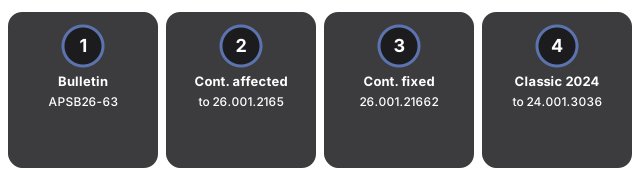
APSB26-63 is Adobe's June 2026 Acrobat security pack (priority 2). It covers the Continuous track through 26.001.21651 and Acrobat 2024 Classic through 24.001.30365 on Windows and macOS. The fixed builds are Continuous 26.001.21662 and Classic 2024 24.001.30383. The bulletin lists many CVEs in the CVE-2026-479xx range, including out-of-bounds writes rated critical (CVSS 7.8) such as CVE-2026-47911. Adobe and independent alerts from JPCERT/CC and GovCERT.HK describe the same trigger: a user opens a specially crafted PDF. Adobe states it is not aware of in-the-wild exploits for the fixed issues. The bulletin was later amended (through mid-July 2026) with extra CVE rows, so the June pack is the one to install even if you already checked once in early June.
| Detail | Value |
|---|---|
| Bulletin | APSB26-63 (published 2026-06-09, priority 2) |
| Affected Continuous | Acrobat / Reader 26.001.21651 and earlier |
| Fixed Continuous | 26.001.21662 |
| Affected Classic 2024 | 24.001.30365 and earlier |
| Fixed Classic 2024 | 24.001.30383 |
| In the wild | None known per Adobe |
Why it matters for everyday files
Most people meet PDFs as attachments and downloads. Desktop Acrobat and Reader still parse the full file format, including edges that a simple preview never hits. A critical out-of-bounds write means a hostile PDF can run code in the same session as your documents. That is a different risk from "the file looks wrong" - it is "the file runs something." Browser-side PDF tools on this site never install Acrobat; they are useful when you only need text, images, or a quick check and want to avoid opening an untrusted file in the desktop app.
What to do with your files right now
Take these steps on any machine that still runs Acrobat or Reader:
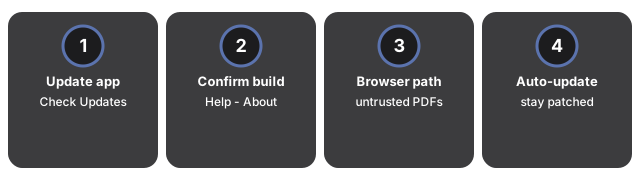
- Update the desktop app. Open Acrobat or Reader, choose Help then Check for Updates, and install Continuous 26.001.21662 or Classic 2024 24.001.30383 (or newer).
- Confirm the build number under Help - About before you reopen PDFs from email or chat.
- Prefer a browser path for untrusted PDFs. Use PDF to text or PDF preflight when you only need content checks, not a full desktop edit session.
- Keep auto-update on for Acrobat/Reader so the next bulletin does not sit unpatched for weeks.