Initializing, please wait a moment

Como Explorar Hohmann Transfer 3D Explorer - Paso a Paso


El Hohmann Transfer 3D Explorer arranca en cuanto carga la pagina: arrastra para orbitar la vista, desplaza o pellizca para hacer zoom, y pulsa Play transfer para disparar ambos encendidos. Todo se procesa en tu propio dispositivo - sin instalacion, sin cuenta.


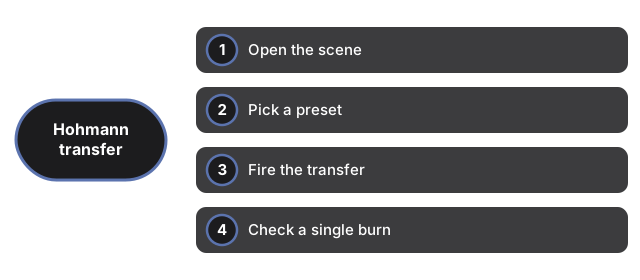
Abrir la escena

Carga la pagina y el preset LEO to GEO aparece por defecto, con la nave en reposo sobre el anillo orbital interior. El motor 3D se descarga una vez y queda en cache. Si WebGL no esta disponible, aparece un aviso sencillo en lugar de un lienzo roto, y el panel de datos sigue funcionando normalmente.


Elegir un preset

Pulsa LEO to GEO para la transferencia a escala de satelite (r1=6,678 km, r2=42,164 km) o Earth to Mars para la transferencia interplanetaria (r1=1.0 AU, r2=1.524 AU). Cada preset redibuja los anillos orbitales interior y exterior, la elipse de transferencia y el panel de datos a la vez.


Disparar la transferencia

Pulsa Play transfer. El boton cambia a Transferring mientras la nave recorre la elipse turquesa desde el marcador turquesa de salida hasta el marcador naranja de llegada en unos tres segundos de animacion - representando exactamente la mitad de la orbita de transferencia real. Al llegar, el boton cambia a Reset to inner orbit.


Comprobar un encendido individual

Haz clic solo en el marcador turquesa para el delta-v del encendido de salida, o en el marcador naranja para el encendido de llegada. Para LEO to GEO estos son 2.45 km/s y 1.47 km/s; para Earth to Mars la cifra publicada cubre toda la maniobra en lugar de un reparto claro por encendido.

Leer el panel de datos

El panel enumera el radio orbital interior r1, el radio orbital exterior r2, el tiempo de transferencia y el delta-v total para el preset activo, ademas de una nota sobre como se obtuvo o calculo la cifra del tiempo de transferencia. Una nota final indica que los radios orbitales en pantalla estan comprimidos para facilitar la lectura, mientras que las cifras de r1, r2, tiempo y delta-v son reales.

← Volver a Space 3D

Why trust these tools

  • Ten-plus years of web tooling. The freetoolonline editorial team has shipped browser-based utilities since 2015. The goal has never changed: get you to a working output fast, without an install.
  • No install, no sign-up. Open a tool and get a working output in seconds - nothing to download and no account to create. Tools that need heavy processing run it on our service, so even a low-powered machine gets the job done.
  • Analytics stops at the page view. We measure which pages get visited, not what you type or upload inside a tool. There is nothing to sign in to and no profile is attached to your input.
  • Open-source core components. The processing engines underneath (libheif, libde265, pdf-lib, terser, clean-css, ffmpeg.wasm, and others) are public and audit-able. We link to each one in its tool page's footer.
  • Free, with or without ads. All tools are fully functional without sign-up. The Disable Ads button in the header is always available if you need a distraction-free run.

Related tools:

  • All Guides - Browser Tool Library - Free, in-browser guides on compressing files, converting HEIC, testing screens, hashing, PDFs, and
  • Solar System 3D Explorer - Solar System 3D Explorer - All eight planets orbit the sun live on screen - drag to orbit the view,
  • Black Hole 3D Visualizer - Black Hole 3D Visualizer - Tens of thousands of glowing particles orbit the black event-horizon
  • Galaxy 3D Simulator - Galaxy 3D Simulator - Up to 100,000 points form the spiral arms on desktop (30,000 on phones so
  • Tyrannosaurus rex 3D Viewer - View a Tyrannosaurus rex in 3D - rotate the model, size it against a person, and read its real
  • Mosasaurus 3D Viewer - View a Mosasaurus in 3D - rotate the giant marine reptile, size it against a person, and read its
  • Velociraptor 3D Viewer - View a Velociraptor in 3D at its true, turkey-sized scale - rotate the model, size it against a
  • Triceratops 3D Viewer - View a Triceratops in 3D - rotate its frilled skull and three horns, size the model against a
  • Spinosaurus 3D Viewer - View a Spinosaurus in 3D at published scale - rotate the sail-backed model, size it against a
  • Stegosaurus 3D Viewer - View Stegosaurus in 3D - rotate the plated model, size it against a person, and read its real
  • Brachiosaurus 3D Viewer - View Brachiosaurus in 3D - rotate the tall sauropod, size it against a person, and read its real
  • GPU Test - WebGL Benchmark & Info - GPU Test - WebGL Benchmark & Info - See what your browser's graphics stack can do - WebGL 1 and 2

Related guides:

Related news: