Initializing, please wait a moment

Calculadora de Prestamo Paso a Paso

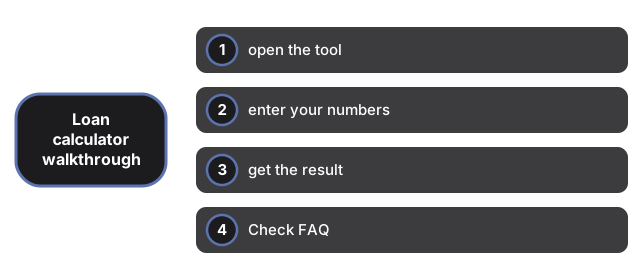
La Calculadora de Prestamo funciona en tres pasos: abre la herramienta, ingresa tus numeros y luego lee el resultado. Esta pagina explica que espera cada paso.

Respuesta rapida. Abre la Calculadora de Prestamo, ingresa el monto del prestamo, la tasa de interes y el plazo, y lee la cuota mensual - se actualiza mientras escribes.

Paso 1 - abre la herramienta

Abre la Calculadora de Prestamo. No necesitas instalar ni iniciar sesion antes de empezar.

Paso 2 - ingresa tus numeros

Ingresa el monto del prestamo, la tasa de interes anual en porcentaje y el plazo en anos.

Paso 3 - obten el resultado

La cuota mensual, el total pagado y el interes total se actualizan mientras escribes - no hay boton para el resultado principal. Selecciona "Show first 12 months" para ver como se divide el primer ano de pagos entre capital e interes.

Frequently Asked Questions

¿Necesito crear una cuenta para usarla?

No. La herramienta se ejecuta directamente en el navegador, sin instalacion ni inicio de sesion.

¿Se envian mis datos a algun lugar?

No. Los numeros que ingresas permanecen en tu dispositivo y nunca se envian a un servidor ni a un servicio de analisis.

¿El resultado incluye impuestos o comisiones?

No. El resultado es solo un calculo ilustrativo - no incluye impuestos, seguros ni comisiones del prestamista.

← Volver a herramientas de utilidad

Why trust these tools

  • Ten-plus years of web tooling. The freetoolonline editorial team has shipped browser-based utilities since 2015. The goal has never changed: get you to a working output fast, without an install.
  • No install, no sign-up. Open a tool and get a working output in seconds - nothing to download and no account to create. Tools that need heavy processing run it on our service, so even a low-powered machine gets the job done.
  • Analytics stops at the page view. We measure which pages get visited, not what you type or upload inside a tool. There is nothing to sign in to and no profile is attached to your input.
  • Open-source core components. The processing engines underneath (libheif, libde265, pdf-lib, terser, clean-css, ffmpeg.wasm, and others) are public and audit-able. We link to each one in its tool page's footer.
  • Free, with or without ads. All tools are fully functional without sign-up. The Disable Ads button in the header is always available if you need a distraction-free run.

Related tools:

  • QR Code Generator - QR code generator online - create a scannable QR for a URL, short text, contact vCard, or Wi-Fi
  • All Video Converter - Upload a video, trim with start/duration sliders, convert to MP4, WebM, MOV, MP3, or WAV.
  • UnZip File, Extract, Decompress Zip - Extract files from a ZIP online - open archives, browse contents, and download individual files in
  • Compress, Zip File and Folder - Compress folders and files into a ZIP archive online.
  • Video And SlideShow Maker - Video maker online - build an MP4 slideshow from a sequence of images with optional audio.
  • All Guides - Browser Tool Library - Free, in-browser guides on compressing files, converting HEIC, testing screens, hashing, PDFs, and
  • Code Formatter Beautifier - Beautify JavaScript, CSS, HTML, and JSON in your browser.
  • QR Code Scanner - QR Code Scanner - M1: Find out what a QR code says from a screenshot or saved photo - choose the
  • Base64 Encoder - Encode text to Base64 or decode a Base64 string back to text, right in your browser - no upload and
  • Garden Defense - Garden Defense - Pick a defender card - Shooter (100 energy), Battery (50, makes more energy), or
  • Percentage Calculator - Percentage Calculator - Work out a percentage of a number, the reverse (what percent one number is
  • Retro Arcade Shooter - Retro Arcade Shooter - a free lo-fi browser shooter: blast robot spiders through a dark server

Related guides: