Initializing, please wait a moment
Cách chơi Retro Arcade Shooter - từng bước
Trang Retro Arcade Shooter tải Underrun trong iframe (~120 KB). Đơn cơ sở: WASD di chuyển, chuột ngắm, giữ click bắn, reboot mỗi CPU qua ba màn. Nhấn Play.
Bước 1 - nhấn Play
Play chèn iframe (mã Underrun + bản đồ PNG). Underrun của Dominic Szablewski (MIT); nhạc Andreas Loesch; LICENSE kèm theo.
Bước 2 - âm thanh và màn 1
Click canvas để mở âm thanh (Sonant-X tổng hợp trong tab). Chờ boot; rồi màn 1.
Bước 3 - di chuyển và bắn
WASD hoặc mũi tên. Chuột ngắm. Giữ chuột trái (plasma có cooldown). Nhện melee; tháp bắn. Nhặt health pack.
Bước 4 - reboot CPU
Reboot mỗi CPU để mở lối ra. Ba màn. Chết thì màn tải lại sau ~3s.
Bước 5 - không có gì
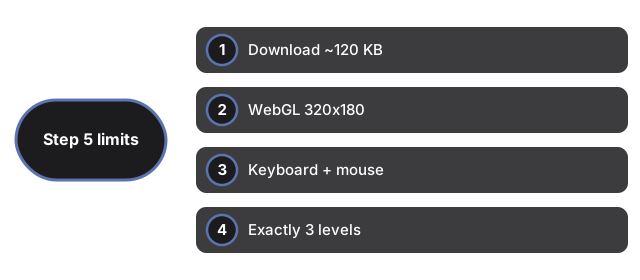
Không save, điểm, tài khoản. Không cảm ứng hay gamepad. Một súng. Góc top-down nghiêng, không phải FPS (Retro FPS Online).
| Mục | Giá trị | Ghi chú |
|---|---|---|
| Tải | ~120 KB | Iframe same-origin |
| Renderer | WebGL 320x180 | Cần WebGL |
| Input | Bàn phím + chuột | Không cảm ứng |
| Màn | 3 | Bản đồ PNG |
| Save | Không | Không storage |
Xem khi nào chơi, so sánh và Chili Blast Shooter.
Why trust these tools
- Ten-plus years of web tooling. The freetoolonline editorial team has shipped browser-based utilities since 2015. The goal has never changed: get you to a working output fast, without an install.
- No install, no sign-up. Open a tool and get a working output in seconds - nothing to download and no account to create. Tools that need heavy processing run it on our service, so even a low-powered machine gets the job done.
- Analytics stops at the page view. We measure which pages get visited, not what you type or upload inside a tool. There is nothing to sign in to and no profile is attached to your input.
- Open-source core components. The processing engines underneath (libheif, libde265, pdf-lib, terser, clean-css, ffmpeg.wasm, and others) are public and audit-able. We link to each one in its tool page's footer.
- Free, with or without ads. All tools are fully functional without sign-up. The Disable Ads button in the header is always available if you need a distraction-free run.