Initializing, please wait a moment
Cách chơi Retro FPS Online - từng bước
Trang Retro FPS Online chạy Freedoom đầy đủ bằng WebAssembly. Chọn chiến dịch, chờ tải một lần, chơi và save trên trình duyệt này. Xuất .ftolfps để mang tiến độ sang máy khác.
Bước 1 - xem thẻ
Chiến dịch 1 (36 màn), Chiến dịch 2 (32 màn) và Import hiện ngay. Không gọi mạng trước khi click.
Bước 2 - click một chiến dịch
Tải một lần vào IndexedDB. Không fetch trước click này.
Bước 3 - màn hình title
Xong tải thì vào menu game. Lần sau load từ IndexedDB, chơi offline được.
Bước 4 - save và xuất
Esc mở Save/Load. Export tạo .ftolfps; Import máy khác sẽ kiểm tra phiên bản engine.
Bước 5 - giới hạn
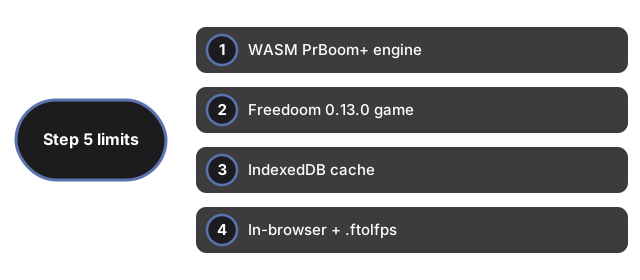
Đổi chiến dịch sẽ reload trang. Không multiplayer hay tài khoản. Điện thoại chỉ cảm ứng không phải mục tiêu. Xóa dữ liệu site sẽ mất cache và save.
| Mục | Giá trị | Ghi chú |
|---|---|---|
| Engine | WASM | Hỗ PrBoom+ |
| Game | Freedoom 0.13.0 | Giấy phép tự do |
| Cache | IndexedDB | Theo phiên bản engine |
| Save | Trình duyệt + .ftolfps | Export/Import |
| Input | Bàn phím + chuột | Cần focus màn hình |
Xem khi nào chơi, so sánh và Retro Arcade Shooter.
Why trust these tools
- Ten-plus years of web tooling. The freetoolonline editorial team has shipped browser-based utilities since 2015. The goal has never changed: get you to a working output fast, without an install.
- No install, no sign-up. Open a tool and get a working output in seconds - nothing to download and no account to create. Tools that need heavy processing run it on our service, so even a low-powered machine gets the job done.
- Analytics stops at the page view. We measure which pages get visited, not what you type or upload inside a tool. There is nothing to sign in to and no profile is attached to your input.
- Open-source core components. The processing engines underneath (libheif, libde265, pdf-lib, terser, clean-css, ffmpeg.wasm, and others) are public and audit-able. We link to each one in its tool page's footer.
- Free, with or without ads. All tools are fully functional without sign-up. The Disable Ads button in the header is always available if you need a distraction-free run.