Como visualizar datos online - crea un grafico a partir de tus numeros

Un visualizador de datos convierte filas de numeros en un grafico en tu navegador. Pega CSV, JSON o lineas simples Etiqueta, Valor, elige un tipo de grafico y mira como se dibuja al instante. Barra, linea, circular y mas estan a un clic. Todo se ejecuta en tu dispositivo, sin subir nada y sin cuenta.

Last reviewed: 2026-06-16

PropiedadValor
FormatoOnline, sin instalar, sin registro
CostoGratis
Herramienta de implementacionhttps://freetoolonline.com/developer-tools/data-visualizer.html

Pasos

  1. Pega tus datos como CSV con una fila de encabezado, JSON o un par "Etiqueta, Valor" por linea - o carga un ejemplo listo con un clic.
  2. Elige un tipo de grafico: barra, linea, circular, anillo, area polar, radar, dispersion, burbuja o barra apilada.
  3. Da un titulo al grafico y haz clic en Visualizar; el grafico se vuelve a dibujar cuando cambias el tipo, el titulo o los datos.
  4. Vuelve a abrir un grafico reciente de la lista - los graficos recientes se recuerdan en este navegador.
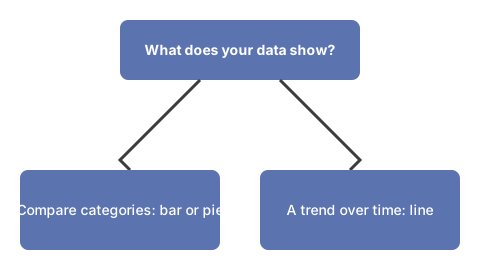
Arbol de decision para elegir el tipo de grafico: para comparar valores entre categorias, elige un grafico de barras o circular; para mostrar como cambia un valor a lo largo del tiempo, elige un grafico de lineas.
Elige el tipo de grafico segun lo que muestran tus datos.

Formatos de entrada

Se detectan tres formatos de entrada automaticamente. CSV usa una fila de encabezado con separadores de coma o salto de linea. JSON puede ser un array de objetos (una clave de nombre mas claves de valor numerico) o un objeto clave/valor simple. El texto simple es un par "Etiqueta, Valor" por linea. El ejemplo de abajo dibuja cinco valores como grafico de barras.

EtiquetaValor
Mon120
Tue200
Wed150
Thu80
Fri170

Analisis de IA en el dispositivo

En un navegador con WebGPU puedes ejecutar un analisis de IA privado opcional. El pequeno modelo de lenguaje se descarga una vez y se ejecuta en tu dispositivo, lee tus datos y reconstruye el grafico - no se sube nada. Sin WebGPU el motor de graficos funciona solo, asi que la herramienta siempre dibuja tus datos.

Privacidad

Todo se ejecuta en tu navegador. No hay widget de subida ni cuenta; los graficos recientes quedan solo en tu dispositivo y tus datos nunca salen de la pagina.

Para las diferencias estructurales entre CSV y JSON como formatos de intercambio de datos, ver CSV vs JSON data formats.

← Volver a las herramientas para desarrolladores

Why trust these tools

  • Ten-plus years of web tooling. The freetoolonline editorial team has shipped browser-based utilities since 2015. The goal has never changed: get you to a working output fast, without an install.
  • No install, no sign-up. Open a tool and get a working output in seconds - nothing to download and no account to create. Tools that need heavy processing run it on our service, so even a low-powered machine gets the job done.
  • Analytics stops at the page view. We measure which pages get visited, not what you type or upload inside a tool. There is nothing to sign in to and no profile is attached to your input.
  • Open-source core components. The processing engines underneath (libheif, libde265, pdf-lib, terser, clean-css, ffmpeg.wasm, and others) are public and audit-able. We link to each one in its tool page's footer.
  • Free, with or without ads. All tools are fully functional without sign-up. The Disable Ads button in the header is always available if you need a distraction-free run.

Related tools:

  • MD5 converter - Free online MD5 hash generator and MD5-to-text reverse lookup.
  • Convert PDF to TEXT online - Extract text from PDF online for copying and editing.
  • Text To HTML Editor - Text to HTML editor online - write in a WYSIWYG view and watch the generated HTML update live, with
  • CSS Gradient Animator Generator - CSS gradient generator - build animated linear gradients with live preview; copy ready-to-paste CSS
  • CSS Minifier - Minify CSS online for faster page loads.
  • CSS UnMinifier - CSS unminifier online - beautify minified CSS with proper indentation, line breaks, and readable
  • JavaScript Minifier - JavaScript minifier online free - paste your JS, click Minify, and copy the compressed code.
  • JSON Parser By Tree View - Paste JSON to validate, format, and view it in a tree.
  • JavaScript UnMinifier - JavaScript unminifier online - reformat minified JS with indentation and line breaks for
  • Keyboard Test - Keyboard test online - press each key to highlight it, spot non-working keys, and verify Num Lock,
  • Text Diff - Text diff online - compare two text blocks and highlight added, removed, and changed characters,
  • Developer Tools - Developer tools to parse JSON, minify or unminify CSS/JS, compare text, and generate MD5 hashes.

Tags: #developer

Related guides:

Related news:

Loading reviews...