Cara memvisualisasikan data online - buat grafik dari angka Anda

Alat visualisasi data mengubah baris angka menjadi grafik di browser Anda. Tempel CSV, JSON, atau baris sederhana Label, Nilai, pilih jenis grafik, dan lihat langsung tergambar. Batang, garis, lingkaran, dan lainnya hanya satu klik. Semua berjalan di perangkat Anda, tanpa unggah dan tanpa akun.

Last reviewed: 2026-06-16

PropertiNilai
FormatOnline, tanpa instal, tanpa daftar
BiayaGratis
Alat pelaksanahttps://freetoolonline.com/developer-tools/data-visualizer.html

Langkah

  1. Tempel data Anda sebagai CSV dengan baris header, JSON, atau satu pasangan "Label, Nilai" per baris - atau muat contoh bawaan dengan satu klik.
  2. Pilih jenis grafik: batang, garis, lingkaran, donat, area polar, radar, sebar, gelembung, atau batang bertumpuk.
  3. Beri judul pada grafik lalu klik Visualisasikan; grafik tergambar ulang saat Anda mengubah jenis, judul, atau data.
  4. Buka kembali grafik terbaru dari daftar - grafik terbaru diingat di browser ini.
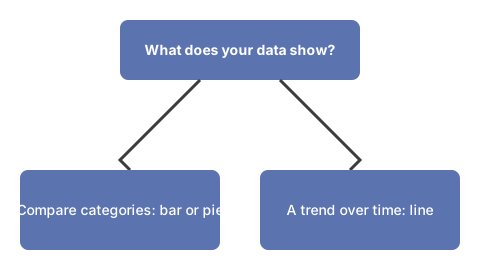
Pohon keputusan untuk memilih jenis bagan: untuk membandingkan nilai antar kategori, pilih bagan batang atau lingkaran; untuk menunjukkan nilai yang berubah seiring waktu, pilih bagan garis.
Pilih jenis bagan berdasarkan apa yang ditunjukkan data Anda.

Format masukan

Tiga format masukan dideteksi otomatis. CSV memakai baris header dengan pemisah koma atau baris baru. JSON bisa berupa array objek (kunci nama plus kunci nilai numerik) atau objek kunci/nilai sederhana. Teks sederhana adalah satu pasangan "Label, Nilai" per baris. Contoh di bawah menggambar lima nilai sebagai grafik batang.

LabelNilai
Mon120
Tue200
Wed150
Thu80
Fri170

Wawasan AI di perangkat

Pada browser dengan WebGPU Anda dapat menjalankan wawasan AI privat opsional. Model bahasa kecil diunduh sekali dan berjalan di perangkat Anda, membaca data Anda, dan membangun ulang grafik - tidak ada yang diunggah. Tanpa WebGPU mesin grafik bekerja sendiri, jadi alat selalu menggambar data Anda.

Privasi

Semua berjalan di browser Anda. Tidak ada widget unggah dan tidak ada akun; grafik terbaru hanya ada di perangkat Anda dan data Anda tidak pernah meninggalkan halaman.

Untuk perbedaan struktural antara CSV dan JSON sebagai format pertukaran data, lihat CSV vs JSON data formats.

← Kembali ke alat pengembang

Why trust these tools

  • Ten-plus years of web tooling. The freetoolonline editorial team has shipped browser-based utilities since 2015. The goal has never changed: get you to a working output fast, without an install.
  • No install, no sign-up. Open a tool and get a working output in seconds - nothing to download and no account to create. Tools that need heavy processing run it on our service, so even a low-powered machine gets the job done.
  • Analytics stops at the page view. We measure which pages get visited, not what you type or upload inside a tool. There is nothing to sign in to and no profile is attached to your input.
  • Open-source core components. The processing engines underneath (libheif, libde265, pdf-lib, terser, clean-css, ffmpeg.wasm, and others) are public and audit-able. We link to each one in its tool page's footer.
  • Free, with or without ads. All tools are fully functional without sign-up. The Disable Ads button in the header is always available if you need a distraction-free run.

Related tools:

  • MD5 converter - Free online MD5 hash generator and MD5-to-text reverse lookup.
  • Convert PDF to TEXT online - Extract text from PDF online for copying and editing.
  • Text To HTML Editor - Text to HTML editor online - write in a WYSIWYG view and watch the generated HTML update live, with
  • CSS Gradient Animator Generator - CSS gradient generator - build animated linear gradients with live preview; copy ready-to-paste CSS
  • CSS Minifier - Minify CSS online for faster page loads.
  • CSS UnMinifier - CSS unminifier online - beautify minified CSS with proper indentation, line breaks, and readable
  • JavaScript Minifier - JavaScript minifier online free - paste your JS, click Minify, and copy the compressed code.
  • JSON Parser By Tree View - Paste JSON to validate, format, and view it in a tree.
  • JavaScript UnMinifier - JavaScript unminifier online - reformat minified JS with indentation and line breaks for
  • Keyboard Test - Keyboard test online - press each key to highlight it, spot non-working keys, and verify Num Lock,
  • Text Diff - Text diff online - compare two text blocks and highlight added, removed, and changed characters,
  • Developer Tools - Developer tools to parse JSON, minify or unminify CSS/JS, compare text, and generate MD5 hashes.

Tags: #developer

Related guides:

Related news:

Loading reviews...