Private PDF Chat vs Cloud PDF Chat Services
freetoolonline.com Editorial TeamChat with PDF answers questions about a document without the file ever leaving your browser. Cloud PDF chat services answer the same kind of question by receiving the file first. Which one fits depends on what the document is, how polished the answers must be, and what you are willing to download.
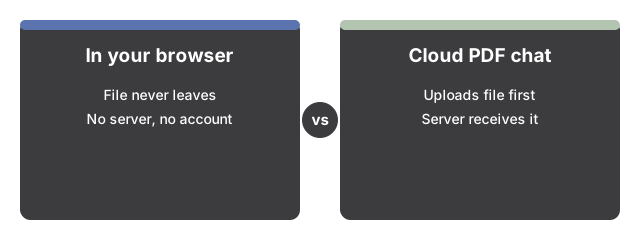
The line that separates them: where the file goes
Here, the PDF is parsed on your device, matched on your device, and - when a model is active - answered on your device. There is no server behind the page, nothing is stored past the page session, no analytics run on the input, and no account is asked for. A cloud PDF chat service starts by receiving your document; everything else about it may be excellent, but that first step is the one this page refuses to take. For a confidential file, that difference usually ends the comparison before features begin.
| Question | Chat with PDF (this site) | Cloud PDF chat services |
|---|---|---|
| Where the file goes | Stays in the browser - never uploaded | Uploaded to the service's servers |
| Account or signup | None on any path | Varies by service |
| Cost of the first answer | Zero download for passage matching; model sizes stated before any download | Varies by service; the upload itself comes first |
| Evidence per answer | Matching passages with page numbers on every turn | Varies by service |
| Answer drafting | A small on-device model - a solid first draft to verify against the cited pages | Typically larger models running on servers |
Honest about the trade
The trade is stated on the page rather than hidden: written answers are drafted by a small on-device model working over the retrieved passages, and a small model occasionally misses a nuance a larger cloud model would catch. What it gives back matters most for a private document - the file never leaves the machine, and every claim in the draft can be checked against a cited page number in one glance. Those citations are the safety net that makes a smaller drafting model workable.
Vs plain text extraction
If the job is getting all of the text out of a PDF - to paste into a translator, an editor, or a spreadsheet - PDF to Text does it in one pass, with no model in sight. Reach for the chat page instead when the document is long and the job is a question: it locates the relevant passages and, with a model, drafts an answer over them. Extraction hands you the haystack; the chat page hands you the needle plus the page it came from.
Vs open-ended AI chat
The Private AI Chat page runs the same class of on-device model without any document grounding: its answers come from the model's own training, not from a file of yours. Grounding is exactly what the PDF page adds - answers are drafted over passages of your document and cite its pages. The two pages share the language-model cache, so a model downloaded for one is instantly available on the other, and trying both costs one download, not two.
Vs running OCR first
None of the above helps with a scanned or photographed PDF, because there is no text layer to search. This page warns when a file looks scanned instead of failing silently, and the fix it names is OCR - Image to Text OCR recognizes the text in a photographed page so there is something to search. A cloud service may bundle OCR into its pipeline; here it is deliberately a separate, visible step, so the no-upload promise stays intact.
Claims this page deliberately does not make
No offline promise: the page and any model download need the network first - what is guaranteed local is the handling of the document. No multi-document search: one PDF at a time, and opening a new one clears the transcript. No unlimited length: reading stops at the first 300 pages, and the tool says so. And no analyst-grade authority: the draft is a starting point whose sources are always in view. A service that promises more on any of these points is answering a different job - weigh it on where your file has to travel to get there.
Where to go from here
To see whether the no-upload design fits your document at all, start with Chat With a PDF Without Uploading It - When To Use It. For the controls in running order - sample demo, file, question, upgrades - see Chat With a PDF in Your Browser - Step by Step.
Why trust these tools
- Ten-plus years of web tooling. The freetoolonline editorial team has shipped browser-based utilities since 2015. The goal has never changed: get you to a working output fast, without an install.
- No install, no sign-up. Open a tool and get a working output in seconds - nothing to download and no account to create. Tools that need heavy processing run it on our service, so even a low-powered machine gets the job done.
- Analytics stops at the page view. We measure which pages get visited, not what you type or upload inside a tool. There is nothing to sign in to and no profile is attached to your input.
- Open-source core components. The processing engines underneath (libheif, libde265, pdf-lib, terser, clean-css, ffmpeg.wasm, and others) are public and audit-able. We link to each one in its tool page's footer.
- Free, with or without ads. All tools are fully functional without sign-up. The Disable Ads button in the header is always available if you need a distraction-free run.