Titanoboa 3D Viewer vs AR-Apps
Titanoboa 3D Viewer laeuft als Palaeozaen-Schlangen-WebGL im Browser ohne Konto und ohne raumskaliges AR - nutzen Sie eine Telefon-AR-App fuer Raumplatzierung und ein Museum fuer echtes Bein.
Titanoboa-Optionen nebeneinander
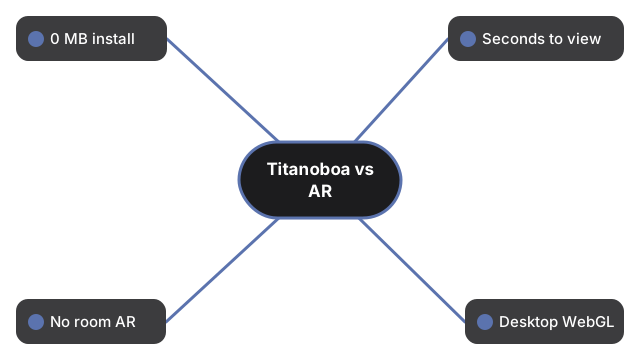
Diese Zeilen vergleichen, was der Titanoboa-Viewer wirklich liefert, mit typischen Telefon-AR-Apps, einem Museumsbesuch und einem Standbild:
| Aspekt | 3D-Viewer im Browser | Telefon-AR-App | Museum / Standbild |
|---|---|---|---|
| Install / Download | 0 MB App-Install; three.js vendored und nach dem ersten Laden gecacht | Oft 50 bis 500 MB Store-Download | Reisezeit; oder 0 MB fuer ein Foto |
| Zeit bis zur ersten Ansicht | Sekunden - ein Seitenladen; Engine lazy-load nach Paint; optionales glTF kann danach nachladen | Minuten - Install, Rechte, Tracking | Stunden fuer Besuch; sofort fuer Foto |
| In einem physischen Raum platzieren | Nein - nur Orbit auf flachem Bildschirm | Ja - echtes AR, wenn Tracking funktioniert | Hall-Massstab vor Ort; keines im Foto |
| Desktop ohne Telefon | Ja - aktueller Browser mit WebGL | Meist nein | Foto ja; Museum nein |
| Veroeffentlichte Groessenzahlen zur Hand | Ja - etwa 12.8 m Mittel (bis etwa 14.3 m); Masse etwa 1135 kg Mittel (730-1819 kg); Mittelkoerper etwa 0.7-1.0 m (Panel 0.8 m); 60-58 Mya Cerrejon Kolumbien; Head et al. 2009 | Variiert je App | Etiketten variieren; Foto traegt selten das volle Blatt |
| Gruppe / Rekonstruktions-Ehrlichkeit | Riesen-Boide (kein Dinosaurier); Weichteilfarbe kuenstlerisch; optionales CC-BY-SA-4.0-glTF (seth the yutyrannus via Printables) stilisiert, kein Laserscan; stiller prozeduraler Fallback | Oft als "Dinosaurier"-Haeute vermarktet | Knochen sind echt; Farbe bleibt interpretativ |
Wann der Titanoboa-Browser-Viewer passt
Waehlen Sie den Titanoboa-Browser-Viewer, wenn Sie eine palaeozaene Riesenschlange mit Size vs human im ehrlichen 12.8-m-Mittel-Laengenverhaeltnis orbitieren und Fakten anklicken wollen - ohne etwas zu installieren. Nichts vom Besuch wird an einen Server gesendet.
Wann eine Telefon-AR-App oder ein Museum besser passt
Eine Telefon-AR-App gewinnt, wenn Sie die Silhouette auf dem Wohnzimmerboden brauchen; dieser Viewer behauptet nie Raumplatzierung. Ein Museum gewinnt fuer das Gehen neben echten Schlangen- oder Meeresreptil-Montagen. Ein Standbild gewinnt nur, wenn Sie einen einzelnen teilbaren Frame ohne Interaktivitaet brauchen.
Was dieser Titanoboa-Vergleich nicht ist
Dieser Titanoboa-Vergleich ist eine Trade-off-Tabelle fuer den gelieferten Viewer - kein Ranking kommerzieller AR-Marken, erfindet keine AR-Funktionen, die die Seite nicht hat, behauptet nicht, Titanoboa sei ein Dinosaurier, behauptet nicht, das optionale glTF sei eine wissenschaftlich exakte Rekonstruktion, und erfindet keinen Spielstand. Zum Steuerungs-Walkthrough siehe Titanoboa in 3D ansehen. Zu Laenge und Gewicht neben einer 1.8-m-Person siehe Titanoboa Groessenvergleich.
Why trust these tools
- Ten-plus years of web tooling. The freetoolonline editorial team has shipped browser-based utilities since 2015. The goal has never changed: get you to a working output fast, without an install.
- No install, no sign-up. Open a tool and get a working output in seconds - nothing to download and no account to create. Tools that need heavy processing run it on our service, so even a low-powered machine gets the job done.
- Analytics stops at the page view. We measure which pages get visited, not what you type or upload inside a tool. There is nothing to sign in to and no profile is attached to your input.
- Open-source core components. The processing engines underneath (libheif, libde265, pdf-lib, terser, clean-css, ffmpeg.wasm, and others) are public and audit-able. We link to each one in its tool page's footer.
- Free, with or without ads. All tools are fully functional without sign-up. The Disable Ads button in the header is always available if you need a distraction-free run.