Cách Sử Dụng Trình Khám Phá 3D Khoang Liên Sao Bong Bóng Cục Bộ - Từng Bước
Mở Trình Khám Phá 3D Khoang Liên Sao Bong Bóng Cục Bộ, nhấn Play hoặc kéo thanh trượt dòng thời gian, rồi nhấp vào một điểm đánh dấu hoặc đọc bảng thông tin để xem các số liệu thật đã công bố về vùng lân cận rộng 1.000 năm ánh sáng của Mặt Trời.
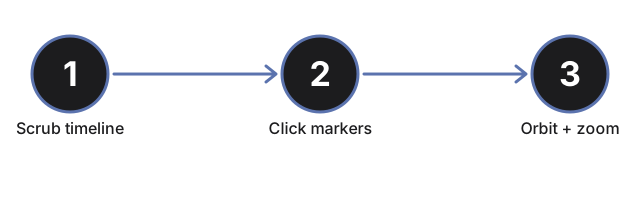
Nhấn Play hoặc kéo thanh trượt dòng thời gian
Nhấn nút Play để tự động chạy qua lịch sử 14 triệu năm của bong bóng, hoặc kéo thanh trượt (0 đến 14 triệu năm) để nhảy thẳng đến bất kỳ điểm nào. Kéo thanh trượt sẽ tạm dừng chế độ tự chạy.
Xem bong bóng phình to và Mặt Trời tiến vào gần
Khi dòng thời gian tiến lên, lớp vỏ trong mờ phình to ra ngoài và điểm đánh dấu Mặt Trời màu vàng nhỏ trôi từ xa bên ngoài vào gần giữa - dòng trạng thái báo thời điểm Mặt Trời đi vào bong bóng, khoảng 5 triệu năm trước theo dòng thời gian thật.
Đọc bộ đếm siêu tân tinh trực tiếp
Bộ đếm trực tiếp trên bảng thông tin tăng lên đến khoảng 15 khi dòng thời gian tiến lên, khớp với số liệu công bố về số siêu tân tinh đã tạo ra bong bóng.
Nhấp vào bảy điểm đánh dấu màu xanh của các vùng
Nhấp vào bất kỳ điểm nào trong bảy điểm đánh dấu màu xanh trên bề mặt bong bóng để đọc khoảng cách và vai trò thật đã công bố của vùng đó: Ophiuchus, Lupus, Pipe, Chamaeleon, Musca, Corona Australis, hoặc đám mây phân tử Taurus.
Hiện Perseus và Orion
Nhấn "Hiện Perseus & Orion (không thuộc bong bóng này)" để hiện thêm hai điểm đánh dấu cho hai vùng lân cận nổi tiếng thường bị cho là nằm trên bề mặt Bong Bóng Cục Bộ nhưng, theo nghiên cứu đã công bố, thực ra không phải - nhấp vào một trong hai để đọc lý do.
Kéo để xoay góc nhìn và dùng toàn màn hình
Kéo để xoay camera quanh vật thể, dùng con lăn chuột hoặc chụm hai ngón tay để phóng to, và dùng nút Toàn màn hình để mở rộng toàn bộ khung nhìn, giúp thấy rõ hơn bong bóng khi nó phình to.
Tiếp theo: xem khi nào nên dùng trình khám phá này hoặc so sánh với Trình Khám Phá 3D Năm Thiên Hà - Quỹ Đạo Mặt Trời.
Why trust these tools
- Ten-plus years of web tooling. The freetoolonline editorial team has shipped browser-based utilities since 2015. The goal has never changed: get you to a working output fast, without an install.
- No install, no sign-up. Open a tool and get a working output in seconds - nothing to download and no account to create. Tools that need heavy processing run it on our service, so even a low-powered machine gets the job done.
- Analytics stops at the page view. We measure which pages get visited, not what you type or upload inside a tool. There is nothing to sign in to and no profile is attached to your input.
- Open-source core components. The processing engines underneath (libheif, libde265, pdf-lib, terser, clean-css, ffmpeg.wasm, and others) are public and audit-able. We link to each one in its tool page's footer.
- Free, with or without ads. All tools are fully functional without sign-up. The Disable Ads button in the header is always available if you need a distraction-free run.