Como Usar el Explorador 3D del Calendario Anual de Lluvias de Meteoros - Paso a Paso
Abre el Explorador 3D del Calendario Anual de Lluvias de Meteoros, arrastra el control deslizante de dia o elige una lluvia de la lista, y luego lee el panel de datos para ver su fecha real de pico, su fuerza y si esta activa ahora.
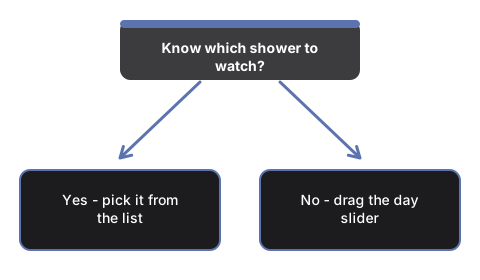
Elige una lluvia de la lista
Abre #t3dAmcShowerSelect y elige cualquiera de las 12 lluvias anuales principales. El cuadrante salta directo al dia de pico real publicado de esa lluvia, y el panel de datos se llena con su fecha de pico, su tasa horaria cenital (ZHR), su radiante y su cuerpo de origen.
O arrastra el control deslizante de dia tu mismo
Arrastra #t3dAmcDaySlider (0 a 365, un valor por cada dia del ano) a cualquier dia. El marcador de la Tierra se mueve alrededor del anillo del cuadrante para coincidir, y cualquier marcador de lluvia cuya ventana de actividad real cubra ese dia se vuelve amarillo brillante y crece.
Ir a hoy
Pulsa #t3dAmcTodayBtn para ajustar el cuadrante a la fecha real actual de tu dispositivo y ver que lluvias, si alguna, estan activas hoy.
Reproducir a lo largo del ano
Pulsa #t3dAmcPlayBtn para que el cuadrante avance por si solo a lo largo de todo el ano, o pulsalo de nuevo para pausar y desplazarte manualmente.
Lee los colores de los marcadores
Los marcadores azules se remontan a un cometa; los marcadores naranjas se remontan a un asteroide - solo las Cuadrantidas y las Geminidas caen en ese segundo grupo. Cualquier marcador se vuelve amarillo brillante cuando el dia seleccionado cae dentro de su ventana de actividad publicada.
Siguiente: consulta cuando usar este explorador o como se compara con el Explorador 3D del Radiante de Lluvia de Meteoros.
Why trust these tools
- Ten-plus years of web tooling. The freetoolonline editorial team has shipped browser-based utilities since 2015. The goal has never changed: get you to a working output fast, without an install.
- No install, no sign-up. Open a tool and get a working output in seconds - nothing to download and no account to create. Tools that need heavy processing run it on our service, so even a low-powered machine gets the job done.
- Analytics stops at the page view. We measure which pages get visited, not what you type or upload inside a tool. There is nothing to sign in to and no profile is attached to your input.
- Open-source core components. The processing engines underneath (libheif, libde265, pdf-lib, terser, clean-css, ffmpeg.wasm, and others) are public and audit-able. We link to each one in its tool page's footer.
- Free, with or without ads. All tools are fully functional without sign-up. The Disable Ads button in the header is always available if you need a distraction-free run.