Cómo Usar el Explorador 3D del Helicóptero Ingenuity en Marte
Abre el Explorador 3D del Helicóptero Ingenuity en Marte, arrastra el control deslizante de hitos de vuelo y lee el panel de datos para ver la fecha real, el número de vuelo y la altitud publicados en cada hito.
Arrastra el control deslizante de hitos de vuelo
Arrastra #t3dFlightScrub (0 a 4) para mover el helicóptero a cada uno de los 5 hitos reales y publicados de vuelo y estado de la misión, desde el aterrizaje con el róver Perseverance el 2021-02-18 hasta el vuelo final el 2024-01-18.
Lee la tabla de hitos
El panel de datos lista los 5 hitos - el aterrizaje, el primer vuelo, el aumento de velocidad del rotor, la marca de misión extendida con más de 50 vuelos, y el vuelo final - con el hito activo resaltado. Arrastra el control deslizante y observa cómo cambia la fila resaltada.
Activa la comparación de velocidad del rotor con la Tierra
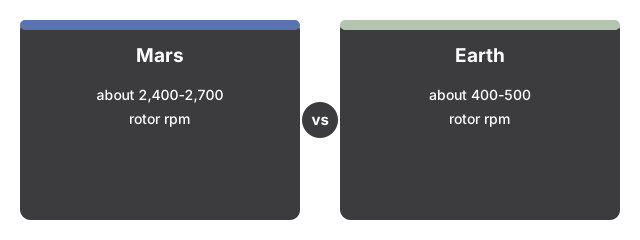
Marca la casilla "Comparar con la velocidad de rotor de un helicóptero terrestre típico" para revelar un segundo helicóptero, más pequeño, sobre una plataforma lateral, girando a aproximadamente un quinto de la velocidad visual. El panel de datos añade las dos cifras reales en rpm lado a lado - aproximadamente 2.400-2.700 rpm en Marte frente a aproximadamente 400-500 rpm en la Tierra.
Arrastra para orbitar y usa la pantalla completa
Arrastra para orbitar la cámara, usa el desplazamiento o el gesto de pinza para el zoom, y usa el botón de Pantalla Completa para expandir todo el panel y ver mejor el terreno, el marcador del róver y el helicóptero.
A continuación: consulta cuándo usar este explorador o cómo se compara con el Explorador 3D de la Trayectoria del Róver Curiosity.
Why trust these tools
- Ten-plus years of web tooling. The freetoolonline editorial team has shipped browser-based utilities since 2015. The goal has never changed: get you to a working output fast, without an install.
- No install, no sign-up. Open a tool and get a working output in seconds - nothing to download and no account to create. Tools that need heavy processing run it on our service, so even a low-powered machine gets the job done.
- Analytics stops at the page view. We measure which pages get visited, not what you type or upload inside a tool. There is nothing to sign in to and no profile is attached to your input.
- Open-source core components. The processing engines underneath (libheif, libde265, pdf-lib, terser, clean-css, ffmpeg.wasm, and others) are public and audit-able. We link to each one in its tool page's footer.
- Free, with or without ads. All tools are fully functional without sign-up. The Disable Ads button in the header is always available if you need a distraction-free run.