Initializing, please wait a moment
Cómo Usar el Explorador 3D del Objeto Interestelar 3I/ATLAS
Abre el Explorador 3D del Objeto Interestelar 3I/ATLAS y desliza el selector (0-2) para comparar 1I/'Oumuamua, 2I/Borisov y 3I/ATLAS lado a lado, cada uno con sus propios datos reales y publicados de órbita, tamaño y actividad de la coma.
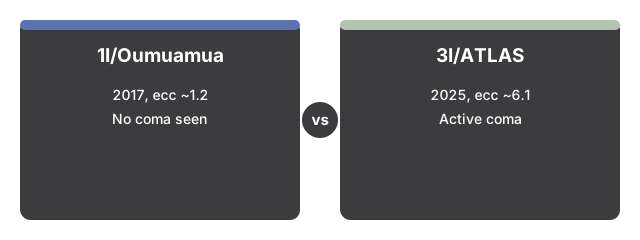
- Abre https://freetoolonline.com/space-3d/3i-atlas-interstellar-object.html y espera a que se representen los tres objetos, sus curvas de trayectoria y el Sol.
- Arrastra el selector (0-2) para cambiar el objeto resaltado entre 1I/'Oumuamua, 2I/Borisov y 3I/ATLAS - la posición predeterminada (2) muestra el 3I/ATLAS.
- Lee el panel de datos para conocer la fecha real de descubrimiento, la excentricidad orbital, la inclinación, el perihelio, la velocidad, el tamaño del núcleo y el estado de la coma del objeto activo.
- Consulta la tabla de comparación debajo del panel de datos - la fila resaltada es el objeto activo.
- Observa cómo las tres curvas de trayectoria se abren a medida que aumenta la excentricidad - la de 'Oumuamua es la más cerrada, la del 3I/ATLAS es la más abierta, lo que refleja su excentricidad real de unos 6,1.
- Arrastra para orbitar y desplaza o pellizca para ampliar y ver de cerca la coma de cada objeto (o su ausencia, en el caso de 'Oumuamua).
Datos clave publicados
| Dato | Valor |
|---|---|
| Excentricidad orbital (3I/ATLAS) | unos 6,1 (la más extrema de los tres) |
| Excentricidad orbital ('Oumuamua) | unos 1,2 |
| Excentricidad orbital (Borisov) | unos 3,36 |
| Máxima cercanía del 3I/ATLAS a la Tierra | unos 1,8 UA (270 millones de km) - sin riesgo de impacto |
A continuación: la guía de cuándo usarlo o la comparación con alternativas. Abre el Explorador 3D del Objeto Interestelar 3I/ATLAS.
Why trust these tools
- Ten-plus years of web tooling. The freetoolonline editorial team has shipped browser-based utilities since 2015. The goal has never changed: get you to a working output fast, without an install.
- No install, no sign-up. Open a tool and get a working output in seconds - nothing to download and no account to create. Tools that need heavy processing run it on our service, so even a low-powered machine gets the job done.
- Analytics stops at the page view. We measure which pages get visited, not what you type or upload inside a tool. There is nothing to sign in to and no profile is attached to your input.
- Open-source core components. The processing engines underneath (libheif, libde265, pdf-lib, terser, clean-css, ffmpeg.wasm, and others) are public and audit-able. We link to each one in its tool page's footer.
- Free, with or without ads. All tools are fully functional without sign-up. The Disable Ads button in the header is always available if you need a distraction-free run.