Sky Gates Flight vs Installing a Flying Game App
For a quick arcade flight, Sky Gates Flight gets you airborne in your browser with nothing installed, while a flying game app asks for a download and setup first. Here is an honest look at what each side gives you, numbers included.
The numbers side by side
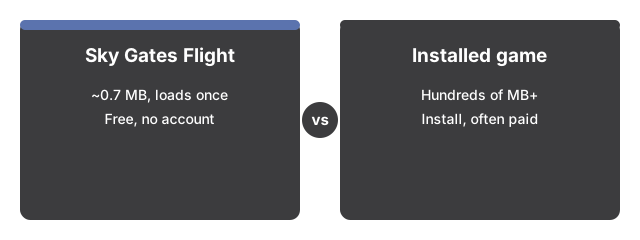
The numbers below put Sky Gates Flight side by side with its alternatives at a glance.

Sky Gates Flight cuts the usual setup to zero: nothing to install, free, and flying in seconds. An installed flying game asks for more upfront.
| Aspect | Sky Gates Flight in the browser | Typical installed flying game |
|---|---|---|
| Install size | 0 MB - a 0.7 MB 3D engine loads once, then stays cached | Hundreds of MB or more |
| Time to first flight | Seconds - load the page, click Start flight | Minutes - download, install, launch |
| Price | 0 - free, no account | Often paid or full of purchases |
| Content | One plane, one endless run | Missions, upgrades, aircraft choices |
The gap sits mostly at the start. Everything on screen - plane, ocean, islands, clouds, gates - is procedural geometry drawn live in your browser, so no model, sprite, or audio files are ever downloaded.
Where the browser version wins
The browser version wins here: one page covers desktop and phone, so you steer by dragging on the scene or with the arrow keys and WASD, and the fullscreen button puts the whole run on your screen. The game ramps on its own - speed climbs every ten seconds from 40 toward a cap of 90, red gates get harsher with time, and an occasional gold x2 gate doubles your power after 30 seconds of flying. Your best distance and peak power are saved in this browser and shown before you even start, with no accounts, uploads, or leaderboards involved.
Where an installed game still wins
An installed flying game usually earns its download somewhere. Many ship realistic flight models with lift, stall, and fuel; Sky Gates Flight is an arcade game with simplified physics, not a flight simulator. Installed titles often add missions, upgrades, aircraft choices, and full soundtracks; here there is one plane, one endless run, and gate chimes synthesized on your device that stay muted until you turn the sound on. Saves are scoped differently too: your record run lives only in this browser's local storage, so clearing site data removes it and it does not travel between devices.
The practical rule
The practical rule for Sky Gates Flight: reach for the browser version when the point is flying right now - a short break, a shared computer, a phone with no storage to spare. Pick an installed game when you want realistic flight physics, missions and progression, or sound designed as a soundtrack rather than a toggle.
For the gates, controls, and scoring in detail, see Sky Gates Flight step by step.
For the situations where a short browser run genuinely fits - and where it does not - see when to play Sky Gates Flight.
Why trust these tools
- Ten-plus years of web tooling. The freetoolonline editorial team has shipped browser-based utilities since 2015. The goal has never changed: get you to a working output fast, without an install.
- No install, no sign-up. Open a tool and get a working output in seconds - nothing to download and no account to create. Tools that need heavy processing run it on our service, so even a low-powered machine gets the job done.
- Analytics stops at the page view. We measure which pages get visited, not what you type or upload inside a tool. There is nothing to sign in to and no profile is attached to your input.
- Open-source core components. The processing engines underneath (libheif, libde265, pdf-lib, terser, clean-css, ffmpeg.wasm, and others) are public and audit-able. We link to each one in its tool page's footer.
- Free, with or without ads. All tools are fully functional without sign-up. The Disable Ads button in the header is always available if you need a distraction-free run.