How to Play Retro Arcade Shooter - Step by Step
The Retro Arcade Shooter page loads Underrun in a same-origin iframe (~120 KB). Clear a dark underground server facility: WASD to move, mouse to aim, hold click to fire, and reboot every CPU to open the next of three levels. Press Play to start.
Step 1 - press Play on this page
Press Play to inject the iframe (readable Underrun source + PNG level maps + texture atlas). The launch panel notes the coarse-pointer limit. The game is Underrun by Dominic Szablewski (MIT); music by Andreas Loesch; LICENSE and credits ship beside the files.
Step 2 - unlock audio and start level 1
Click once in the game canvas to unlock audio (Sonant-X synthesizes music and SFX in the tab - no audio file downloads). Terminal-style boot text appears; then you spawn in level 1.
Step 3 - move, aim, and fire
WASD or arrow keys move. Mouse aims. Hold left click to fire plasma (per-shot cooldown while held). Spider robots swarm melee; sentry turrets shoot projectiles. Grab health packs when they drop.
Step 4 - reboot every CPU
Each level has a CPU count you must reboot to open the exit. Finish all three levels (maps loaded from tiny PNG images). On death the level auto-reloads after about three seconds - runs stay short.
Step 5 - what this page does not do
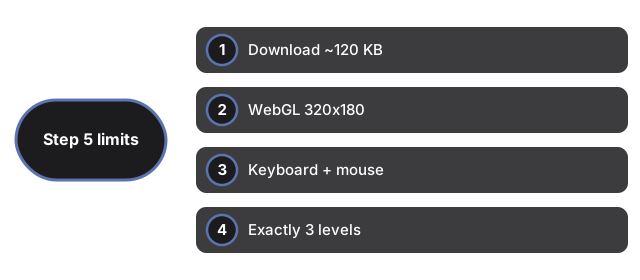
No saves, scores, accounts, or leaderboards. No touch or gamepad. One plasma gun, no upgrades. Exactly three levels - not procedural. This is a tilted top-down view, not a first-person shooter (see Retro FPS Online for that).
| Setting | Value | Notes |
|---|---|---|
| Download | ~120 KB | Same-origin iframe; zero network after load |
| Renderer | WebGL 320x180 | Pixelated upscale; needs WebGL |
| Input | Keyboard + mouse | No touch; no gamepad |
| Levels | 3 | PNG maps; reboot CPUs to advance |
| Saves | None | Nothing written to browser storage |
See when to play, comparisons, and Chili Blast Shooter.
Why trust these tools
- Ten-plus years of web tooling. The freetoolonline editorial team has shipped browser-based utilities since 2015. The goal has never changed: get you to a working output fast, without an install.
- No install, no sign-up. Open a tool and get a working output in seconds - nothing to download and no account to create. Tools that need heavy processing run it on our service, so even a low-powered machine gets the job done.
- Analytics stops at the page view. We measure which pages get visited, not what you type or upload inside a tool. There is nothing to sign in to and no profile is attached to your input.
- Open-source core components. The processing engines underneath (libheif, libde265, pdf-lib, terser, clean-css, ffmpeg.wasm, and others) are public and audit-able. We link to each one in its tool page's footer.
- Free, with or without ads. All tools are fully functional without sign-up. The Disable Ads button in the header is always available if you need a distraction-free run.