How to Play Seasonal Witchcat - Step by Step
The Seasonal Witchcat page loads a ~34 KB season-switching adventure in an iframe. Explore temples, open seasons, and rescue every cat. Press Play on this page to start.
Step 1 - press Play
Press Play to inject the iframe (~34 KB). The canvas fills the stage. Upstream is Witchcat by Jonathan Vallet (MIT, JS13K 2025).
Step 2 - move and read signs
WASD or arrow keys walk the witch. Face a stone sign and press Space while looking up to read temple hints. Heart icons at the top show remaining lives.
Step 3 - open season orbs
Explore north, south, east, and west temples. Touch season orbs to open winter, summer, fall, and spring. Each orb also raises your max lives.
Step 4 - switch seasons on stone triggers
Stand on a season stone and press action to cycle opened seasons. Winter freezes water into ice. Summer grows roots and vines to climb. Autumn grows mushrooms and fills holes with leaves. Spring blooms flowers on stone.
Step 5 - fight and clear paths
Space shoots a fireball in the facing direction. Burn bushes and some enemies. Avoid spikes, moving hazards, and falling into water or holes when the season does not protect you.
Step 6 - rescue every cat
Hidden cats sit across the map. Walk into a cat to send it home to its hub marker. Checkpoints save progress under ftol:seasonalwitchcat:save. Win when all cats are rescued.
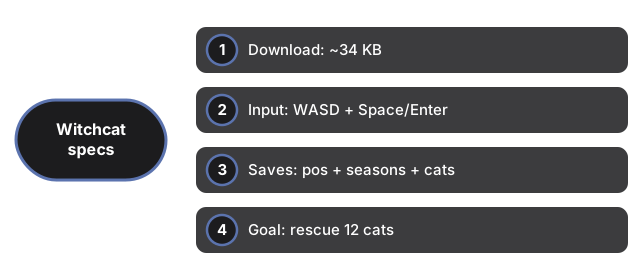
| Setting | Value | Notes |
|---|---|---|
| Download | ~34 KB | single index.html |
| Input | WASD/arrows, Space/Enter | gamepad supported |
| Saves | position + seasons + cats | ftol:seasonalwitchcat:save |
| Goal | 12 cats | season temples |
See when to play, comparisons, and Thirteen Step Escape.
Why trust these tools
- Ten-plus years of web tooling. The freetoolonline editorial team has shipped browser-based utilities since 2015. The goal has never changed: get you to a working output fast, without an install.
- No install, no sign-up. Open a tool and get a working output in seconds - nothing to download and no account to create. Tools that need heavy processing run it on our service, so even a low-powered machine gets the job done.
- Analytics stops at the page view. We measure which pages get visited, not what you type or upload inside a tool. There is nothing to sign in to and no profile is attached to your input.
- Open-source core components. The processing engines underneath (libheif, libde265, pdf-lib, terser, clean-css, ffmpeg.wasm, and others) are public and audit-able. We link to each one in its tool page's footer.
- Free, with or without ads. All tools are fully functional without sign-up. The Disable Ads button in the header is always available if you need a distraction-free run.