Browser FPS vs Desktop Engine vs Emulator in a Tab
There are three honest ways to play a classic-style shooter today: a browser page like Retro FPS Online (the free game Freedoom, one click, nothing installed), a desktop engine you install and point at game files, or a vintage-PC emulator running the original executables. Each wins somewhere; this page compares them plainly.
The comparison
The comparison for playing FPS in a browser versus a desktop engine install or an emulator tab is setup steps, install size, cost, and offline support.
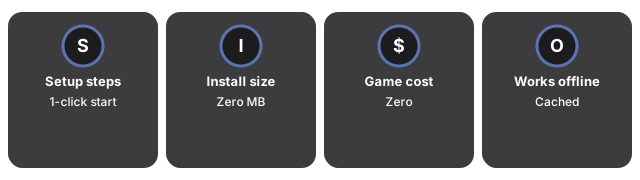
| Browser page (this site) | Desktop engine install | Emulator in a tab | |
|---|---|---|---|
| Setup steps before playing | 1 click, 1 automatic download | 3-5 (download engine, get game files, configure) | 2-4 (find a working setup, load game files) |
| Software installed on the computer | 0 | 1 program + game files | 0 (in-browser) or 1 (desktop emulator) |
| Game content cost | 0 (Freedoom is a complete free game) | 0 with free content; commercial titles must be bought | original game files must be legally owned |
| Works offline after first use | yes (cached in the browser) | yes | sometimes (depends on the site) |
| Frame rate and widescreen | display-rate, widescreen | display-rate, widescreen, most options | the original fixed rate and square view |
| Saves move to another computer | yes - one export file | manually (find and copy save files) | usually stuck in that browser or setup |
| Mods and custom levels | no (fixed free campaigns) | yes - the main reason to install | limited |
Which to pick
Pick the browser page when the goal is playing now, on any computer, legally and free - especially somewhere you cannot install software. Its save-export file is also the easiest cross-machine progress story of the three; the step-by-step guide shows the flow. Pick a desktop engine when you own commercial campaigns or want mods, custom levels and every rendering option. Pick an emulator when the point is period-correct behavior - the original fixed frame rate, square view and quirks - rather than comfort. If you are still weighing the browser option, when a browser shooter fits covers the fit question directly.
Why trust these tools
- Ten-plus years of web tooling. The freetoolonline editorial team has shipped browser-based utilities since 2015. The goal has never changed: get you to a working output fast, without an install.
- No install, no sign-up. Open a tool and get a working output in seconds - nothing to download and no account to create. Tools that need heavy processing run it on our service, so even a low-powered machine gets the job done.
- Analytics stops at the page view. We measure which pages get visited, not what you type or upload inside a tool. There is nothing to sign in to and no profile is attached to your input.
- Open-source core components. The processing engines underneath (libheif, libde265, pdf-lib, terser, clean-css, ffmpeg.wasm, and others) are public and audit-able. We link to each one in its tool page's footer.
- Free, with or without ads. All tools are fully functional without sign-up. The Disable Ads button in the header is always available if you need a distraction-free run.