How to Play Medieval Wall Defense - Step by Step
The Medieval Wall Defense page loads a ~631 KB single-file incremental wall-defense game in an iframe. You hold a castle wall against marching waves, spend gold on heroes and upgrades, bank Research Points when you end a run, and spend Crowns on permanent prestige bonuses across hundreds of attempts.
Step 1 - start from the title screen
Press Play on the game page, then Start on the title overlay inside the iframe. A short tutorial may walk you through placing your first hero - you can dismiss it with Esc or finish the prompts. The game is adapted from Matt's open-source Crownfall project (MIT license); credits ship next to the game files.
Step 2 - place heroes and read the wave HUD
Click or tap open tiles on the field to hire heroes from the side panel. Each hero type has different range, damage, and upgrade paths - archers, mages, and support units stack synergies as waves climb. Watch the wave counter and boss warnings in the top HUD; gold from kills funds more hires and in-run upgrades. Touch targets on the skill bar and hero panel are sized for phone play.
Step 3 - cast skills with 1-4 or taps
Skill slots unlock over time through research and prestige. Press number keys 1 through 4 or tap the on-screen skill buttons to arm a skill, then click the field to target it. Esc cancels an armed skill without firing. Skills share cooldowns shown on the bar - timing them for boss waves matters more than spamming on trash mobs.
Step 4 - pause, research, and end runs deliberately
Space toggles pause and opens the pause overlay with run stats and prestige hints. Press R anytime to open the research book and spend Research Points on permanent nodes - damage, economy, skill slots, auto-buy helpers, and more. Press Q to end the current run early; you confirm, bank earned Research Points, and return to the research screen instead of losing everything on a wipe.
Step 5 - prestige with Crowns and manage settings
When a run ends or you open pause, you may spend Crowns on a prestige tree for multi-run bonuses - faster starts, stronger heroes, offline Research rates, and ancestry picks. M toggles mute; volume sliders persist under ftol:medievalwalldefense:castleMuted and related keys. Settings cover game speed, reduced motion, auto-prestige thresholds, and save backup reminders.
Step 6 - offline gains and local saves only
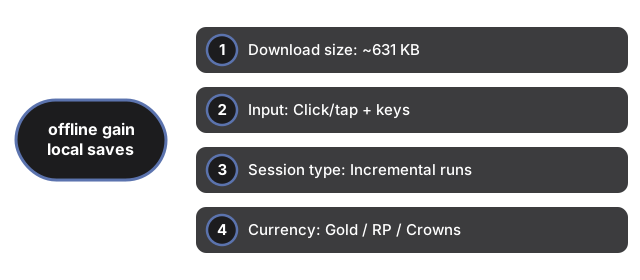
Closing the tab while research nodes generate offline Research Points - the game tracks last-close time and rate under ftol:medievalwalldefense:castleLastCloseAt and castleOfflineRpRate. All progress - prestige Crowns, research trees, commanders, daily scores, stats, and settings - stays in your browser via ftol:medievalwalldefense:castle* localStorage keys. No account, no cloud sync, zero server calls during play.
| Setting | Value | Notes |
|---|---|---|
| Download size | ~631 KB | Single index.html in same-origin iframe |
| Input | Click/tap + keys | 1-4 skills; Space pause; R research; Q end; M mute; Esc close |
| Session type | Incremental runs | Hundreds of waves across prestige loops |
| Currency | Gold / RP / Crowns | Gold in-run; Research Points bank on Q; Crowns for prestige |
| Saves | localStorage | Keys: ftol:medievalwalldefense:castle* |
| Server calls | 0 | Runs entirely client-side |
See when to play in the browser, how it compares with other games, Garden Defense, and Pixel Pipeline Reflex on this site.
Why trust these tools
- Ten-plus years of web tooling. The freetoolonline editorial team has shipped browser-based utilities since 2015. The goal has never changed: get you to a working output fast, without an install.
- No install, no sign-up. Open a tool and get a working output in seconds - nothing to download and no account to create. Tools that need heavy processing run it on our service, so even a low-powered machine gets the job done.
- Analytics stops at the page view. We measure which pages get visited, not what you type or upload inside a tool. There is nothing to sign in to and no profile is attached to your input.
- Open-source core components. The processing engines underneath (libheif, libde265, pdf-lib, terser, clean-css, ffmpeg.wasm, and others) are public and audit-able. We link to each one in its tool page's footer.
- Free, with or without ads. All tools are fully functional without sign-up. The Disable Ads button in the header is always available if you need a distraction-free run.