Play a Classic FPS in Your Browser Step by Step
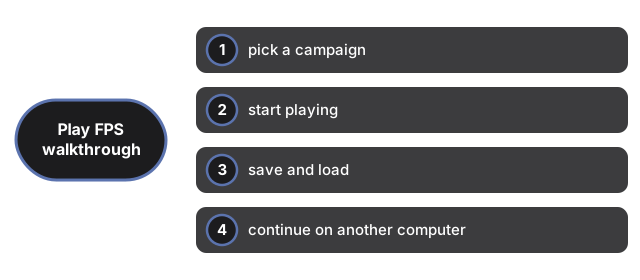
Open Retro FPS Online, click a campaign card, and the freely licensed game Freedoom downloads once and starts in the tab. This page walks through the exact clicks - starting, playing, saving, and moving your progress to another computer with an export file.
Step 1 - pick a campaign
The page shows two cards: Campaign 1 (four episodes, 36 levels) and Campaign 2 (32 levels in one run). Each card states its one-time download before anything is fetched. Click one; a progress bar shows the download, and the title screen appears when it finishes. The download is cached in this browser, so the next visit skips it - even offline.
Step 2 - start playing
Use the game's own menu to start a new game and pick a skill level. Click the screen once to give it the keyboard and mouse: arrows move, Ctrl fires, Space opens doors, and moving the mouse turns. The Fullscreen button on the toolbar fills the display; Esc leaves fullscreen or opens the game menu.
Step 3 - save and load
Press Esc during play, pick Save Game, and choose a slot - the same flow the desktop originals used. Saves are stored in this browser and survive reloads; load them from the same menu. The page's status panel shows how many save files this browser holds.
Step 4 - continue on another computer
Click Export saves on the toolbar; the page downloads a .ftolfps file containing every save slot and setting. On the other computer, open the same page, use the Import card to load the file, then start a campaign and pick Load Game - your slots are there. If the published engine version changed since the export, the import is refused with a clear message instead of loading wrongly. Not sure this is the right setup for you? See when a browser shooter fits and how it compares to installing one.
Why trust these tools
- Ten-plus years of web tooling. The freetoolonline editorial team has shipped browser-based utilities since 2015. The goal has never changed: get you to a working output fast, without an install.
- No install, no sign-up. Open a tool and get a working output in seconds - nothing to download and no account to create. Tools that need heavy processing run it on our service, so even a low-powered machine gets the job done.
- Analytics stops at the page view. We measure which pages get visited, not what you type or upload inside a tool. There is nothing to sign in to and no profile is attached to your input.
- Open-source core components. The processing engines underneath (libheif, libde265, pdf-lib, terser, clean-css, ffmpeg.wasm, and others) are public and audit-able. We link to each one in its tool page's footer.
- Free, with or without ads. All tools are fully functional without sign-up. The Disable Ads button in the header is always available if you need a distraction-free run.