City Drive Open World 3D vs Installing a Driving Game
freetoolonline.com editorial team
For a quick drive, City Drive Open World 3D gets you into an open-world night city in your browser with nothing installed, while a driving game from a store asks for a download and setup first. Here is an honest look at what each side gives you, numbers included.
The numbers side by side
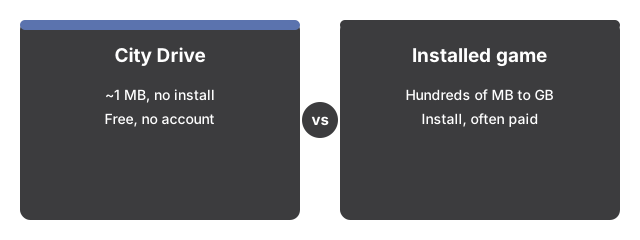
The numbers below put City Drive Open World 3D side by side with its alternatives at a glance.

| Aspect | City Drive in the browser | Typical installed driving game |
|---|---|---|
| Install size | 0 MB - about 1 MB loads once, then stays cached | Hundreds of MB to tens of GB |
| Time to first drive | Seconds - press Play and click through the title card | Minutes - download, install, launch |
| Price | 0 - free, no account | Often paid or full of purchases |
| World | Seeded procedural night city with traffic, pedestrians, police | Hand-built or licensed maps, more variety |
| Beyond driving | On-foot mode, carjacking, 5-star wanted chases | Missions, careers, multiplayer |
Everything on screen - streets, towers, cars, people - is procedural geometry drawn live in your browser, and every sound is synthesized on your device, so no model or audio files are downloaded beyond the one-time bundle.
Where the browser version wins
The browser version wins here: one page covers desktop, phone, and gamepad: keyboard on one, an on-screen joystick plus action buttons on another, triggers and stick on the third. It starts in seconds on machines where installing anything is off the table, and the sandbox loop is genuinely there: arcade handling with handbrake powerslides, damage and explosions, pedestrians that flee, police that escalate to five stars and chase, and an on-foot mode where any car on the street can become yours. The seed field makes a favorite city repeatable and shareable.
Where an installed game still wins
An installed driving game usually earns its download somewhere. Many ship realistic handling with gears, tires, and simulation-grade physics; City Drive is an arcade sandbox, not a simulator. Installed titles add missions, careers, car rosters, licensed soundtracks, and multiplayer; here there is one procedural city and no progress save - only your settings (volume, quality, day length) persist in this browser, and each visit starts a fresh session.
The practical rule
As a practical rule, drive here when you want an open city right now - anywhere, on anything, with nothing installed. Install a driving game when you want realistic physics, missions, or progression that follows your account.
For the controls and wanted-system rules, see City Drive step by step.
For the specific situations where City Drive Open World 3D fits a short break or a shared machine, see when to play City Drive Open World 3D.
Why trust these tools
- Ten-plus years of web tooling. The freetoolonline editorial team has shipped browser-based utilities since 2015. The goal has never changed: get you to a working output fast, without an install.
- No install, no sign-up. Open a tool and get a working output in seconds - nothing to download and no account to create. Tools that need heavy processing run it on our service, so even a low-powered machine gets the job done.
- Analytics stops at the page view. We measure which pages get visited, not what you type or upload inside a tool. There is nothing to sign in to and no profile is attached to your input.
- Open-source core components. The processing engines underneath (libheif, libde265, pdf-lib, terser, clean-css, ffmpeg.wasm, and others) are public and audit-able. We link to each one in its tool page's footer.
- Free, with or without ads. All tools are fully functional without sign-up. The Disable Ads button in the header is always available if you need a distraction-free run.