Stegosaurus in 3D ansehen
Stegosaurus 3D Viewer zeigt einen gepanzerten Stegosaurus von etwa 9 m im Browser - ziehen zum Drehen, scrollen oder kneifen zum Zoomen, eine 1.8-m-Person für den Massstab aktivieren und Kopf, Rückenplatte, Schwanz oder Bein anklicken für einen Teil-Fakt.
Öffne die Stegosaurus-Seite und nimm die Kamera
Öffne den Stegosaurus 3D Viewer und warte, bis das Faktenpanel füllt. Wenn die Statuszeile sagt, dass du ziehen kannst, orbite den Stegosaurus mit dem Zeiger und zoome mit dem Rad oder zwei Fingern. Fullscreen vergrößert den Wrapper und hält die Controls sichtbar.
Nutze die vier Stegosaurus-Controls unter dem Canvas
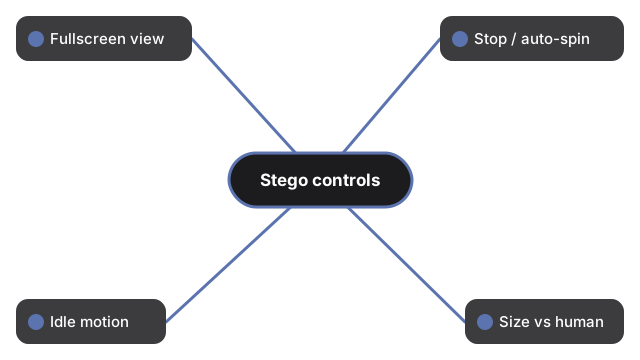
Unter dem Stegosaurus-Canvas steuern vier Controls Ansicht und Massstab:
- Fullscreen - füllt die Anzeige und hält die Buttons sichtbar
- Stop rotation / Auto-rotate - friert oder setzt die Auto-Drehung fort
- Idle motion - fügt leichte Atmung und Beinschwung hinzu; erneut tippen für Stand still
- Size vs human - zeigt eine 1,8-m-Person im Maßstab der Szene selbst, abgeleitet aus der veröffentlichten Länge von etwa 9 m (die Szene zeichnet Stegosaurus mit 12 Welteinheiten und skaliert die Person mit demselben Einheiten-pro-Meter-Faktor); nochmals tippen für Hide human
Lies das Faktenpanel und klicke Körperteile
Das Faktenpanel hat fünf Zeilen: Länge 9 m, Gewicht 4,0 t, Wann es lebte 152-145 Ma (Oberjura), Ernährung Pflanzenfresser und Beschrieben - Gattung benannt von Marsh 1877; S. stenops benannt 1887, Colorado. Ein kurzer Klick - Zeigerbewegung unter 8 Pixel, also ein Klick und kein Ziehen - auf Kopf, Hals, Körper, ein Bein, den Schwanz, eine Rückenplatte oder einen Schwanzstachel wechselt die Notiz zum Teil; ein Klick ins Leere kehrt zum Artenblatt zurück. Beim ersten Zeichnen erscheint ein prozeduraler Stegosaurus mit doppelter Reihe drachenförmiger Platten und stacheligem Thagomizer-Schwanz; danach holt die Seite ein veröffentlichtes Modell, stegosaurus.glb (etwa 423 KB, CC0 1.0, von Quaternius via Poly Pizza), und tauscht es ein, woraufhin die Statuszeile meldet, dass ein echtes 3D-Modell dieser Art gezeigt wird. Haut und Farbe sind eine künstlerische Rekonstruktion; Platten- und Stachelfunktion ist debattiert (Display, Verteidigung, Thermoregulation) - die Seite behauptet keinen einzigen geklärten Zweck.
Was dieser Stegosaurus-How-to-Guide nicht ist
Dieser Guide ist ein Steuerungs-Walkthrough für den Browser-Viewer - er platziert das Modell nicht in deinem Raum (kein AR), behauptet keine Weichteil- oder Farbgenauigkeit, behauptet keine einzige geklärte Funktion für Platten oder Thagomizer und erfindet weder Punktestand noch Gewinnzustände. Zur Größengeschichte siehe Stegosaurus-Größenvergleich. Zur Größe und zum Vergleich mit AR-Apps siehe Stegosaurus-Größenvergleich.
Why trust these tools
- Ten-plus years of web tooling. The freetoolonline editorial team has shipped browser-based utilities since 2015. The goal has never changed: get you to a working output fast, without an install.
- No install, no sign-up. Open a tool and get a working output in seconds - nothing to download and no account to create. Tools that need heavy processing run it on our service, so even a low-powered machine gets the job done.
- Analytics stops at the page view. We measure which pages get visited, not what you type or upload inside a tool. There is nothing to sign in to and no profile is attached to your input.
- Open-source core components. The processing engines underneath (libheif, libde265, pdf-lib, terser, clean-css, ffmpeg.wasm, and others) are public and audit-able. We link to each one in its tool page's footer.
- Free, with or without ads. All tools are fully functional without sign-up. The Disable Ads button in the header is always available if you need a distraction-free run.