Triceratops Size Comparison
The Triceratops 3D Viewer shows a horned quadruped at published school-bus scale: length about 8-9 m, shoulder height about 3 m, weight about 5.4-10 metric tons. Turn on Size vs human and a 1.8 m person appears at the true length ratio, so the size gap is readable at a glance.
Triceratops published figures
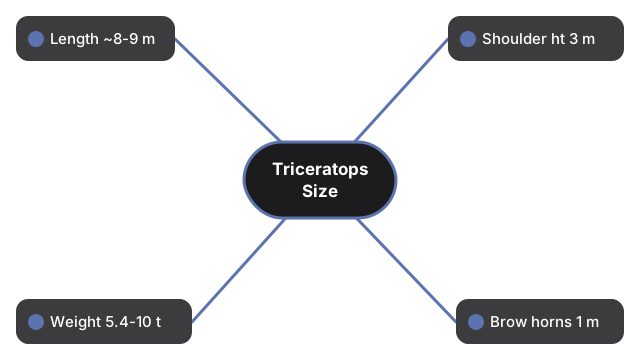
These are real published measures, given as a range where sources disagree:
| Measure | Figure | Vs a 1.8 m person |
|---|---|---|
| Length | about 8-9 m (some sources cite 6-8.5 m for the type species) | ~4.4x to ~5x a person end-to-end; model uses representative ~8 m (~4.4x) |
| Shoulder height | about 3 m (specimens range about 2.3-3.8 m) | ~1.7x adult standing height |
| Weight | about 5.4-10 metric tons | heavier than the largest modern elephants per AMNH |
| Brow horns | about 1 m each | plus a smaller nasal horn on the snout |
| Skull length | up to nearly 3 m | among the largest skulls of any land animal |
| When it lived | 68-66 million years ago | Late Cretaceous, western North America |
What the on-screen facts panel shows next to this table
The facts panel beside the Triceratops canvas is deliberately shorter than the table above. It carries one representative figure per row rather than a range: Length 8 m, Weight 7.0 t, When it lived 68-66 Mya (Late Cretaceous, Maastrichtian), Diet Herbivore, and Described - named 1889 by Othniel Charles Marsh, from holotype YPM 1820 collected in 1888 from the Lance Formation, Wyoming. There is no shoulder-height row in the panel, so the 3 m figure and the 2.3-3.8 m specimen spread live here in the table. The panel closes with the same caution this guide applies: skin and color are an artistic reconstruction, because fossils do not preserve soft tissue or color, and the figures shown are real published values.
How the Triceratops size-vs-human toggle stays honest
The Triceratops model is normalised to a fixed on-screen length so that any species fits the canvas the same way. Size vs human then scales the 1.8 m figure by the same units-per-metre factor derived from the representative 8 m length, which is why the person ends up at the true ratio rather than at a guessed one. Tap Size vs human under the canvas to show the figure, and the button flips to Hide human to put it away. The comparison is proportional, not a decorative sticker.
What a person would see beside a Triceratops
What a person would see is a back line above their own head: at about 3 m at the shoulder, a Triceratops back line sits above a 1.8 m person's head. From snout to tail the animal spans roughly school-bus length. Turn on the person in the viewer and orbit beside a front leg to feel how the frill and brow horns tower past the scale figure.
The four Triceratops controls under the canvas
Open the Triceratops 3D Viewer and the status line reports its own progress. It first reads that the 3D engine is loading, about 0.7 MB, one time and then cached; once the scene is live it switches to drag to rotate, scroll or pinch to zoom, click a body part for a fact. Drag with the pointer to orbit, and use the scroll wheel or a two-finger pinch to zoom. Four controls sit under the canvas:
- Fullscreen - expands the wrapper around the scene, so the buttons stay visible instead of disappearing with the page
- Stop rotation / Auto-rotate - freezes the auto-spin, then resumes it
- Idle motion / Stand still - adds subtle breathing and leg sway, then holds the pose
- Size vs human / Hide human - shows or hides the 1.8 m scale figure described above
Part inspection is a short click rather than a drag: the viewer only treats a press as a click when the pointer travelled under about 8 pixels, so an orbit never fires a part note by accident. Clicking the head, the frill, the neck, the body, a leg, or the tail swaps the panel for a note on that part, and clicking empty space returns to the fact sheet. The frill note is a good example of the tone: a solid bony shield extending from the back of the skull, likely used for display and species recognition as well as defense.
The in-browser viewer against phone AR apps and museums
These rows compare what the Triceratops viewer actually ships against typical phone AR apps, a museum hall visit, and a still photo:
| Aspect | In-browser 3D viewer | Phone AR app | Museum / static image |
|---|---|---|---|
| Install / download | 0 MB app install; the engine is vendored and cached after first load | Often 50 to 500 MB store download | Travel time; or 0 MB for a photo |
| Time to first view | Seconds - one page load; engine lazy-loads after paint | Minutes - install, permissions, tracking setup | Hours for a visit; instant for a photo |
| Place in a physical room | No - orbit on a flat screen only | Yes - true AR placement when tracking works | Hall scale in person; none in a photo |
| Desktop without a phone | Yes - current browser with WebGL | Usually no | Photo yes; museum no |
| Published size figures on hand | Yes - about 8-9 m length, shoulder about 3 m, about 5.4-10 t, 68-66 Mya | Varies by app | Labels vary; photo rarely carries full sheet |
| Reconstruction honesty | Artistic skin; frill defense vs display role stays debated | Often sells a single settled "armor frill" story | Bones are real; color still interpretive |
Two details behind the first two rows are worth knowing. The engine is fetched after the page paints rather than before, so the layout and the numbers are readable while the 3D scene is still arriving, and the browser keeps it cached for later visits. A first-paint shape of the animal is drawn immediately, then a real published model, about 0.3 MB and freely licensed, replaces it when available; the status line changes to say it is showing a real 3D model of this species. If a device has WebGL turned off the scene cannot draw, and the page says so plainly while the facts panel keeps working, so the measurements are never locked behind the graphics.
Everything runs on your device, so there is no account and nothing about the visit is sent to a server - which is what makes it usable on a locked-down classroom laptop. Pick a phone AR app instead when you need the silhouette standing on your own floor, since this viewer never claims room placement. A museum wins for walking beside mounted ceratopsian bone at hall scale; the largest known Triceratops skeleton, nicknamed Big John, measures about 8 m long. A static image wins only when you need one shareable frame with no interactivity.
What the Triceratops size numbers are not
These are published bone-based estimates carrying an honest range, not precision measurements of one animal. Skin color is an artistic reconstruction, the frill's defensive versus display role stays debated, and neither the viewer nor this guide settles that question or invents herd or horn-locking combat mechanics. The viewer is a screen-based model: it does not place the animal in your room, does not claim soft-tissue accuracy, and is not a ranking of commercial AR brands.
Other dinosaurs to compare
Other dinosaurs in the collection make useful size comparisons too: Triceratops is a horned quadruped herbivore, so for a plated herbivore of similar length, see the Stegosaurus 3D Viewer, or for a giant marine reptile, see the Mosasaurus 3D Viewer. Tyrannosaurus rex lived in the same 68-66 million-year window, so for that comparison, see the Tyrannosaurus rex size comparison.
Frequently asked questions
Does the Triceratops model show pointed teeth?
No - it renders a horny beak at the front of the mouth instead, matching the real animal. The same underlying engine draws pointed, cone-shaped teeth for meat-eating dinosaurs in the viewer, but switches to the beak shape here because Triceratops did not have front teeth like that.
Besides Big John, are there other named Triceratops specimens behind these figures?
Yes. "Lane" was found with unusually well-preserved fossil skin impressions, and "Kelsey" (about 6.7 to 7.3 m long, roughly 5.4 metric tons) sits near the lower end of the length and weight range shown in the table above.
Is the Triceratops viewer a game, with a score or a timer?
No. There is no score, no timer, and no fail state - it is a factual explorer built for rotating the animal and reading real published figures, not for winning or losing.
How different is Triceratops from a raptor like Velociraptor?
Very different. Triceratops is a quadruped herbivore built around its frill and three horns, while the Velociraptor 3D Viewer shows a much smaller, feathered, two-legged predator - about 2 m long against Triceratops' 8 to 9 m. The two body plans share almost nothing. For the full published Velociraptor numbers and viewer controls, see the Velociraptor size comparison guide.
Are small anatomical details like eyes modeled, or just left as a rough shape?
The model renders a distinct sclera, iris, and pupil for each eye rather than a blank socket. Like the rest of the skin, the exact color is a stylized approximation since fossils do not preserve eye color, but the eye structure itself is deliberately modeled, not left blank.
Why trust these tools
- Ten-plus years of web tooling. The freetoolonline editorial team has shipped browser-based utilities since 2015. The goal has never changed: get you to a working output fast, without an install.
- No install, no sign-up. Open a tool and get a working output in seconds - nothing to download and no account to create. Tools that need heavy processing run it on our service, so even a low-powered machine gets the job done.
- Analytics stops at the page view. We measure which pages get visited, not what you type or upload inside a tool. There is nothing to sign in to and no profile is attached to your input.
- Open-source core components. The processing engines underneath (libheif, libde265, pdf-lib, terser, clean-css, ffmpeg.wasm, and others) are public and audit-able. We link to each one in its tool page's footer.
- Free, with or without ads. All tools are fully functional without sign-up. The Disable Ads button in the header is always available if you need a distraction-free run.