Cómo Usar el Explorador 3D de Clasificación Espectral Estelar - Paso a Paso
Abre el Explorador 3D de Clasificación Espectral Estelar, elige una clase por letra o arrastra el control deslizante de temperatura, y luego lee el panel de datos para ver el rango real de temperatura, la familia de líneas dominante y el ejemplo de luminosidad de esa estrella.
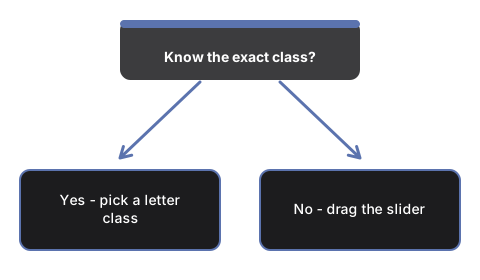
Elige un botón de clase por letra
Presiona cualquiera de los siete botones O, B, A, F, G, K, M para mover #t3dSscTempSlider directamente a la temperatura representativa de esa clase. El color de la estrella y las tres barras de intensidad de líneas se actualizan de inmediato.
O arrastra el control deslizante de temperatura
Arrastra #t3dSscTempSlider para moverte de forma continua por toda la secuencia OBAFGKM. La escala del control permite alcanzar tanto las estrellas O más calientes como las estrellas M más frías en un solo arrastre.
Alterna la clase de luminosidad
Presiona #t3dSscLumBtn-V, #t3dSscLumBtn-III o #t3dSscLumBtn-I para comparar una enana de secuencia principal, una gigante o una supergigante a la misma temperatura - el tamaño de la estrella en pantalla cambia usando los ejemplos reales de Aldebarán y Betelgeuse como escala didáctica.
Fija el Sol
Presiona #t3dSscSunBtn para ir directo a la temperatura efectiva real del Sol, 5.772 K, en luminosidad de secuencia principal - la verdadera clasificación G2V del Sol.
Reproduce la secuencia sin intervención
Presiona #t3dSscPlayBtn para recorrer automáticamente toda la secuencia OBAFGKM de ida y vuelta, o presiónalo de nuevo para pausar y tomar el control manual.
Arrastra para orbitar y usa pantalla completa
Arrastra para orbitar la cámara, usa la rueda del mouse o el gesto de pinza para el zoom, y usa el botón de Pantalla Completa para ampliar toda el área y ver mejor la estrella y las tres barras de intensidad de líneas.
A continuación: consulta cuándo usar este explorador o cómo se compara con el Explorador 3D de Radiación de Cuerpo Negro.
Why trust these tools
- Ten-plus years of web tooling. The freetoolonline editorial team has shipped browser-based utilities since 2015. The goal has never changed: get you to a working output fast, without an install.
- No install, no sign-up. Open a tool and get a working output in seconds - nothing to download and no account to create. Tools that need heavy processing run it on our service, so even a low-powered machine gets the job done.
- Analytics stops at the page view. We measure which pages get visited, not what you type or upload inside a tool. There is nothing to sign in to and no profile is attached to your input.
- Open-source core components. The processing engines underneath (libheif, libde265, pdf-lib, terser, clean-css, ffmpeg.wasm, and others) are public and audit-able. We link to each one in its tool page's footer.
- Free, with or without ads. All tools are fully functional without sign-up. The Disable Ads button in the header is always available if you need a distraction-free run.