
Tilt and spin the model below to judge each ring gap by eye, then read the exact figures behind it from the facts panel.
Ring buttons highlight the C, B, and A bands or the Cassini Division gap, and a tilt slider swings the view from face-on to a sharper edge-on glimpse of how thin the rings are compared to their width.
On-screen vertical ring thickness is exaggerated millions of times so the bands stay visible; the panel table carries the real published radii and composition figures from NASA and the PDS Ring-Moon Node.
Saturn Rings 3D Explorer
Explore Saturn's main C, B, and A rings and the Cassini Division in 3D - click a band or use the ring buttons to read real NASA/PDS radii and ice composition figures.
Drag to orbit the view, scroll or pinch to zoom, and press C / B / A / Cassini to highlight each ring band. A tilt slider from 10 to 50 degrees swings from a more face-on view to a sharper edge-on glimpse of ring thinness.
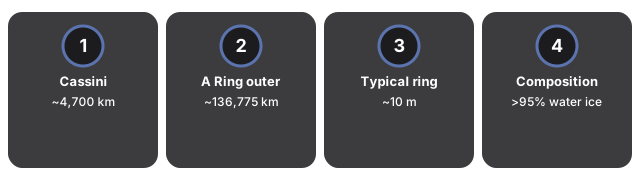
The facts panel lists published ring figures - Cassini Division width ~4,700 km at 117,580-122,170 km from Saturn's center, A ring outer edge ~136,775 km, typical thickness ~10 m, and composition >95% water ice.
- Saturn sphere plus C, B, and A ring bands placed at published radii from Saturn's center
- Cassini Division rendered as a dark gap between the B and A rings
- Ring highlight buttons (C / B / A / Cassini) and click-to-select on ring meshes
- Tilt slider 10-50 degrees on the ring plane (default 26 degrees)
- Real published figures in the panel; vertical thickness is exaggerated and disclosed
- Runs fully in the browser with the vendored three.js engine - no account, no upload
Teachers use it to show why the Cassini Division looks empty, students compare ring radii in km, and curious readers tilt edge-on to grasp how a ~10 m thick sheet spans more than 70,000 km across.
| Quantity | Published value | Source |
|---|---|---|
| Cassini Division width | ~4,700 km (117,580-122,170 km from Saturn center) | PDS Ring-Moon Node / NASA Cassini |
| A Ring outer edge | ~136,775 km from Saturn center | PDS / peer-reviewed ring reviews |
| Typical ring thickness | ~10 m | NASA Cassini science / ring collisional models |
| Composition | >95% water ice | NASA Cassini: rings are billions of chunks of water ice |
Everything renders on your device with WebGL. The 3D engine loads once (about 0.7 MB) and is cached; no scene data is sent to a server.
The scene is an educational visualization tuned to teach ring structure - it does not compute ring particle dynamics, density waves, or n-body gravity. Vertical ring thickness is exaggerated millions of times on screen so the bands remain visible; the km radii in the table are real.
For a step-by-step walkthrough, read the Saturn Rings 3D Explorer step-by-step guide. The Space 3D collection also includes a Solar System 3D Explorer and a Moon Phases 3D Explorer with a synodic-month slider.
Frequently Asked Questions
What does the Saturn Rings 3D Explorer show?
Saturn at the center with procedural C, B, and A ring bands at published radii and the Cassini Division as a dark gap between B and A. Click any band or use the ring buttons to fill the facts panel with NASA and PDS figures.
Are the ring sizes and thickness to scale?
Ring radii follow published km values from Saturn's center, but vertical thickness is exaggerated millions of times on screen so the bands stay visible. Real rings are only ~10 m thick across tens of thousands of km of width - the panel table carries the real figures.
Is this a physics simulation?
The scene is an educational visualization tuned to teach ring structure - it does not compute ring particle dynamics, density waves, or n-body gravity. The copy never claims a physical simulation.
What real figures does the panel include?
Cassini Division width ~4,700 km at 117,580-122,170 km from Saturn's center, A ring outer edge ~136,775 km, typical thickness ~10 m, and composition >95% water ice - all from NASA Cassini science and the PDS Ring-Moon Node.
How do I use the ring buttons?
Press C, B, A, or Cassini to highlight that band and update the facts panel. You can also click a ring mesh directly in the 3D view. Each selection shows the same NASA figures with the band name in the panel heading.
What does the tilt slider do?
The tilt slider runs from 10 to 50 degrees (default 26) and swings the ring plane from a more face-on view to a sharper edge-on glimpse, helping you see how thin the rings are compared to their width.