
Scrub through a synodic month and watch the Sun-Earth-Moon geometry set the lit fraction on the Moon - the facts panel names each phase and lists the real orbital figures.
The phase slider runs from day 0 to 29.53 of the synodic month - the interval between successive new moons - and a play button animates one full cycle in about 30 seconds at 1x.
On-screen sizes and distances are compressed so the Sun, Earth, and Moon fit one view; the panel table carries the real published figures from NASA.
Moon Phases 3D Explorer
Moon Phases 3D Explorer turns the Sun-Earth-Moon geometry into a month you can scrub. Move one slider and the lit fraction on the Moon moves with it, so new moon, first quarter and full moon stop being vocabulary and become positions you can point at and name.
Drag to orbit the view, scroll or pinch to zoom, and slide the phase day control from 0 to 29.53 to step through new moon, first quarter, full moon, and back. The panel names the phase you are parked on as you go.
- Phase slider from day 0 to 29.53 of the synodic month with a live phase name in the panel
- Play button animates one full lunar month in about 30 seconds at 1x
- Sun, Earth, and Moon shown as a geometry lesson - Lambert shading shows the lit hemisphere
- Real published figures in the panel; on-screen layout is compressed and disclosed
- Runs fully in the browser with the vendored three.js engine - no account, no upload
Teachers use it to show why a crescent sits low at dusk, students compare sidereal vs synodic month length, and curious readers pause on full moon to read the 384,400 km mean distance.
| Quantity | Published value | Source |
|---|---|---|
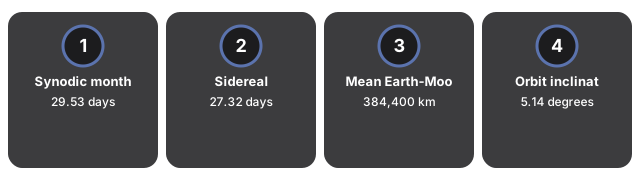
| Synodic month (new moon to new moon) | 29.53 days | NASA Moon Fact Sheet |
| Sidereal month (orbit vs stars) | 27.32 days | NASA GSFC eclipse site |
| Mean Earth-Moon distance | 384,400 km | NASA Moon Facts |
| Orbit inclination to ecliptic | 5.14 degrees | NASA Moon Fact Sheet |
Everything renders on your device with WebGL. The 3D engine loads once (about 0.7 MB) and is cached; no scene data is sent to a server.
The scene is an educational visualization tuned to teach phase geometry - it does not compute an ephemeris or n-body gravity. Starting angles are set by the slider, not by today's date.
For a step-by-step walkthrough, read the Moon Phases 3D Explorer step-by-step guide. The Space 3D collection also includes a Solar System 3D Explorer and an Earth 3D Globe with a live day-night line.
Frequently Asked Questions
What does the Moon Phases 3D Explorer show?
Scrub through a synodic month and watch the Sun-Earth-Moon geometry set the lit fraction on the Moon - the facts panel names each phase and lists the real orbital figures.
Are the sizes and distances to scale?
On-screen sizes and distances are compressed so the Sun, Earth, and Moon fit one view; the panel table carries the real published figures from NASA.
Is this a physics simulation?
The scene is an educational visualization tuned to teach phase geometry - it does not compute an ephemeris or n-body gravity. The copy never claims a physical simulation.
What real figures does the panel include?
Synodic month 29.53 days, sidereal month 27.32 days, mean Earth-Moon distance 384,400 km, and orbital inclination 5.14 degrees - all from NASA published fact sheets.
How do I step through the phases?
Drag the phase day slider from 0 to 29.53, or press Play month to animate one full synodic cycle in about 30 seconds at 1x.