How to Explore Galaxy 3D Simulator - Step by Step
Galaxy 3D Simulator draws a spiral galaxy from up to 100,000 rendered points, right in this browser tab - no install, no account. This walkthrough covers every control: rotating and zooming the camera, going fullscreen, regenerating fresh spiral shapes, and reading the real Milky Way figures beside the scene.
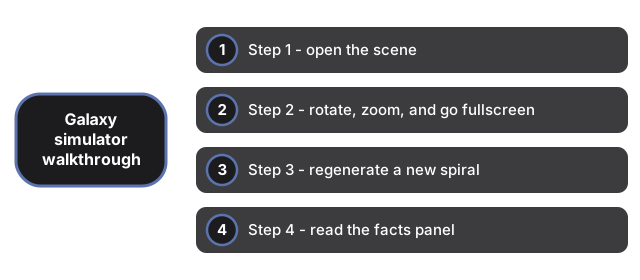
Step 1 - open the scene
Go to the page and give it a moment on first visit. The 3D engine downloads once and is cached, so later visits start faster. Everything renders on your own device - nothing is uploaded and no server does any drawing. On a desktop the spiral is built from up to 100,000 points; on a phone it uses 30,000 so rotation stays smooth. The status line reports the exact number of points currently rendered. If your browser cannot run WebGL, the page shows a plain notice instead of a black box.
Step 2 - rotate, zoom, and go fullscreen
Drag anywhere on the scene to rotate the galaxy; the camera has damping, so motion eases to a stop rather than cutting off. Scroll with a mouse wheel, or pinch on a touchscreen, to zoom - pull in close and the disk resolves into individual points around the warm, glowing core. One click on the fullscreen control expands the scene to the whole display, and if you leave it alone for a few seconds, a slow automatic rotation keeps the view alive on its own.
Step 3 - regenerate a new spiral
Press the New spiral button to rebuild the galaxy with a fresh arm count - anywhere from 3 to 5 arms - and a new scatter pattern, so no two spirals look alike. The old geometry is disposed of each time, which keeps graphics memory from leaking during long sessions. The coloring is procedural rather than photographic: a warm dense core fades into blue-white arms, with scattered hot stars mixed through the disk.
Step 4 - read the facts panel
The facts panel carries the real Milky Way figures: more than 100 billion stars, a disk about 100,000 light-years across, and the sun sitting roughly 26,000 light-years from the center on an orbit of about 230 million years. One honest note - the spiral itself is parametric art tuned to look right, not a gravitational model or a map of real star catalogs. The table figures are the real ones; the rendered points are stand-ins.
Why trust these tools
- Ten-plus years of web tooling. The freetoolonline editorial team has shipped browser-based utilities since 2015. The goal has never changed: get you to a working output fast, without an install.
- No install, no sign-up. Open a tool and get a working output in seconds - nothing to download and no account to create. Tools that need heavy processing run it on our service, so even a low-powered machine gets the job done.
- Analytics stops at the page view. We measure which pages get visited, not what you type or upload inside a tool. There is nothing to sign in to and no profile is attached to your input.
- Open-source core components. The processing engines underneath (libheif, libde265, pdf-lib, terser, clean-css, ffmpeg.wasm, and others) are public and audit-able. We link to each one in its tool page's footer.
- Free, with or without ads. All tools are fully functional without sign-up. The Disable Ads button in the header is always available if you need a distraction-free run.