Solar System 3D Explorer vs Installing an Astronomy App
freetoolonline.com editorial team
You can watch the planets orbit in Solar System 3D Explorer within seconds of opening the page, or install a native astronomy app on your desktop. This page compares the two honestly, including the places where the installed app genuinely wins.
The numbers side by side
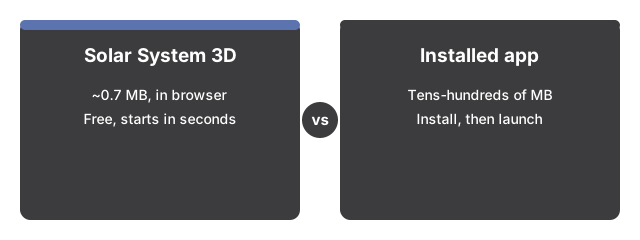
The numbers below put Solar System 3D Explorer side by side with its alternatives at a glance.
Solar System 3D Explorer opens in seconds with nothing to install; a native astronomy app asks for a download first.
| Aspect | Solar System 3D Explorer | Installed desktop astronomy app |
|---|---|---|
| Install size | 0 MB installed - about 0.7 MB engine download, cached after the first visit | Typically tens to hundreds of MB |
| Time to first view | Seconds - open the page and the scene starts | Minutes - download, install, then launch |
| Price | 0 - free, no account | Free to paid, varies by product |
| Shows tonight's actual sky | No - starting angles are randomized | Commonly yes |
What the browser page does well
Solar System 3D Explorer is a lightweight in-browser simulation - everything renders on your own device, with no upload, no server rendering, no sign-in. You get the sun and all eight planets orbiting at their real period ratios, drag-orbit and pinch-zoom camera control, a 0.2x to 8x speed slider with a pause button, Saturn's ring, and a facts panel with real published figures - diameter in km, distance in AU, orbital period. Fullscreen keeps the controls visible, and low-powered phones automatically get a lighter scene so the motion stays smooth.
Where an installed app honestly wins
A native astronomy app can compute where the planets actually are on a given date - something Solar System 3D Explorer deliberately does not do. Installed apps add moons, comets, asteroids, and deep star catalogs, and model true scale across long spans of time. This page is a compressed-scale visualization with randomized starting angles, and it says so. If your task is planning a night of real observation, the dedicated install is the right call.
Picking between them
Picking is mostly about purpose: use Solar System 3D Explorer when the job is understanding - watching period ratios play out, checking a diameter or a distance, showing a class how the system moves. Reach for an installed app when the job is precision on a real date. Many people keep both; the zero-cost, zero-install page covers the quick cases.
For a closer look at the use cases it fits, plus the click-by-click walkthrough, see Solar System 3D Explorer step by step.
Why trust these tools
- Ten-plus years of web tooling. The freetoolonline editorial team has shipped browser-based utilities since 2015. The goal has never changed: get you to a working output fast, without an install.
- No install, no sign-up. Open a tool and get a working output in seconds - nothing to download and no account to create. Tools that need heavy processing run it on our service, so even a low-powered machine gets the job done.
- Analytics stops at the page view. We measure which pages get visited, not what you type or upload inside a tool. There is nothing to sign in to and no profile is attached to your input.
- Open-source core components. The processing engines underneath (libheif, libde265, pdf-lib, terser, clean-css, ffmpeg.wasm, and others) are public and audit-able. We link to each one in its tool page's footer.
- Free, with or without ads. All tools are fully functional without sign-up. The Disable Ads button in the header is always available if you need a distraction-free run.