Planet Size Comparison 3D Explorer - Quando Usar, Passo a Passo e Comparações
equipe editorial do freetoolonline.comO Planet Size Comparison 3D Explorer desenha o Sol e os oito planetas como esferas dimensionadas a partir dos raios médios publicados pela NASA, do Sol com 696,340 km até Mercúrio com apenas 2,440 km. Ele roda neste navegador, sem instalação e sem conta: arraste para orbitar a fila, use a rolagem ou o gesto de pinça para aproximar e clique no botão de um mundo para destacá-lo e ler o raio dele.
Como comparar dois planetas passo a passo
Três ações cobrem uma comparação completa no Planet Size Comparison 3D Explorer. Primeiro, espere a linha de status abaixo da tela avisar que você pode arrastar para orbitar e rolar para aproximar; o painel de dados abre com a Terra já destacada e uma tabela com os nove raios. Segundo, clique em Júpiter para destacar a esfera dele com 69,911 km e depois na Terra com 6,371 km, observando o título do painel mudar para o mundo escolhido enquanto a câmera se aproxima dele. Terceiro, use Pause spin para congelar a fila e tirar uma captura de tela, ou Play spin para girar devagar. O modo de tela cheia mantém os botões dos mundos e o painel visíveis enquanto você orbita e aproxima a vista.
Os nove raios que o painel lista
| Mundo | Raio médio (NASA) |
|---|---|
| Sol | 696,340 km |
| Mercúrio | 2,440 km |
| Vênus | 6,052 km |
| Terra | 6,371 km |
| Marte | 3,390 km |
| Júpiter | 69,911 km |
| Saturno | 58,232 km |
| Urano | 25,362 km |
| Netuno | 24,622 km |
O raio de cada esfera permanece proporcional ao número daquela linha, portanto o salto de tamanho da Terra para Júpiter é a proporção real, e não um desenho aproximado. A cena usa Júpiter como escala de referência, o que mantém os planetas internos grandes o suficiente para serem vistos ao lado do Sol.
Uma demonstração de cinco minutos em sala de aula
Uma demonstração de cinco minutos é a sessão que o Planet Size Comparison 3D Explorer atende melhor: abra a página, destaque Júpiter com 69,911 km, depois a Terra com 6,371 km e deixe a turma ver o salto de tamanho da esfera. O Pause spin dá um quadro parado para comentar, e a tabela do painel responde à pergunta seguinte sobre o Sol com 696,340 km diante de Mercúrio com 2,440 km sem sair da cena. Nada é instalado e nenhum login interrompe a aula, portanto um computador compartilhado da escola funciona igual a um laptop.
Como ele se compara com as outras cenas do Space 3D
| Aspecto | Planet Size Comparison 3D Explorer | Solar System 3D Explorer | Moon Phases 3D Explorer |
|---|---|---|---|
| O que mostra | Nove mundos em uma fila na proporção real de raio | Planetas orbitando o Sol | Geometria das fases entre Sol, Terra e Lua |
| Tamanho das esferas | Em escala, Terra 6,371 km ao lado de Júpiter 69,911 km | Comprimido para as órbitas caberem em uma tela | Não é uma comparação de tamanho |
| Movimento | Apenas o giro, sem movimento orbital | Movimento orbital | Percorre um mês sinódico |
| Instalação e preço | 0 MB, USD 0, sem conta | 0 MB, USD 0, sem conta | 0 MB, USD 0, sem conta |
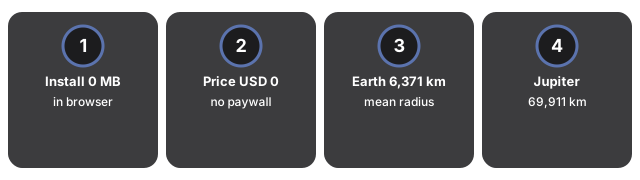
Diante de um diagrama estático de livro, a diferença é que os mesmos nove raios continuam legíveis enquanto você arrasta para orbitar, destaca um mundo e pausa o giro. Um aplicativo de planetário responde a outra pergunta, onde os objetos estão no céu desta noite, e normalmente pede uma instalação antes.
Sessões em que ele não serve
Algumas sessões pedem outra cena. O Planet Size Comparison 3D Explorer não mostra movimento orbital, não coloca os mundos nas distâncias reais até o Sol e não compara massa, portanto trabalhos com distâncias heliocêntricas e perguntas sobre massa pertencem a outro lugar. Também deixa de fora os cinco planetas anões reconhecidos ao lado dos oito mundos da IAU; para ver Ceres, Plutão, Haumea, Makemake e Éris lado a lado, use o guia do Dwarf Planet Size Comparison. Para planetas em órbita com esferas comprimidas, use o Solar System 3D Explorer. Para a geometria das fases entre Sol, Terra e Lua, use o Moon Phases 3D Explorer. A cena também precisa de suporte a WebGL no navegador para renderizar.
Perguntas frequentes
Preciso instalar algo para usar o explorador 3D?
Não. Tudo é renderizado no seu navegador, no seu próprio dispositivo. Não há instalação nem conta, e nada é enviado para nenhum servidor.
Como coloco dois planetas lado a lado?
Clique no botão de qualquer mundo para destacá-lo e ler o raio médio da NASA no painel de dados, depois arraste para orbitar e use a rolagem ou a pinça para aproximar até que os dois mundos fiquem visíveis ao mesmo tempo.
Os espaços entre as esferas são distâncias reais?
Não. Somente os raios estão em escala. O espaçamento entre os mundos foi escolhido para que a fila inteira continue legível em uma tela, portanto trate a cena como uma comparação de tamanho e não como um mapa do Sistema Solar.
Quem mantém este guia atualizado?
A equipe editorial do FreetoolOnline revisa o guia comparando com a cena publicada e confere de novo os raios listados. A data da revisão aparece abaixo do título no topo desta página.
Para ver o ciclo da Lua em vez do tamanho dos planetas, o guia de quando usar o Moon Phases 3D Explorer compara o mês sinódico de 29,53 dias com o mês sideral de 27,32 dias.
Why trust these tools
- Ten-plus years of web tooling. The freetoolonline editorial team has shipped browser-based utilities since 2015. The goal has never changed: get you to a working output fast, without an install.
- No install, no sign-up. Open a tool and get a working output in seconds - nothing to download and no account to create. Tools that need heavy processing run it on our service, so even a low-powered machine gets the job done.
- Analytics stops at the page view. We measure which pages get visited, not what you type or upload inside a tool. There is nothing to sign in to and no profile is attached to your input.
- Open-source core components. The processing engines underneath (libheif, libde265, pdf-lib, terser, clean-css, ffmpeg.wasm, and others) are public and audit-able. We link to each one in its tool page's footer.
- Free, with or without ads. All tools are fully functional without sign-up. The Disable Ads button in the header is always available if you need a distraction-free run.