Password generator vs. alternatives: which to use
The Password Generator on this site runs entirely in your browser and produces a random password using the Web Crypto secure random generator. This guide compares it against the other common approaches: typing your own password, a built-in browser suggestion, a standalone password manager, or a passphrase.
freetoolonline.com Editorial TeamSide-by-side comparison
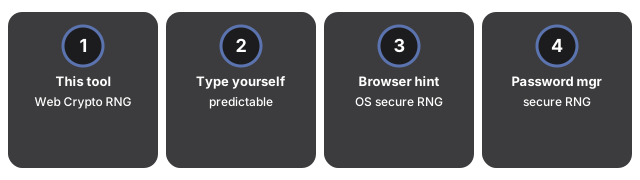
| Approach | Randomness | Typical length | No upload? | Memorable? |
|---|---|---|---|---|
| In-browser generator (this site) | Web Crypto secure RNG | 4 - 64 characters (default 16) | Yes - fully local | No - store in a manager |
| Typing your own | Human choice (predictable patterns) | 8 - 12 (practical limit) | Yes | Yes - but at the cost of strength |
| Browser built-in suggestion | OS/browser secure RNG | 20+ characters | Yes | No - tied to that browser account |
| Standalone password manager generator | Secure RNG | 16 - 32+ characters | Yes | No - stored in manager vault |
| Passphrase (four words) | Word-list random | ~30 characters | Yes | Yes - designed to be remembered |
Typing your own password
Most self-typed passwords follow predictable patterns: dictionary words with a capital first letter, a trailing digit, and a punctuation mark at the end. Studies of leaked breach databases consistently show these patterns making up most of the top 10,000 passwords. At 8 - 12 characters that approach also limits length, which is the strongest lever for entropy. The in-browser generator removes those patterns by construction - each character comes from the secure random generator, not from your memory.
Browser built-in suggestions
Modern browsers (Chrome, Safari, Firefox) offer to generate and save a password automatically on new-account forms. Those suggestions use the OS secure random generator and save the password to your browser account, so the strength is comparable to this generator. The trade-off is portability: the saved password is tied to that browser and its sync account. If you switch browsers, use a second device, or must enter the password on a TV or console, you may not have access to it. The in-browser generator gives you a password you can paste, write down, or store wherever you choose.
Standalone password manager
A dedicated password manager (such as Bitwarden, 1Password, or KeePass) includes its own generator and a vault. It typically produces longer passwords (16 - 32+ characters) and fills them automatically on login forms. The in-browser generator is the right choice when you do not have a manager installed on the device you are using, or when you need a one-off password quickly without logging in to a manager. If you manage passwords regularly, a manager's generator plus its autofill is more convenient.
Passphrases
Passphrases are a strong alternative to short random passwords: a passphrase is four or more unrelated words - for example "correct horse battery staple" - chosen randomly from a word list. At four common words it runs to around 30 characters, giving roughly 44 bits from word entropy alone.
Character set and length controls
Unlike a browser suggestion or most manager defaults, the in-browser generator lets you adjust four character sets (lowercase, uppercase, digits, symbols) and a length slider from 4 to 64. If a site blocks symbols or caps length, you can match the constraint and still generate the strongest password that site allows. The strength label (Weak / Fair / Strong / Very strong) with an estimated bit count updates as you change the settings, so you can see immediately when you have recovered entropy lost by a constraint.
Privacy
Privacy is a Password Generator strength: it runs entirely in your browser tab. The password is not sent to a server, not logged to an analytics service, and not saved on the page between visits. Refreshing or closing the tab clears it with no history.
Companion guides
- Password Generator tool - generate a strong password in-browser with no upload.
- Password generator step by step - walkthrough of every control on the tool page.
- When to use the password generator - the right situations for generating a random password.
- Utility tools hub - the full set of browser-only helpers.
Frequently asked questions
Is the in-browser generator as secure as a password manager's generator?
Yes - both use the operating system secure random generator under the hood. The practical differences are storage and convenience: a manager saves the password for you and autofills it; the in-browser generator gives you the password and expects you to store it yourself.
Can I use the generated password without a password manager?
Yes, but you will need to store it somewhere. Write it down in a secure notebook, paste it into an encrypted note, or copy it into your manager. Do not paste it into a plain-text file or an unencrypted spreadsheet. The generator itself produces no history - closing or refreshing the tab clears the output entirely.
Why does the generator skip some characters?
The lowercase, uppercase, and digit sets omit look-alike characters (l/o in lowercase, I/O in uppercase, 0/1 in digits) to make the password easier to read and type by hand without misreading a one for an el. This removes a few characters from the pool but does not meaningfully reduce strength at 16+ characters.
Should I use a passphrase or this generator for my email account?
Use a passphrase if you must remember the password yourself - a primary email you access across many devices and accounts without a manager. Use this generator if you have a manager that fills the password for you on every device.
Why trust these tools
- Ten-plus years of web tooling. The freetoolonline editorial team has shipped browser-based utilities since 2015. The goal has never changed: get you to a working output fast, without an install.
- No install, no sign-up. Open a tool and get a working output in seconds - nothing to download and no account to create. Tools that need heavy processing run it on our service, so even a low-powered machine gets the job done.
- Analytics stops at the page view. We measure which pages get visited, not what you type or upload inside a tool. There is nothing to sign in to and no profile is attached to your input.
- Open-source core components. The processing engines underneath (libheif, libde265, pdf-lib, terser, clean-css, ffmpeg.wasm, and others) are public and audit-able. We link to each one in its tool page's footer.
- Free, with or without ads. All tools are fully functional without sign-up. The Disable Ads button in the header is always available if you need a distraction-free run.