Remove duplicate lines step by step: clean a list in your browser
The free Remove Duplicate Lines tool on this site strips repeated lines out of a pasted list, keeping the first copy of each and leaving the rest of the order untouched. This guide walks through the exact steps and explains what counts as a duplicate.
freetoolonline.com Editorial TeamHow to remove the duplicates
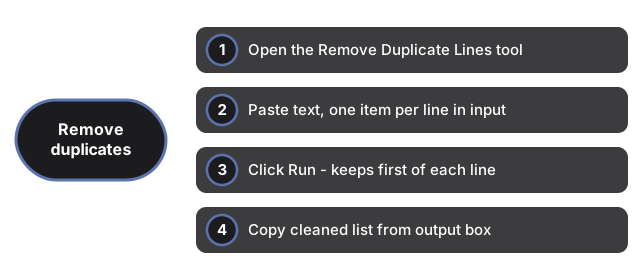
- Open the Remove Duplicate Lines tool.
- Paste or type your text into the input box, keeping one item on each line - the tool treats every line break as the boundary between two entries.
- Click Run. The tool reads the list top to bottom, keeps the first time it sees each exact line, and drops every later repeat.
- Copy the cleaned list out of the output box. Edit the input and click Run again any time - the box is not saved between edits.
What counts as a duplicate
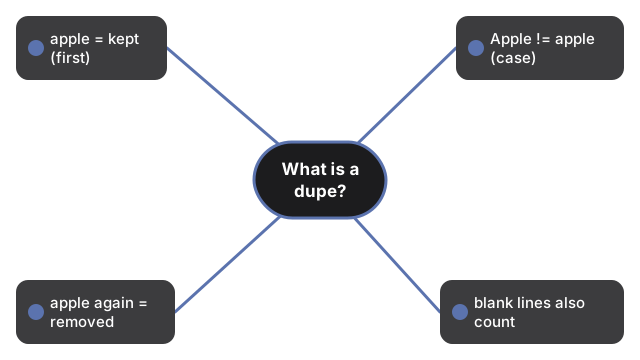
What counts as a duplicate in Remove Duplicate Lines: exact text repeats are dropped after the first occurrence; case-different lines stay separate; repeated blank lines are also de-duplicated - comparison is exact-string with no normalization.
| Input line | Compared to | Treated as duplicate? | Why |
|---|---|---|---|
| apple | apple | Yes | Identical text |
| Apple | apple | No | Comparison is case-sensitive; capital A differs from lowercase a |
| apple | apple | No | The trailing space makes the two lines different strings |
| (blank line) | (blank line) | Yes | Two empty lines are identical, so only the first blank line survives |
Because the check is case-sensitive and whitespace-sensitive, run a case converter or trim stray spaces first if your list mixes capitalization or has inconsistent spacing and you want those variants folded together.
Common uses
Common uses for Remove Duplicate Lines include cleaning a pasted list of email addresses before import, trimming tags or product IDs to the unique set, de-duplicating log or spreadsheet column lines, and tidying a keyword list before paste into a tool that rejects repeats.
Remove Duplicate Lines vs a spreadsheet or command line
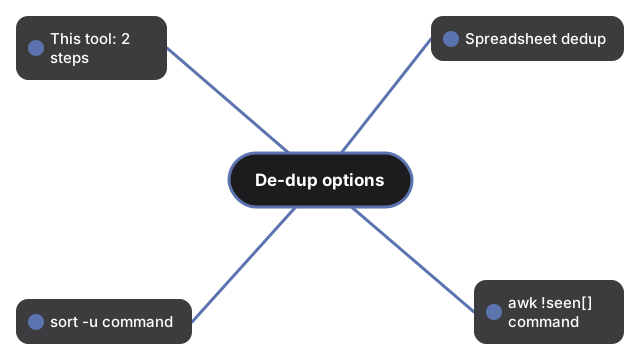
| Method | Steps to clean a list | Keeps original order? | Works offline / no upload |
|---|---|---|---|
| Remove Duplicate Lines (this tool) | 2 (paste, click Run) | Yes | Yes |
| Spreadsheet "Remove duplicates" feature | 4 (paste, select range, open menu, confirm) | Yes | No (cloud sheets upload the data) |
Command line (sort -u) | 3 (save file, run command, read output) | No - sort -u also alphabetizes | Yes |
Command line (awk '!seen[$0]++') | 3 (save file, write one-liner, read output) | Yes | Yes |
The spreadsheet route works well when the list is already inside a sheet, but it means uploading the data to a cloud service for anything other than a desktop app. The command-line route is fast for anyone comfortable with a terminal, but sort -u reorders the list alphabetically as a side effect, which is not always what you want. Remove Duplicate Lines skips both trade-offs: paste, click once, and the order you pasted in is the order you get back, minus the repeats.
Privacy
Privacy for Remove Duplicate Lines: de-duplication runs entirely in your browser tab using plain JavaScript. Nothing you type or paste is uploaded, sent to analytics, or written to any server - refreshing clears the box.
Companion guides
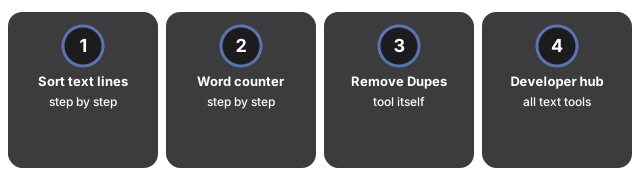
- Sort text lines step by step - another browser-only text tool, for alphabetizing instead of de-duplicating.
- Word counter step by step - for counting words and characters instead of removing repeats.
- Remove Duplicate Lines tool - the tool itself.
- Developer tools hub - the full set, every one running in-browser with no upload.
Frequently asked questions
Which copy of a repeated line does the tool keep?
The first one. The tool reads your list top to bottom and keeps the earliest occurrence of each exact line, dropping every later repeat.
Why didn't "Apple" and "apple" get merged into one line?
The comparison is case-sensitive, so different capitalization counts as a different line. Convert the list to one case first (uppercase or lowercase) if you want those variants treated as duplicates.
Does the tool change the order of the lines that are kept?
No. Only the repeated lines are removed; the lines that remain keep the same relative order they had in your original list.
Is my text uploaded or saved anywhere?
No. De-duplication runs entirely in your browser; nothing you type or paste is sent to a server, and nothing is saved once you refresh or leave the page.
Why trust these tools
- Ten-plus years of web tooling. The freetoolonline editorial team has shipped browser-based utilities since 2015. The goal has never changed: get you to a working output fast, without an install.
- No install, no sign-up. Open a tool and get a working output in seconds - nothing to download and no account to create. Tools that need heavy processing run it on our service, so even a low-powered machine gets the job done.
- Analytics stops at the page view. We measure which pages get visited, not what you type or upload inside a tool. There is nothing to sign in to and no profile is attached to your input.
- Open-source core components. The processing engines underneath (libheif, libde265, pdf-lib, terser, clean-css, ffmpeg.wasm, and others) are public and audit-able. We link to each one in its tool page's footer.
- Free, with or without ads. All tools are fully functional without sign-up. The Disable Ads button in the header is always available if you need a distraction-free run.