Initializing, please wait a moment
How to explore Galilean Moons 3D Explorer
Open the Galilean Moons 3D Explorer, watch the four moons orbit Jupiter with true period ratios, and click each moon to read NASA JPL periods and diameters.
- Open https://freetoolonline.com/space-3d/galilean-moons.html and wait for Jupiter plus four colored moons and orbit rings to paint.
- Click Io first - period 1.769 days, diameter about 3,643 km - then Europa (3.551 d) to see the near 2:1 timing.
- Click Ganymede (7.155 d, largest moon) and confirm it is about 4x Io's period - the Laplace chain.
- Click Callisto (16.689 d) farther out - not locked into the 4:2:1 resonance.
- Press Pause orbits to freeze spacing, then Overview table to compare all four rows at once.
Galilean moons key figures
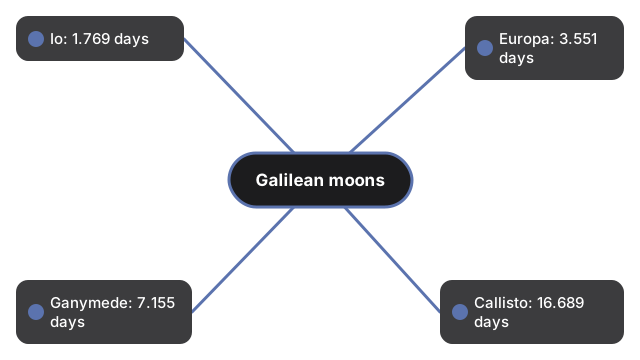
| Moon | Orbital period | Note |
|---|---|---|
| Io | 1.769 days | diameter ~3,643 km |
| Europa | 3.551 days | near 2:1 with Io |
| Ganymede | 7.155 days | largest moon (~4x Io) |
| Callisto | 16.689 days | outside the 4:2:1 resonance |
Next: the when guide or vs alternatives. Open the Galilean Moons 3D Explorer.
Why trust these tools
- Ten-plus years of web tooling. The freetoolonline editorial team has shipped browser-based utilities since 2015. The goal has never changed: get you to a working output fast, without an install.
- No install, no sign-up. Open a tool and get a working output in seconds - nothing to download and no account to create. Tools that need heavy processing run it on our service, so even a low-powered machine gets the job done.
- Analytics stops at the page view. We measure which pages get visited, not what you type or upload inside a tool. There is nothing to sign in to and no profile is attached to your input.
- Open-source core components. The processing engines underneath (libheif, libde265, pdf-lib, terser, clean-css, ffmpeg.wasm, and others) are public and audit-able. We link to each one in its tool page's footer.
- Free, with or without ads. All tools are fully functional without sign-up. The Disable Ads button in the header is always available if you need a distraction-free run.