How to View Dimetrodon in 3D
Dimetrodon 3D Viewer runs an Early Permian sail-backed synapsid - about 3.2 m / 250 kg for D. grandis (Size vs human uses 3.2 m) - not a dinosaur. Drag to rotate, scroll or pinch to zoom, toggle a 1.8 m person, and click a body part.
Open the Dimetrodon page and take the camera
Open the Dimetrodon 3D Viewer and wait for the facts panel to fill. When the status line says you can drag, orbit Dimetrodon with the pointer and zoom with the scroll wheel or a two-finger pinch. Fullscreen expands the wrapper so the controls stay visible beside the scene. After first paint a license-clean CC-BY-SA 4.0 glTF may swap in automatically from the CDN; if that load fails the page stays on the procedural sail-backed silhouette with zero regression.
Use the four Dimetrodon controls under the canvas
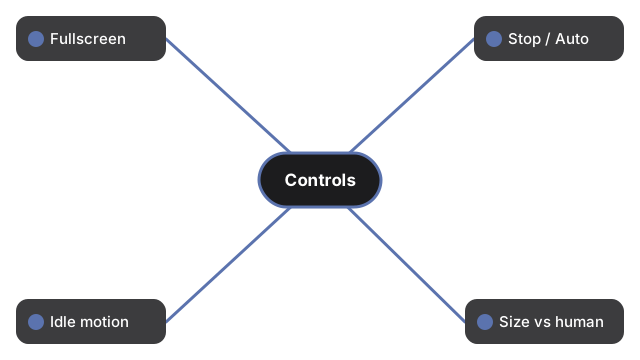
Under the Dimetrodon canvas, four controls handle view and scale:
- Fullscreen - fills the display while keeping the buttons visible
- Stop rotation / Auto-rotate - freezes or resumes auto-spin
- Idle motion - adds subtle body sway; tap again for Stand still
- Size vs human - shows a 1.8 m person at the honest length ratio used by the viewer (3.2 m for D. grandis within the published genus about 1.7-4.6 m range)
Read the Dimetrodon facts panel and click a body part
The Dimetrodon facts panel lists length about 3.2 m for D. grandis (genus about 1.7-4.6 m; Size vs human uses 3.2 m), standing height about 1.8 m to the sail tip for a large adult, mass about 250 kg for D. grandis (genus about 28-250 kg), the Early Permian window about 295-272 million years ago, carnivore diet, naming from Cope 1878, and the tall neural-spine sail. Dimetrodon was a synapsid on the mammal line - more closely related to mammals than to dinosaurs, and it predates dinosaurs by tens of millions of years. A short click - not a drag - on head, sail, or body surfaces a short fossil fact. Soft-tissue color and sail membrane are artistic reconstructions. When the CC-BY-SA 4.0 glTF by seth the yutyrannus via Printables loads, the status text notes a real model with that credit - a stylized reconstruction, not a laser scan. This model is not a fossil-accurate skeleton. Dimetrodon is not a dinosaur.
What the Dimetrodon how-to guide is not
The Dimetrodon how-to guide is a controls walkthrough for the in-browser viewer only - it does not place the model in your room (no AR), does not invent one precise length or weight beyond the disclosed about 3.2 m / 250 kg figures and genus ranges, does not invent soft-tissue or sail-membrane color accuracy, does not invent game score or win states, and does not claim the optional glTF is a scientifically exact reconstruction. For the size story see Dimetrodon size comparison. For trade-offs versus phone AR apps see Dimetrodon 3D viewer vs AR apps.
Why trust these tools
- Ten-plus years of web tooling. The freetoolonline editorial team has shipped browser-based utilities since 2015. The goal has never changed: get you to a working output fast, without an install.
- No install, no sign-up. Open a tool and get a working output in seconds - nothing to download and no account to create. Tools that need heavy processing run it on our service, so even a low-powered machine gets the job done.
- Analytics stops at the page view. We measure which pages get visited, not what you type or upload inside a tool. There is nothing to sign in to and no profile is attached to your input.
- Open-source core components. The processing engines underneath (libheif, libde265, pdf-lib, terser, clean-css, ffmpeg.wasm, and others) are public and audit-able. We link to each one in its tool page's footer.
- Free, with or without ads. All tools are fully functional without sign-up. The Disable Ads button in the header is always available if you need a distraction-free run.