Run Linux in Your Browser Step by Step
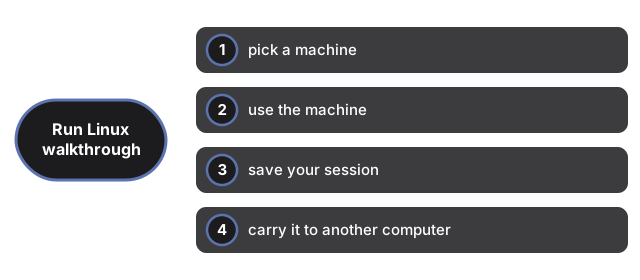
Linux Online takes four steps from a blank tab to a running Linux machine you can save, export and resume anywhere. This page walks through each step with the exact buttons named. Total time on a typical connection: two to five minutes, almost all of it the one-time download.
Step 1 - pick a machine
Open the tool and choose a start card. Terminal gets you a command line after a small download; Desktop adds a taskbar, file manager, text editor and terminal for a much larger download and wants a desktop-class browser. The card states the download size before anything is fetched; the image is cached in this browser, so you pay the wait once.
Step 2 - use the machine
Click the screen to type into Linux; click anywhere outside to give the keyboard back to the page. It is genuine Alpine Linux: try uname -a, ls /, vi hello.txt or htop. In desktop mode a click also captures the mouse (Esc releases it), and the Ctrl+Alt+Del button is there when you need it. The machine has no internet access by design - nothing you run inside can call out.
Step 3 - save your session
Save session stores the whole running machine - open programs included - in this browser, and the auto-save option repeats that every five minutes. When you come back to the page, a Continue card resumes exactly where you stopped. A fresh start is always available too, because changes are never written into the downloaded image.
Step 4 - carry it to another computer
Export session downloads a .ftolvm file - the machine, frozen. On any other computer, open the same page, pick Import a session file, and the machine resumes with your shell history and open programs intact. Not sure this tool suits the job at all? See when a browser Linux fits and how it compares with the alternatives.
Why trust these tools
- Ten-plus years of web tooling. The freetoolonline editorial team has shipped browser-based utilities since 2015. The goal has never changed: get you to a working output fast, without an install.
- No install, no sign-up. Open a tool and get a working output in seconds - nothing to download and no account to create. Tools that need heavy processing run it on our service, so even a low-powered machine gets the job done.
- Analytics stops at the page view. We measure which pages get visited, not what you type or upload inside a tool. There is nothing to sign in to and no profile is attached to your input.
- Open-source core components. The processing engines underneath (libheif, libde265, pdf-lib, terser, clean-css, ffmpeg.wasm, and others) are public and audit-able. We link to each one in its tool page's footer.
- Free, with or without ads. All tools are fully functional without sign-up. The Disable Ads button in the header is always available if you need a distraction-free run.