On-Device Grammar Checker - When To Use One
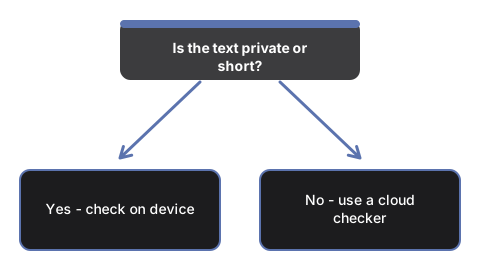
freetoolonline.com Editorial TeamReach for the Grammar Checker - Private, In Your Browser when the text you want to correct must not be pasted into a cloud service. The check runs on your own device on every path the page offers, so nothing you paste is uploaded anywhere. Whether it is the right tool for a given text comes down to three questions: how sensitive the text is, how long it is, and how much polish the job really needs.
Private by construction, not by promise
The page has no checking server behind it. The correction is produced by an engine running on your own machine - the browser's built-in proofreading AI where it exists, or a small open model you chose to download. Your text is not stored past the page session, is not sent to any analytics service, and no account or signup is ever asked for.
That construction settles the choice for a contract draft, a medical note, an HR message, or anything under a confidentiality duty. For text that is public anyway - a blog comment, a forum post - privacy stops being the reason, and the decision moves to convenience and quality below.
The three ways the page can check, and what each costs you
Three separate paths can produce the output, and a status line under the result always names which one did the work, so you know what you are reading.
| Path | First cost | Where it works | What you get |
|---|---|---|---|
| Built-in browser proofreading AI | Zero download | Chrome versions that ship it; the page feature-detects it and never assumes it is there | Corrected text plus a list of the individual changes |
| On-device model | One download, size shown next to each model before it starts | Modern browsers; loaded only on an explicit click | Corrected text plus a change list, up to 8,000 characters per run |
| Prepared sample demo | Zero download | Every browser | A sample text with deliberate mistakes and its corrected version, already on the page when it loads |
The sample demo is worth a sentence more: it shows the exact output shape - corrected text on top, then the change list - before you paste anything or download any model. If the shape is not what you need, you have lost nothing.
When a quick drafting pass is enough
The small on-device models - Llama 3.2 1B by default, with Llama 3.2 3B and Phi 3.5 mini as upgrades - catch common grammar, spelling, and punctuation errors, but they stay below professional cloud checkers. The page states this bound plainly: it is a drafting aid, not a professional editor. That makes it a fit for an email before you hit send, a cover letter draft, or a forum reply - and a poor fit as the last pass on a court filing.
Two behaviours keep the pass predictable. The corrections preserve your wording - the tool fixes errors and does not rewrite tone or style. And every change is listed individually as "from" and "to" with a short reason, so you can accept the fixes with your own eyes rather than on trust, then copy the corrected text with one click.
Repeat checks on the same machine
The model weights are cached by the browser after the one-time download, so later checks on the same machine skip the download entirely. The cache and the last-model choice are even shared with the Private AI Chat page - load a model once and both pages reuse it. When you want the disk space back, a "Clear cached models" button removes the downloaded weights.
When this page is the wrong tool
Four limits are fixed, and knowing them up front avoids wasted minutes. Input on the model path is capped at 8,000 characters, and longer text is cut to fit - a chapter-length document belongs in a different workflow. Corrections are validated for English text only; other languages are not a supported claim. There is no document upload - a DOCX or PDF has to give up its text first, and only pasted text goes in. And there is no cloud fallback: a browser without built-in proofreading AI and without a downloaded model gets the sample demo and an honest notice for its own text, never a silently degraded result.
One more boundary matters if you came for style help: the tool does not rewrite tone. If a paragraph needs to sound friendlier or more formal rather than merely correct, that is a rewriting job, and this page deliberately does not do it.
Where to go from here
For the actual mechanics - which buttons, in which order, and what each status message means - the walkthrough at Check Grammar On Your Device - Step by Step covers a full run. To weigh this page against cloud checkers and the browser's own spellcheck, see On-Device Grammar Checker vs Cloud Checkers.
Why trust these tools
- Ten-plus years of web tooling. The freetoolonline editorial team has shipped browser-based utilities since 2015. The goal has never changed: get you to a working output fast, without an install.
- No install, no sign-up. Open a tool and get a working output in seconds - nothing to download and no account to create. Tools that need heavy processing run it on our service, so even a low-powered machine gets the job done.
- Analytics stops at the page view. We measure which pages get visited, not what you type or upload inside a tool. There is nothing to sign in to and no profile is attached to your input.
- Open-source core components. The processing engines underneath (libheif, libde265, pdf-lib, terser, clean-css, ffmpeg.wasm, and others) are public and audit-able. We link to each one in its tool page's footer.
- Free, with or without ads. All tools are fully functional without sign-up. The Disable Ads button in the header is always available if you need a distraction-free run.