Browser Linux vs Virtual Machine vs Live USB
There are three common ways to try Linux without replacing your operating system: a browser-based machine like Linux Online, a desktop virtual machine app, and a live USB stick. They differ most in setup effort, speed and where your files end up - this page puts the numbers side by side.
The comparison
The comparison for running Linux in a browser versus a local VM or a cloud shell is setup friction, isolation, and whether you can install anything on the machine.
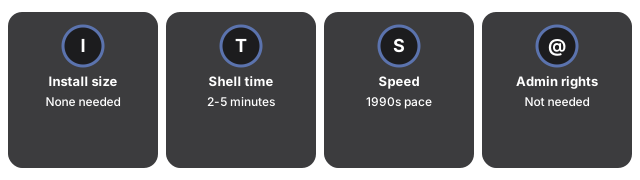
| Aspect | Browser Linux (this tool) | Desktop virtual machine | Live USB stick |
|---|---|---|---|
| Install required | None | App + OS image (several GB) | USB writer app + a USB stick |
| Time to first shell | 2-5 minutes (one-time ~100 MB download) | 30-60 minutes first setup | 15-30 minutes plus a reboot |
| Speed | Late-1990s PC pace (emulated) | Near native | Native |
| Admin rights needed | No | Usually yes | Yes (boot menu) |
| Network inside Linux | None, by design | Yes | Yes |
| Where your work lives | This browser + exportable session files | Disk image on that computer | The USB stick |
How to choose
Choose the browser machine for quick, safe, zero-install jobs: practising commands, trying a risky script, teaching, or any locked-down computer where installing software is not an option - and for moving work between machines, since a session exports as a single file you can import elsewhere to resume exactly. Choose a desktop virtual machine when you need speed, 64-bit software or networking; choose a live USB when you want to test Linux on the real hardware itself. More on the fit in when to run Linux in your browser.
Why trust these tools
- Ten-plus years of web tooling. The freetoolonline editorial team has shipped browser-based utilities since 2015. The goal has never changed: get you to a working output fast, without an install.
- No install, no sign-up. Open a tool and get a working output in seconds - nothing to download and no account to create. Tools that need heavy processing run it on our service, so even a low-powered machine gets the job done.
- Analytics stops at the page view. We measure which pages get visited, not what you type or upload inside a tool. There is nothing to sign in to and no profile is attached to your input.
- Open-source core components. The processing engines underneath (libheif, libde265, pdf-lib, terser, clean-css, ffmpeg.wasm, and others) are public and audit-able. We link to each one in its tool page's footer.
- Free, with or without ads. All tools are fully functional without sign-up. The Disable Ads button in the header is always available if you need a distraction-free run.